CHAPTER THREE - OPERATION
23
SG-System I Operating Manual
3
Operation
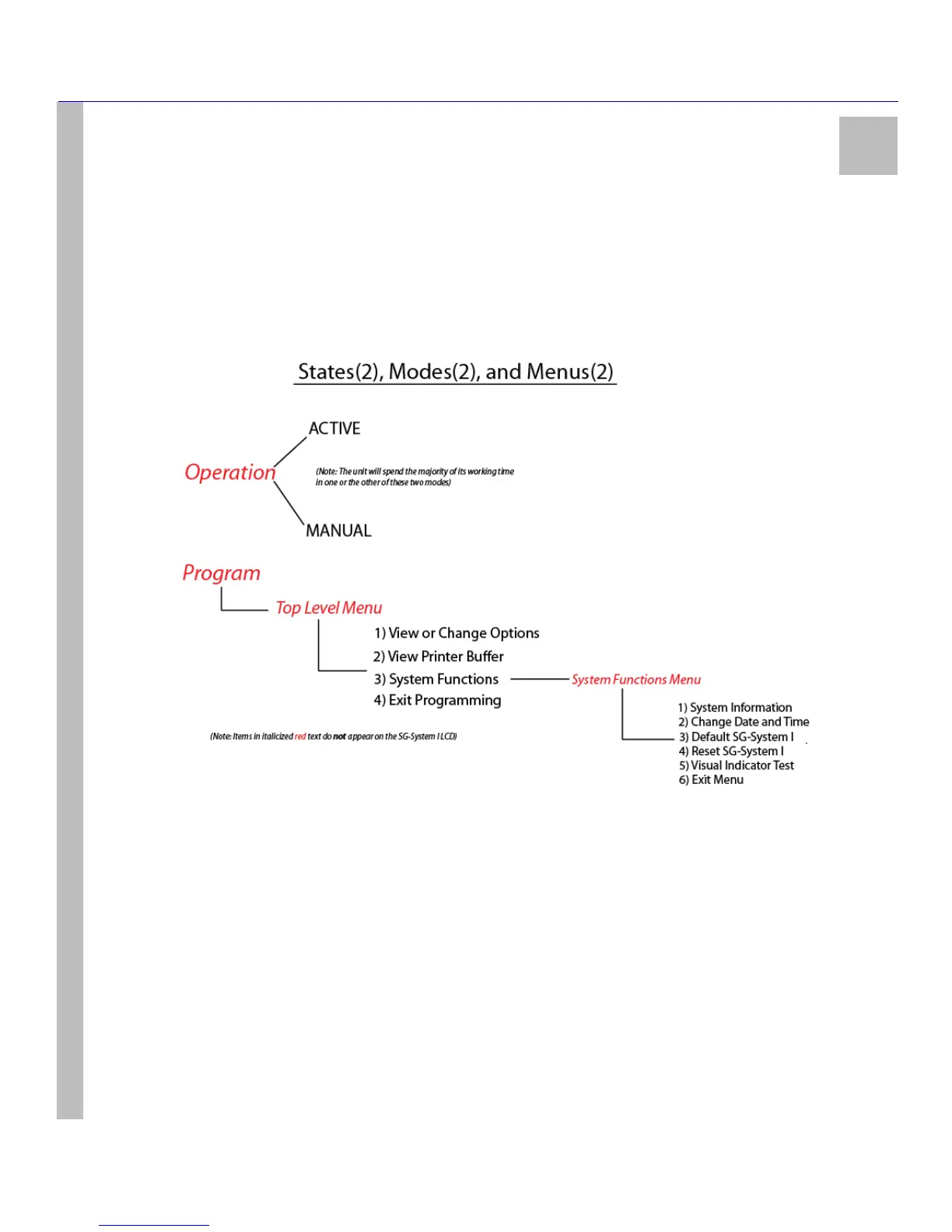
The SG-System I will occupies one of two states, Operation or Program. Operation consists of Active and Manual modes, in either of
which the system will spend the vast majoirity of its working time. Program consists of the Top Level Menu and the System Functions
Menu. The Top Level menu includes View / Edit Options, View Printer, System Functions and Edit Programming. While in System
Functions you can access the System Functions Menu. This menu includes System Information, Date and Time, Default SG-System I,
Reset SG-System I, User Interface and Exit Menu. See Figure 5: Operating States(2), Modes(2), and Menus(2) immediately below.
Figure 5: Operating States(2), Modes(2), and Menus(2)
Active Mode
Active mode is the most common operating mode. The SG-System I is in Active mode when any of the automation software ports are present
and responding to signals. When there are no incoming calls to the unit, Active mode will give way to Manual mode. On receiving an incom-
ing call, the unit will automatically revert to Active mode.
Manual Mode
Manual mode occurs when automation software is lost or has been programmed out (all automation ports have been disabled). Switching
from Active mode to Manual mode in this case is automatic.
In Manual mode, the SG-System I receives signals and attempts to send the first signal in the buffer. The unit simultaneously displays the
message on the LCD screen, activates the buzzer, and activates the acknowledge LED. To stop the buzzer and the acknowledge LED, the
Ack (Acknowledge) button must be pressed and released for every signal not acknowledged in the buffer. The LCD messages received in
Manual mode are duplicates of the printer messages. For messages greater than 39 characters, the first 39 characters are displayed. Pressing
the Enter button will display the remainder of the message. You are strongly advised to make note of these messages in case any are of a seri-
ous nature (e.g. a fire alarm). You must deal with alarms generated while the system is in Manual mode. It is imperative that time spent by the
system in Manual mode must be kept to a strict minimum. Note that the alarm printer and automation buffers reside in the SG-System I.



 To Next Page