CHAPTER FOUR - OPTIONS: SYSTEM
37
SG-System I Operating Manual
4
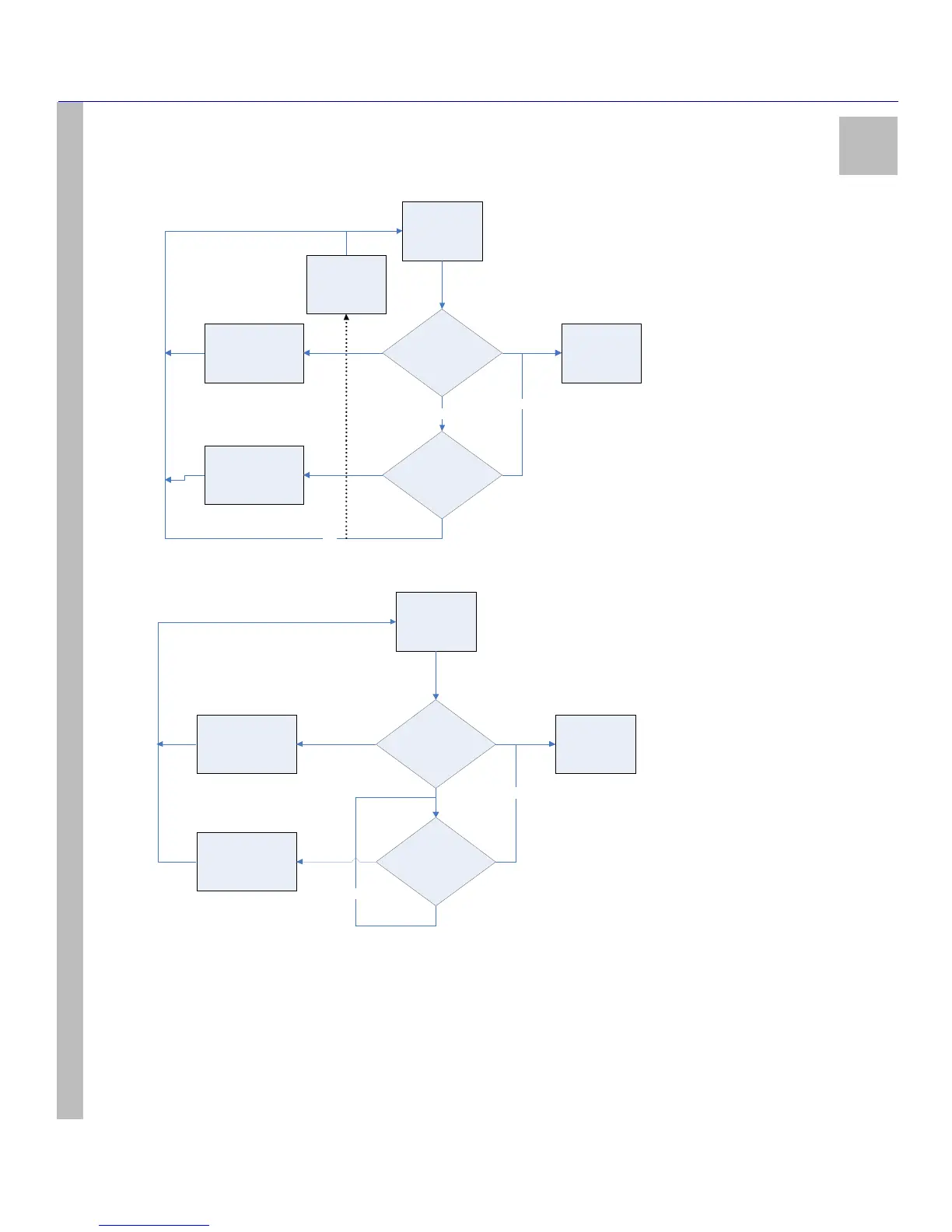
Figure 6: Loop (00), Automatic IP Fallback (04)
Figure 7: Fallback (01)
Option 030: Printer Mode
Default (LOOP)
You can configure this option with an approach similar to the automation outputs of Option 02F above, except that Fallback (01) and Auto-
matic IP Fallback (04) are not available. Acceptable values are Loop (00) or All (02). Note that Loop (00) transmits printer messages to each
port in turn. The first port to respond will be used to process subsequent printer messages until it is no longer able to do so, at which point the
next port in the loop will be employed. All (02) transmits printer messages to all ports simultaneously.
Power Up /
Restart
SG-System I TCP
Port Active?
\SG-System I
Serial 1 Port
Active?
Poll
Automation
Manual Re -start
from Consol e
(Reset Fallback )
Manual Re -start
from Consol e
(Reset Fallback )
NO
YES
NO
Automa tic Falback
mode (4)
Power Up /
Restart
SG-System I Port
Active?
SG-Sys tem I Serial
1 Port Active?
Poll
Automation
Manual Re-start
from C onsole
(R eset Fallbac k)
Manual Re-start
from C onsole
(R eset Fallbac k)
NO
YES
NO



 To Next Page