CHAPTER TWO - INSTALLATION
15
SG-System I Operating Manual
2
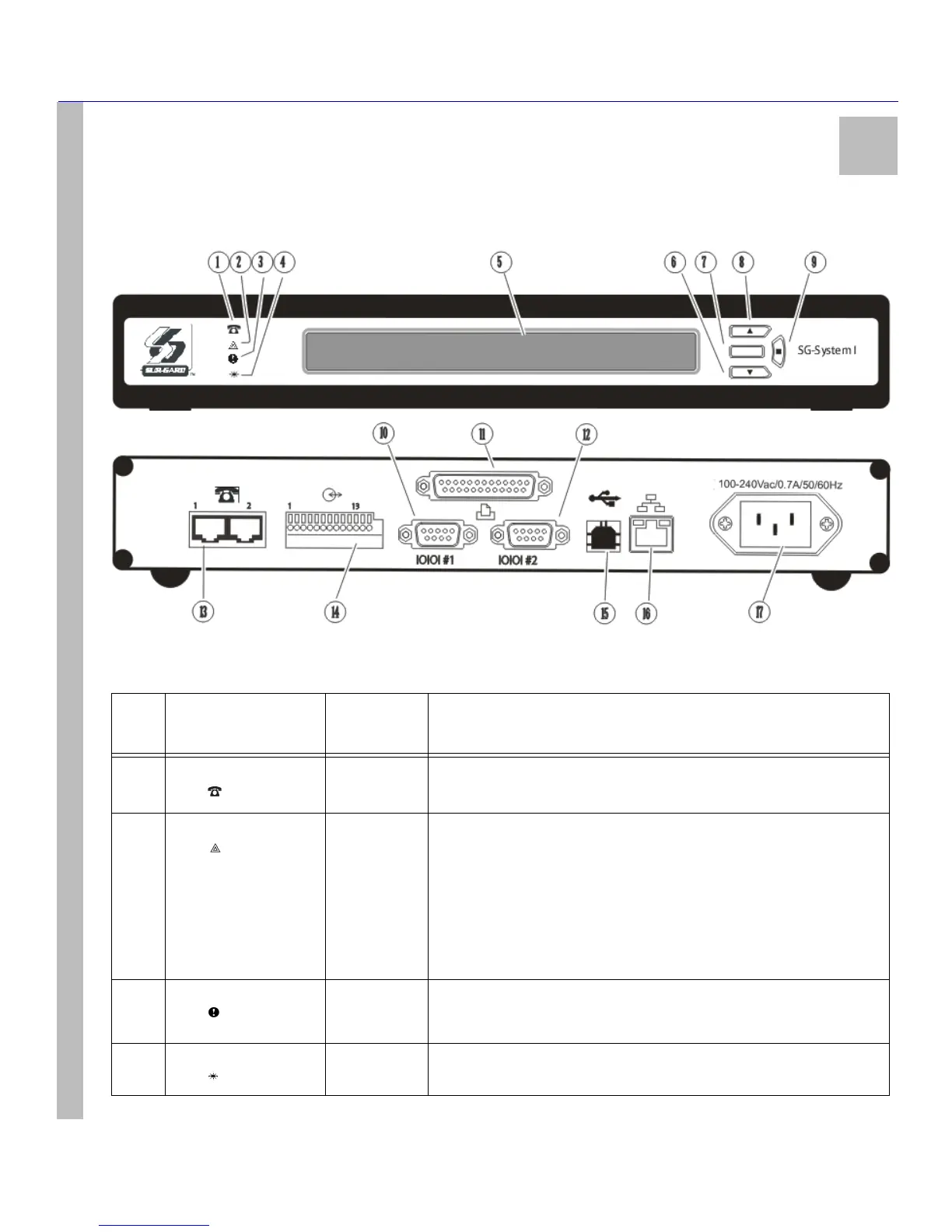
Controls and Indicators
Figure 2: Controls and Indicators
Table 3: SG-System I Front and Rear Panel Descriptions
Item
no.
Indicator/ Control/
Connector
State/Pin
Description
1 TELEPHONE Red
LED
OFF
ON
Both Telphone Lines are Present.
At least One Telephone Line is Absent.
2STATUS Orange
LED
FLASHING
OFF
Two Flashes indicates a Trouble as described below:
• Time Not Set
•Computer Buffer Full
•Printer Buffer Full
• Software Corruption
• Line Test Active
Normal Operation.
3 TROUBLE Yellow
LED
ON
OFF
Indicates any System Trouble not related to network or alarm (Note that the
LCD backlight will override the programmed colour and change to Yellow).
No System Trouble.
4 WATCHDOG Blue
LED
FLASHING
STEADY
Normal Operation (Software watchdog toggles every 200msec).
SG-System I Fault.



 To Next Page