COLLARING MACHINE
27
S-80
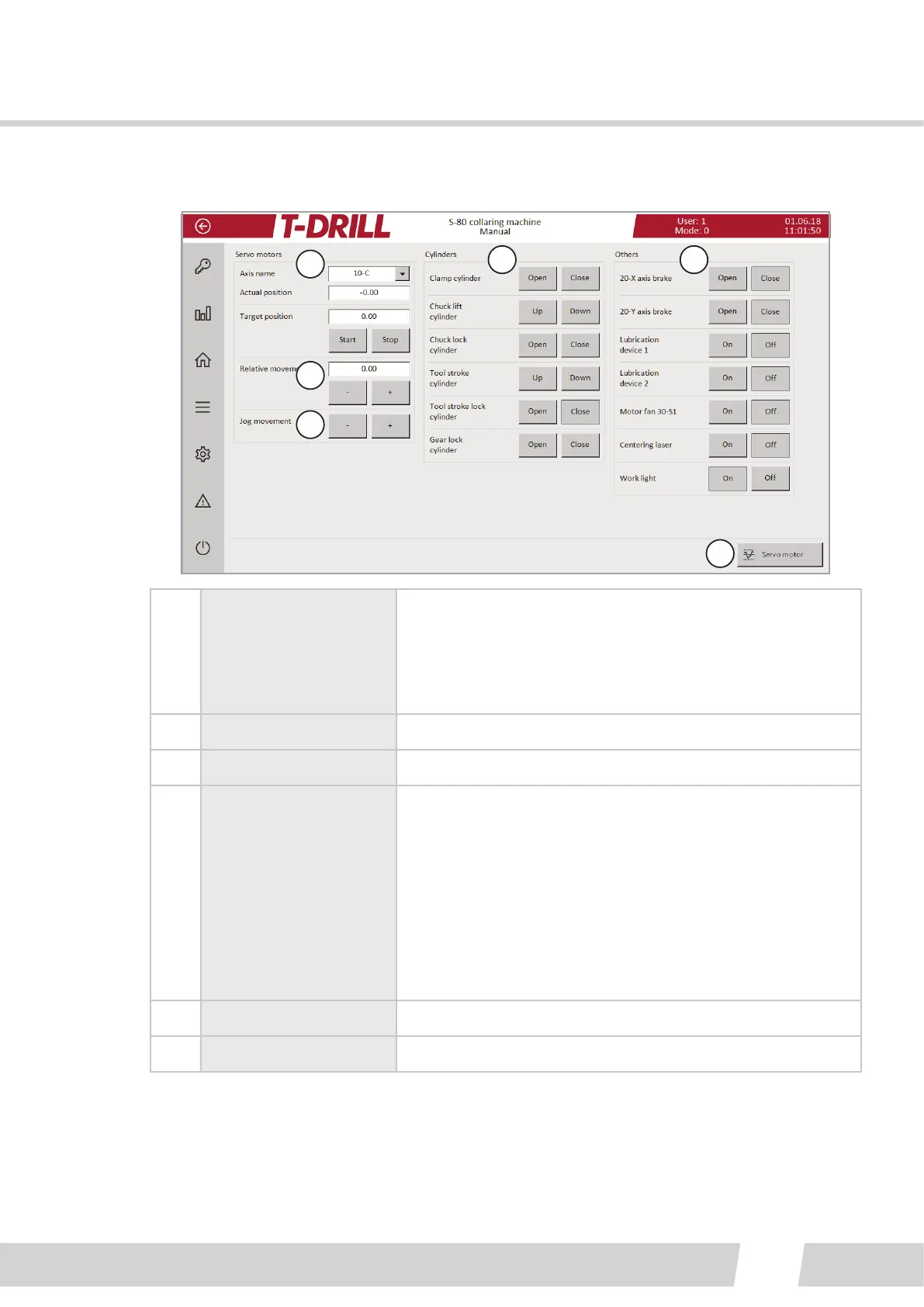
6.2.2.2.2. MANUAL SCREEN
1
2
3
4 5
6
1.
Choose the axis to
move from the pull-
down menu.
“Actual posion” eld shows the current posion, and the
desired target posion is wrien to the “Target posion”
eld. Tap the target eld to open keypad.
Start buon moves the axis to target posion, tap Stop
buon in case necessary to stop before target.
2. Relave movement
3. Jog movement (+) and (-) buons move the axis in steps (jog).
4. Cylinders
Tap buon to acvate movement / funcon.
Clamp cylinder: open / close
Chuck li cylinder: open / close the tool gripper
Chuck lock cylinder: open= S1 inner spindle free, close =
lock the tool on place (lock S1 inner spindle)
Tool stroke cylinder: To release the tool from the chuck
Tool stroke lock cylinder:
Gear lock cylinder: open = 1:1 cylinder at rear posion and
planetary gear is locked. Close = 4:1 collaring rao
5. Others Tap buon to acvate movement / funcon.
6. Servo motors-buon Access Servo motors screen



 To Next Page