INSTRUCTION MANUAL
32
6.2.2.3.2. PROCESS SETTINGS
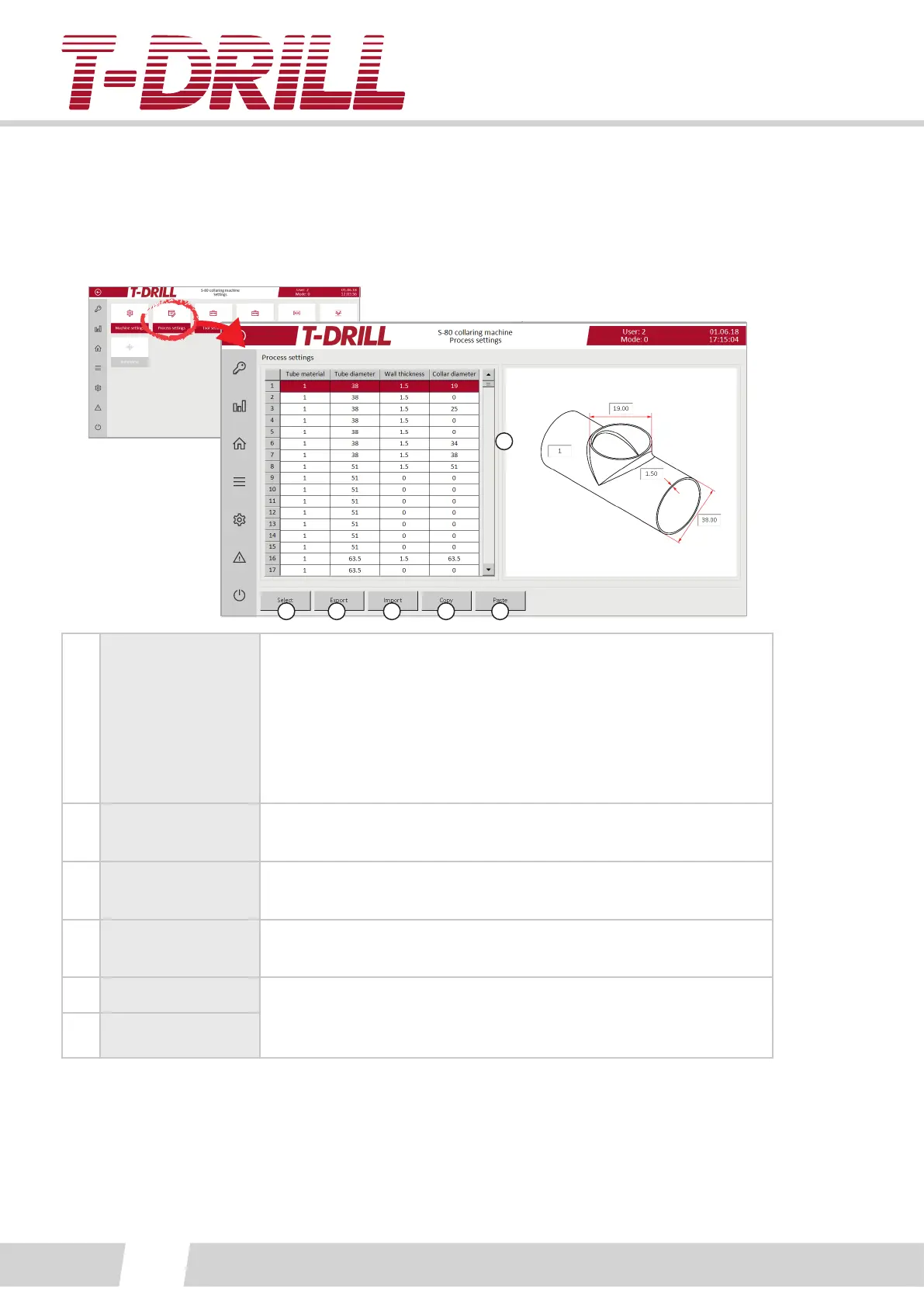
A process in the S-80 machine is one of the work phases; milling, collaring, trimming or
drilling. The process sengs screen is for denion of all values of selected process.
The process sengs screen is also for denion of the tool type.
1
2
3
4
5 6
1.
Predened
processes
The tools to perform this process is dened on the next screen.
Select the process to manage from the list (acvate line and it will
turn red).
The number elds on the picture are editable, the edited value is
transferred to the chosen process list. The values can be edited
also on the selected process screen.
2. Select
Tap to select the acvated process, to open a new adjustment
screen (see next picture).
3. Export
The buon exports the informaon data to the predened folder
on the computer C-drive (C:\T-Drill\).
4. Import
The buon imports the informaon data from the predened
folder on the computer C-drive (C:\T-Drill\).
5. Copy A faster way of making a new line to the list:
Copy an acvated line, and paste it below an acvated line. Alter
denions as required.
6. Paste



 To Next Page