INSTRUCTION MANUAL
40
6.2.2.3.4. TOOL MAGAZINE
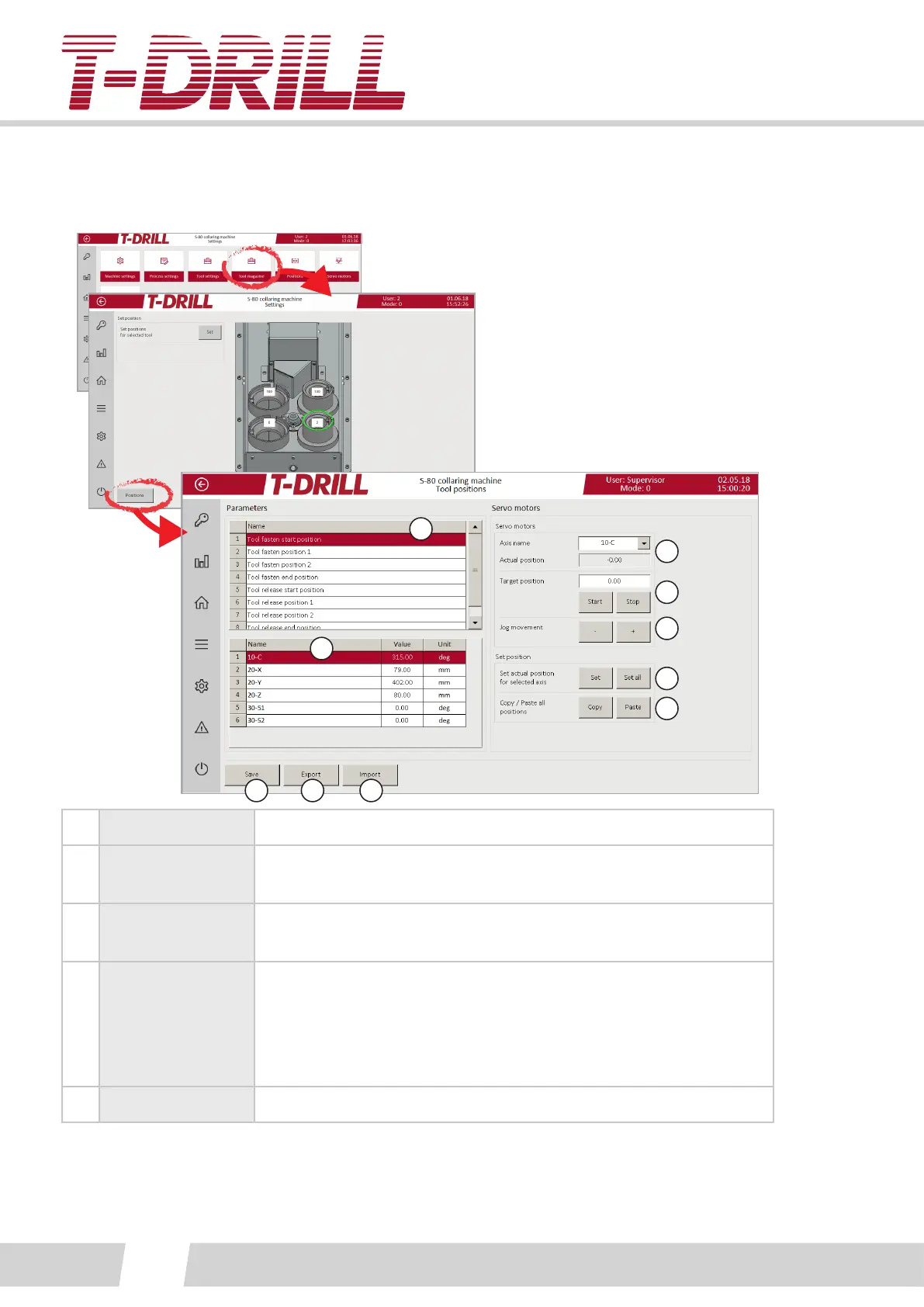
Acvate tool holder to manage parameters, tap select to open parameter screen:
1
2
3
4
5
6
7
8 9 10
1. Posions list List of posions of the chosen magazine tool holder.
2.
Axises and
parameter values
Values to adjust, tap numeric eld to open keypad.
3.
Servo motor axis
list
Choose axis to move / check posion from the pull down menu.
4.
Moving to a
certain posion
“Actual posion” eld shows the current posion, and the desired
target posion is wrien to the “Target posion” eld. Tap the
target eld to open keypad.
Start buon moves the axis to target posion, tap Stop buon in
case necessary to stop before target.
5. Jog movement (+) and (-) buons move the axis in steps (jog).



 To Next Page