COLLARING MACHINE
29
S-80
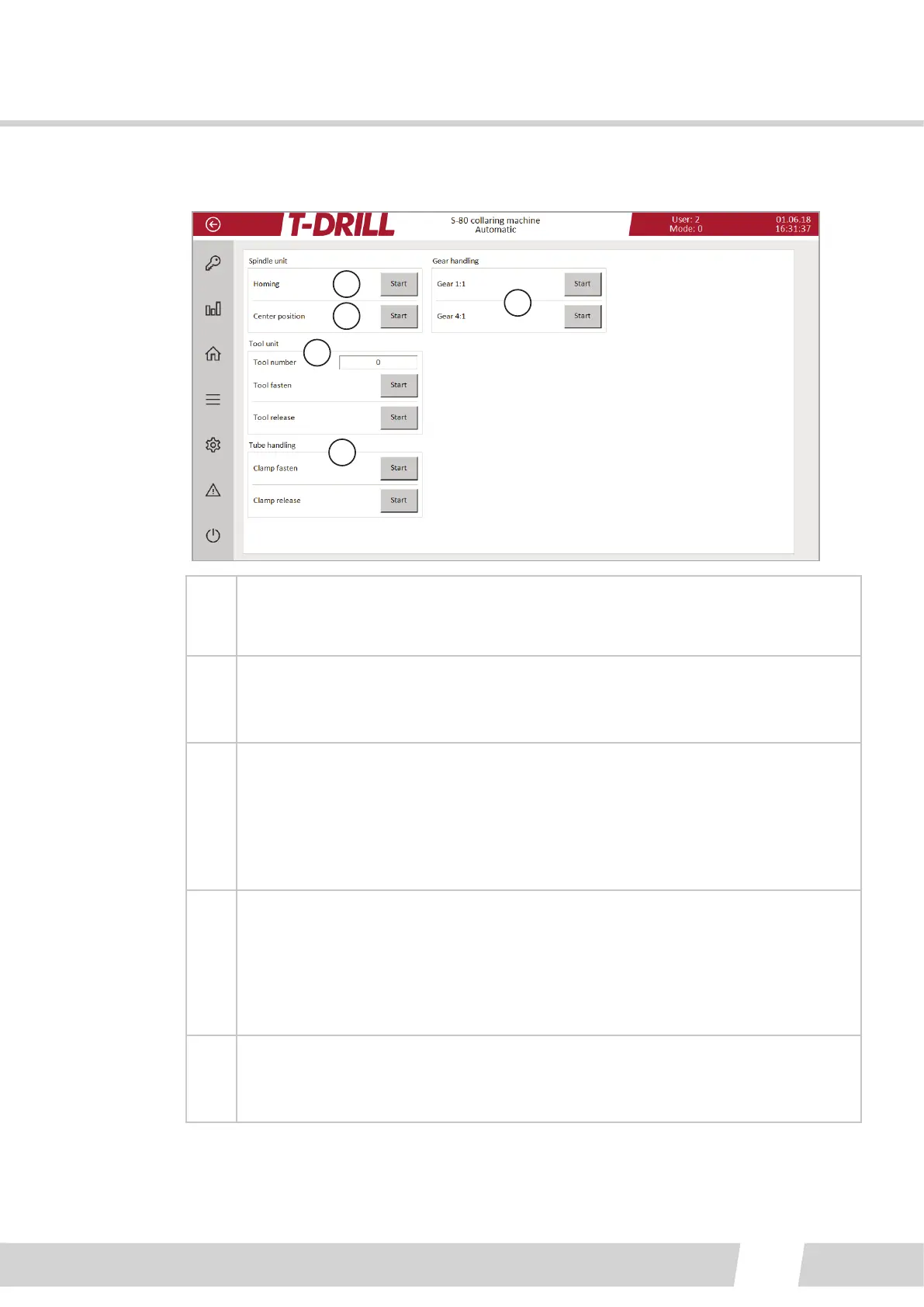
6.2.2.2.3. AUTOMATIC SCREEN
1
2
3
4
5
1
Do homing by tapping the buon: Homing resets all machine axis posions to
home posion.
The homing posion is the starng point of the work cycle.
2
Center posion: Run the machine to the preset posion of the laser beam cross
(The collar center point). The posion is set on “Posions” screen.
3
Tool unit:
Tool number (This has to be set to the tool magazine, tool informaon can be
found on Tool sengs screen).
Tool fasten, for fastening the tool . Automac funcon.
Tool release, for returning the tool . Automac funcon.
See 7.1.1. Collaring tool setup
4
Tube handling: Clamp Fasten / Clamp release:
Tap buon “Clamp Fasten” to run the sequence: the clamp close-sequence is
done, clamp is fully fastened and the air pressure is le on.
Tap buon “Clamp release”: the clamp release-sequence is done, clamp is
released (air pressure o).
5
Gear handling: Tap either “Start” buon to switch gear rao (Mainly for tesng).
Tool changing is done on 1:1 rao, collaring on 1:4 rao. Homing run switches
the gear rao to 1:1 to enable tool change.



 To Next Page