Entering Data in Your Zodiac Handheld
Using Graffiti 2 Gestures
Using Your Zodiac Handheld 36
Using Graffiti 2 Gestures
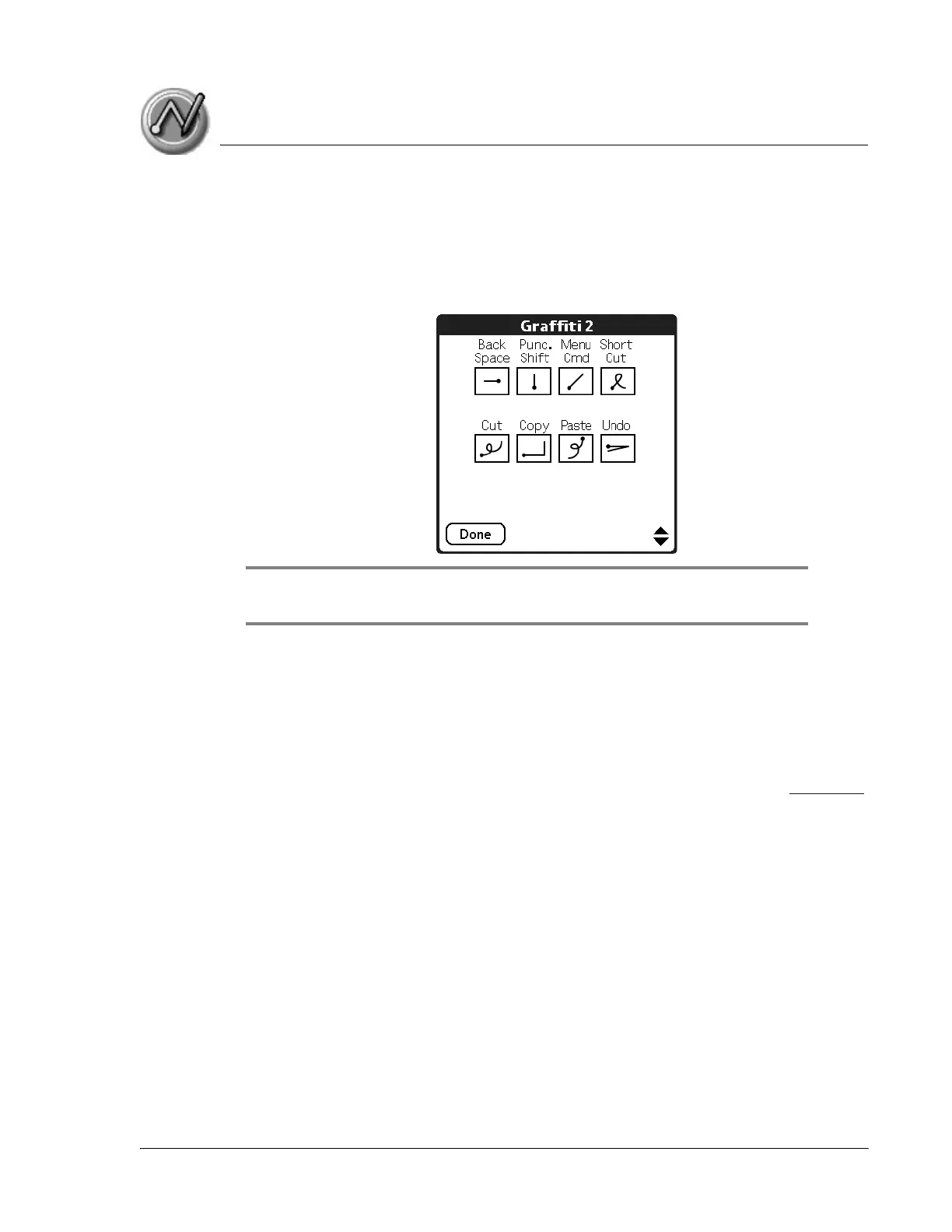
Gestures are editing commands, such as cut, paste, and the ShortCut
command which is explained in the next section. To use gestures, draw the
following strokes:
TIP: The Menu command stroke must be drawn in either of the letter portions of
the Input Area. The remaining strokes can be drawn anywhere in the Input Area.
Using Graffiti 2 ShortCuts
Graffiti 2 ShortCuts let you quickly and easily enter commonly used words or
phrases. ShortCuts are similar to the Glossary or Autotext features of some
word processors. Graffiti 2 writing comes with several predefined ShortCuts.
You can also create your own for any words, letters, or numbers, see page 133
for details.
Your handheld includes the following predefined Graffiti 2 ShortCuts for
common entries:
• br—Breakfast
• di—Dinner
• ds—Date stamp
• dts—Date/time stamp
• lu—Lunch



 To Next Page