EasyManua.ls Logo

Technogym SELECTION 700 - Replacing the Weight Stack Cable

Technogym SELECTION 700
224 pages
Print Icon
To Next Page IconTo Next Page
To Previous Page IconTo Previous Page
Loading...
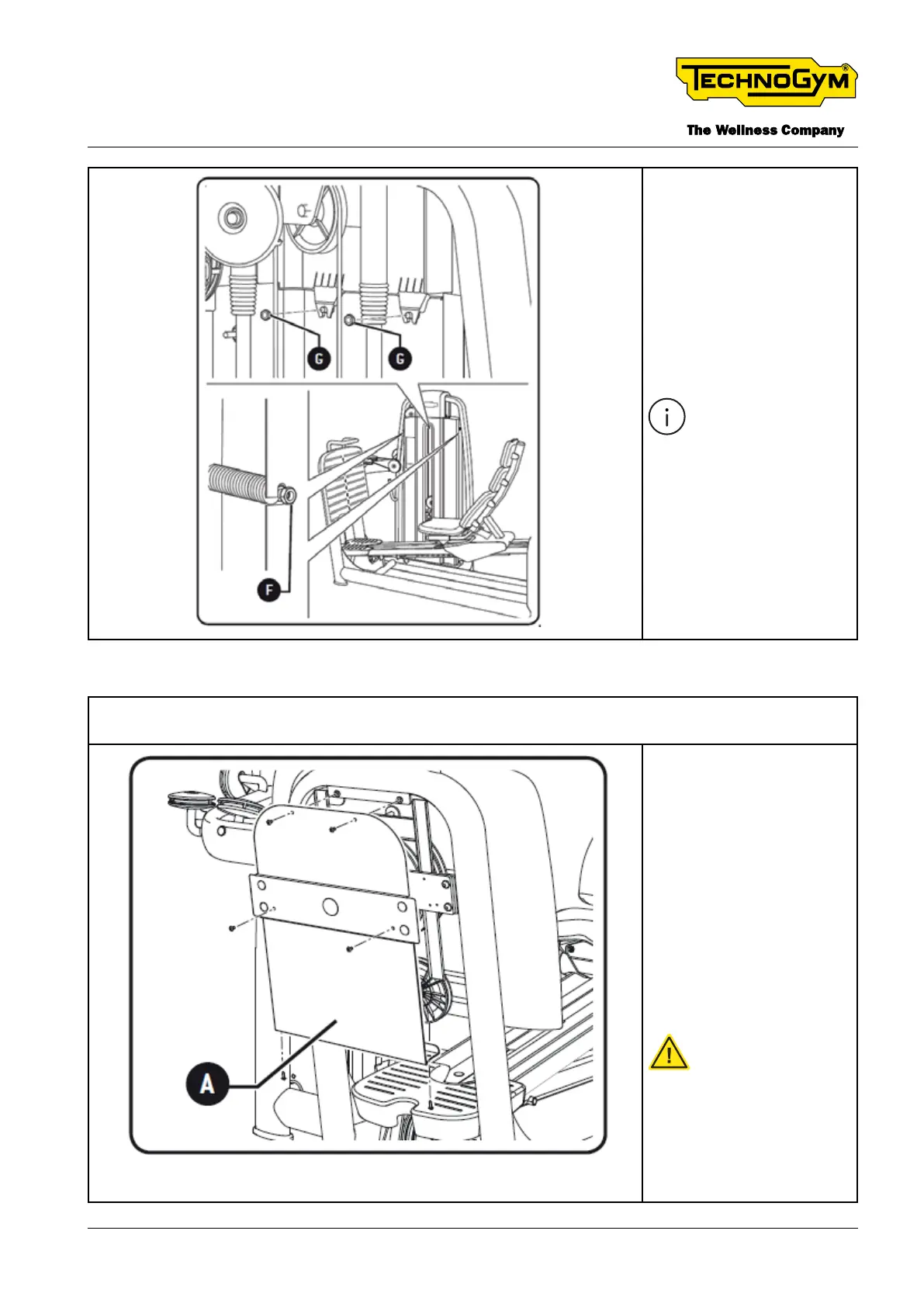
3. Loosen the two nuts
[F]. (TOOL: 13 mm
open end wrench).
4. Unscrew the two
nuts [G]. (TOOL:
ratchet with 13 mm
hexagonal socket).
5. Remove the panel.
To reassemble the
panel, carry out
the above steps in
reverse order.
10.2.2 REPLACING THE WEIGHT STACK CABLE
1. Remove the rear protective weight stack panel as indicated in the paragraph “9.2.1 Disas-
sembling the rear protective weight stack panel”
2. Unscrew two
screws (TOOL:
Medium-sized Phil-
lips screwdriver)
and unscrew four
screws (TOOL: 4
mm hexagon key
wrench). It’s now
possible to remove
the panel [A] be-
hind the platform for
pushing.
CAUTION: pay
attention to the
weight of the
panel [A] during
disassembly.
SELECTION 700 Technical Service Guide
Rev. 2.0
- 189 -Document uncontrolled when printed

Table of Contents

Related product manuals