Manual 0-4691 5-1 SERVICE
5
SECTION 5:
SERVICE
5.01 General Maintenance
A. Filter Element Replacement
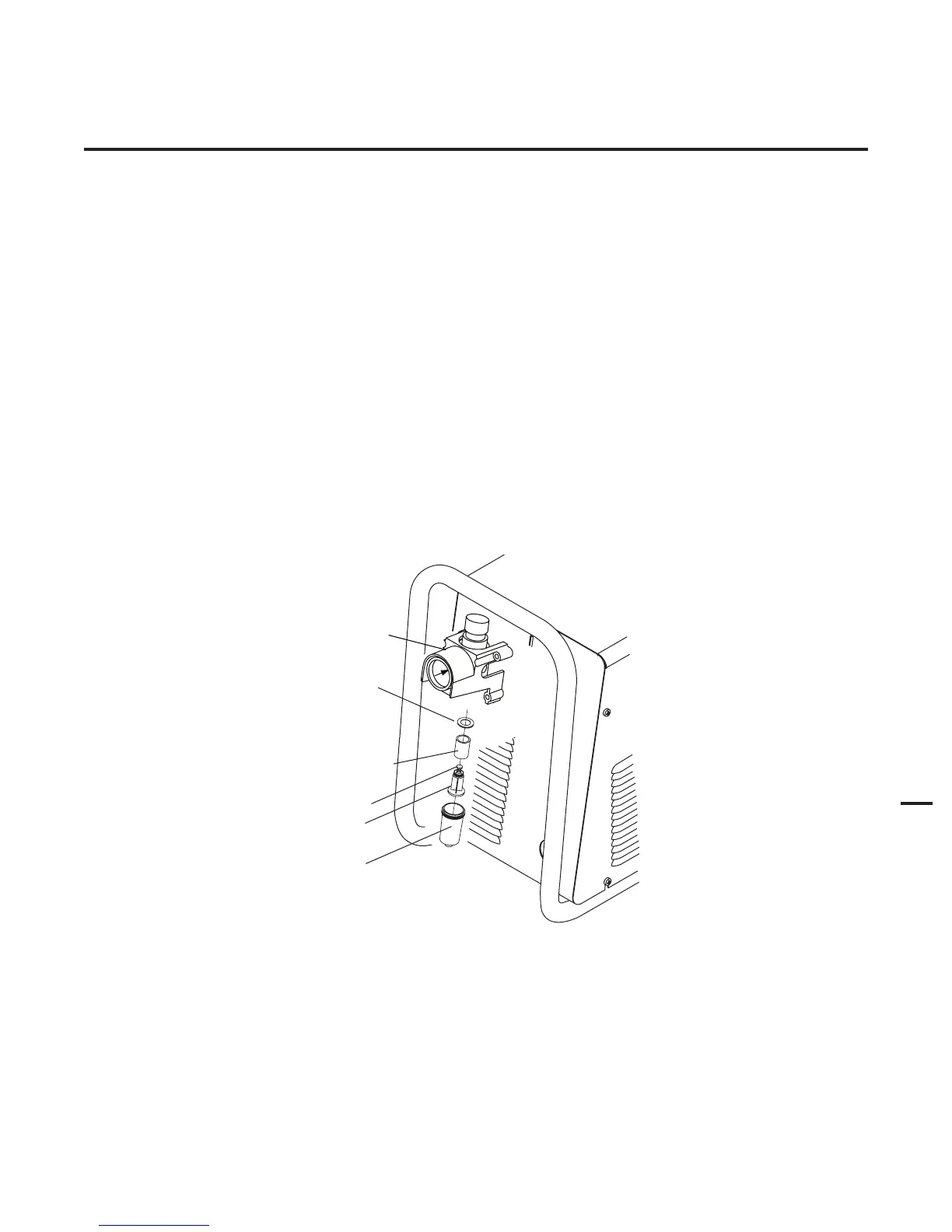
The Regulator/Filter Assembly is on the rear panel. For better system performance, the Regulator/Filter Assembly filter element
should be checked per the Maintenance Schedule (Appendix 3), and either cleaned or replaced.
1. Remove power from the power supply; turn off the gas supply and bleed down the system. Turn the regulator adjustment
knob to the 'zero' setting.
2. Unscrew the bowl on the bottom of the Regulator/Filter Assembly. The filter element will be visible and still attached to
the main body of the Regulator/Filter.
3. Grasp the filter element and unscrew it from the Regulator/Filter body. The filter element will come off with a spool and
some additional pieces.
4. Note the correct assembly of the filter/spool then remove the filter from the spool and either clean it or replace it.
5. The filter element and spool, with the baffle ring in place (teeth facing downward) can be screwed back into the Regulator
body by compressing the spring on the spool. Tighten firmly by hand.
Art # A-02995
Regulator/Filter
Assembly
Spool
Bowl
Spring
Filter
Element
No. 9-4414
Baffle
Ring
Regulator/Filter Element Replacement
6. Reinstall the bowl.
7. Turn on the air supply.











 To Next Page