Manual 0-4691 5-13 SERVICE
5
5.05 Main Input and Internal Power Problems
A. Opening Power Supply Enclosure
The cover of the Power Supply must be removed for access to input power connections and test points.
WARNING
Disconnect primary power at the source before assembling or disassembling the Power Supply, torch parts, or
torch and leads assemblies.
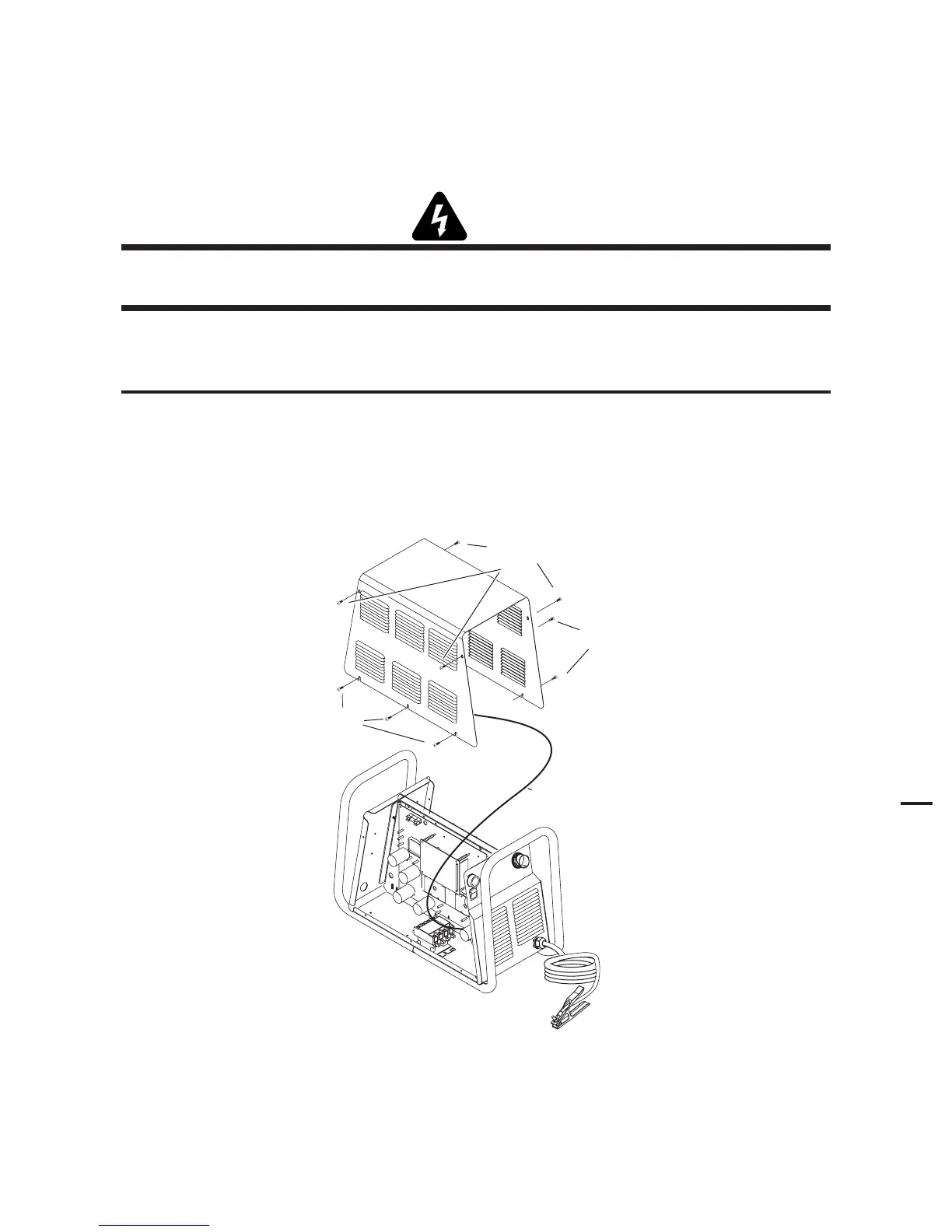
1. Remove the upper screws securing the cover to the main assembly.
2. Loosen, but do not remove, the lower screws.
NOTE
There is a ground wire attached from the cover to the main body of the unit.
3. Carefully lift the cover off the unit, and remove the nut securing the ground wire to the side panel.
4. Re-install the cover by reversing the above steps.
Art # A-04510
Lower
screws
Upper screws
Ground wire
Lower
screws
Cover Removal











 To Next Page