- 93 -
DX-120 Programming Manual BASIC SYSTEM PROGRAMMING TASKS
Setting Up Optional Internal Modem
The DX-120 system can be equipped with an optional internal modem so you can remotely program the DX-120 using
PC-DBA.
The optional modem module provides a dedicated communications path between the system processor and
PC-DBA.
This communications path does not require use of analog port system resources.
NOTE
• The modem speeds are 1200 bps/ 2400 bps.
• Also see “Remote (Modem) Connection” on page 14 for more information about
modem connection to the switch.
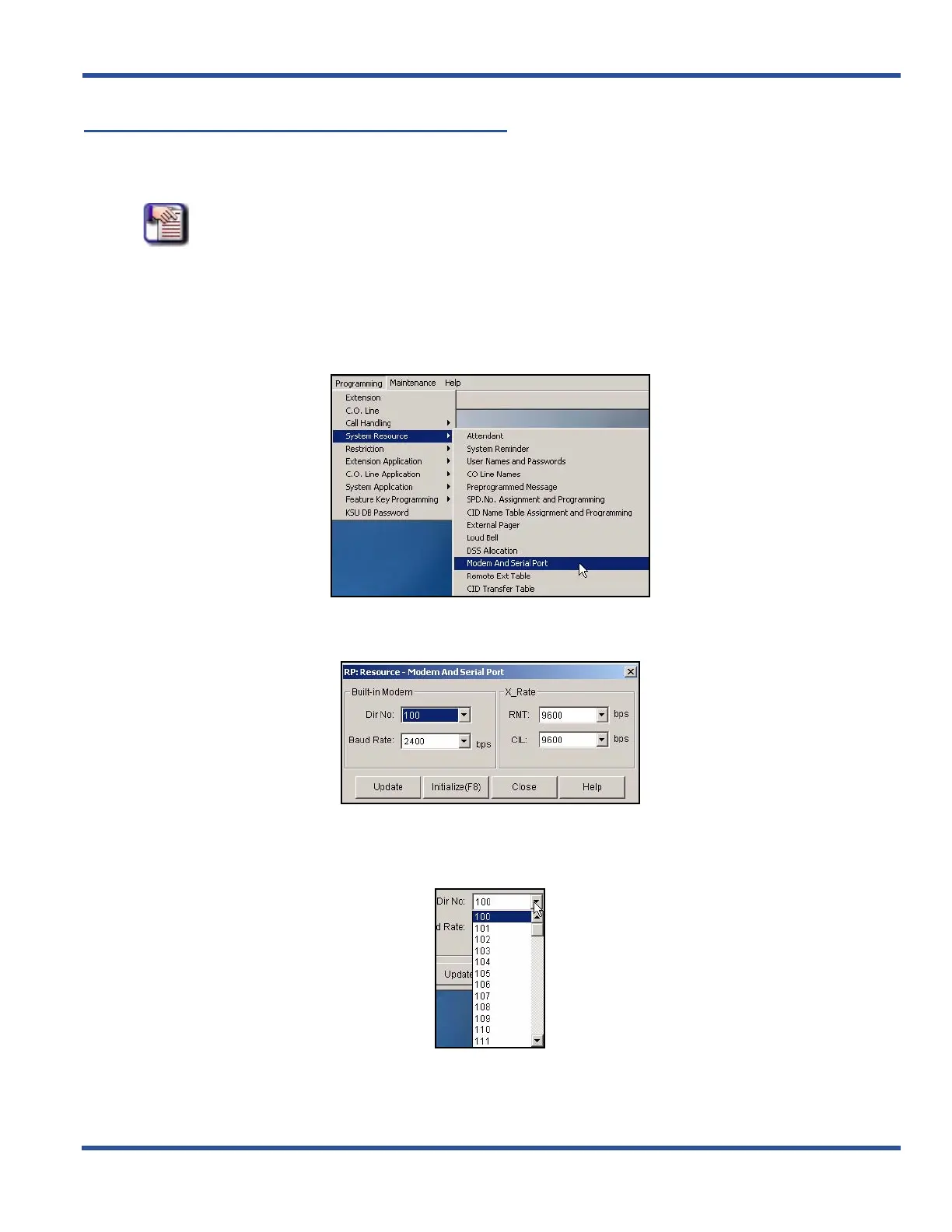
SETTING UP OPTIONAL INTERNAL MODEM VIA PC-DBA
From the PC-DBA main screen:
1) Go to ProgrammingXSystem ResourceXModem and Serial Port to display the Modem and Serial Port
screen.
2) Select the directory number you want to use for the internal modem.
• Valid directory numbers are from those designated for extension directory numbers.
• The default is 100.
Setting Up Optional Internal Modem via PC-DBA (continued on next page)



 To Next Page