- 177 -
DX-120 Programming Manual PROGRAMMING FOR THE OPTIONAL T1 AND ISDN (T1/PRI) CARDS
Setting Up Alternate Line IDs (ALI) -
for Systems with ISDN (T1/PRI) Installation Only
If an ISDN (T1/PRI) card has been installed on the current system, alternate line ID can be set up to allow users to
make outbound call from extensions on a ISDN (T1/PRI) line while sending out a different telephone as the Caller ID
information instead of than the main number of the system (i.e., the "Calling/Answer Party - Site Number).
NOTE
• If you do not put anything in any of these fields then nothing gets sent out and it
then becomes the responsibility of the CO to attach a name and number.
• If the prefix and alternate line ID are not programmed appropriately, the site
number will be assigned as the calling/answering party number.
SETTING UP ALTERNATE LINE IDS (ALI) - VIA PC-DBA
FOR SYSTEMS WITH ISDN (T1/PRI) INSTALLATION ONLY
From the PC-DBA main screen:
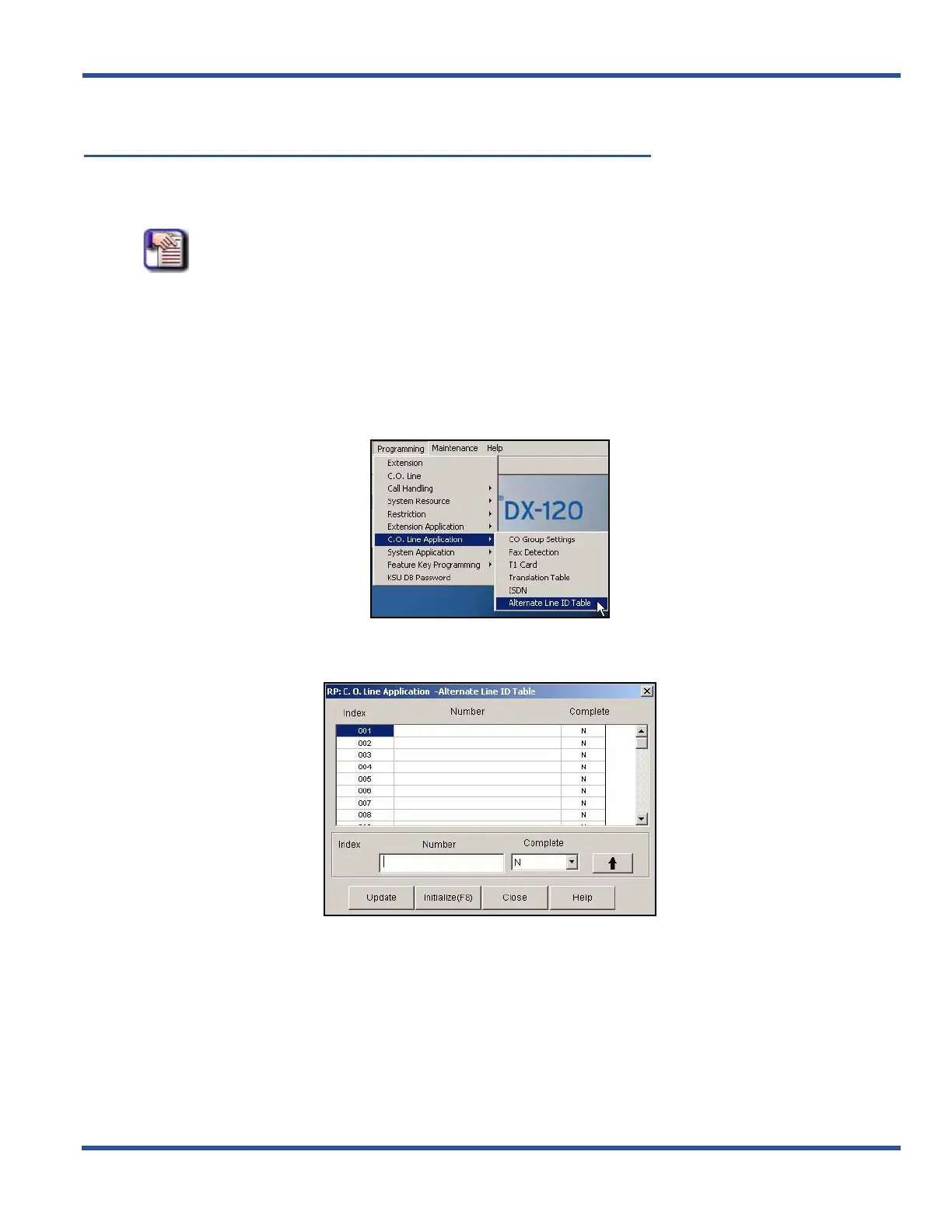
1) Go to ProgrammingXC.O. Line ApplicationXAlternate Line ID Table to display the Alternate Line ID Table
screen.
Setting Up Alternative Line IDs via PC-DBA (continued on next page)



 To Next Page