BASIC CO LINE PROGRAMMING TASKS DX-120 Programming Manual
- 150 -
Setting Up the Alternate CO Line Group
CO Line Alternate Route works with the DX-120 system CO line groups. When this feature is invoked, the system may
route users over CO line groups that they did not necessarily access.
This feature is useful in high traffic environments
when the use of second and third CO line selections may periodically be required.
When a user accesses a CO line group and all of the CO lines in this group are in use, the system automatically ports
over the user to the alternate CO line groups you specify.
The system handles special call handling using delete digits
and insert digits, as required by the alternate lines.
The following conditions apply when assigning alternate CO line
groups/routes.
• When CO lines in all groups are busy, the system plays a busy tone and displays a busy message on the LCD.
• An extension user may invoke callback to the first selected CO line group by pressing the cbck button.
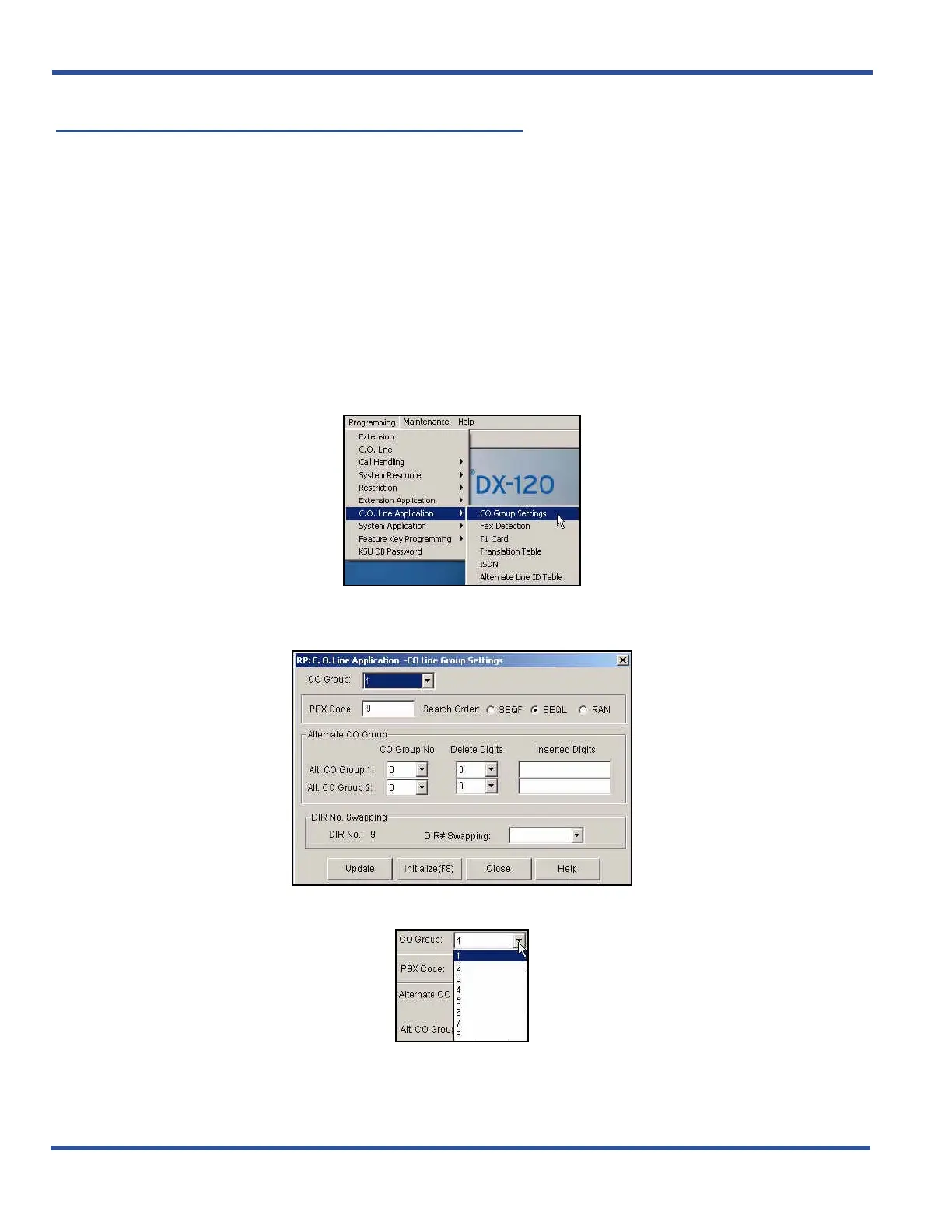
SETTING UP THE ALTERNATE CO LINE GROUP VIA PC-DBA
From the PC-DBA main screen:
1) Go to ProgrammingXC. O. Line ApplicationXCO Group Settings to display the C. O. Line Application--
CO Group Settings screen.
2) Select the CO group you want to program.
Setting Up the Alternate CO Line Group via PC-DBA (continued on next page)
DX-120 Programming Manual
BASIC CO LINE PROGRAMMING TASKS



 To Next Page