BASIC CALL HANDLING PROGRAMMING TASKS DX-120 Programming Manual
- 254 -
Enabling/Disabling TSI Connection
Enabling the TSI Connection tells the system to establish the voice path between the extension and the CO line without
checking the toll restrictions set up for that extension.
If you disable TSI Connection, the system does not establish the
voice path between the extension and the CO line until after it has checked the toll restrictions.
ENABLING/DISABLING TSI CONNECTION VIA PC-DBA
From the PC-DBA main screen:
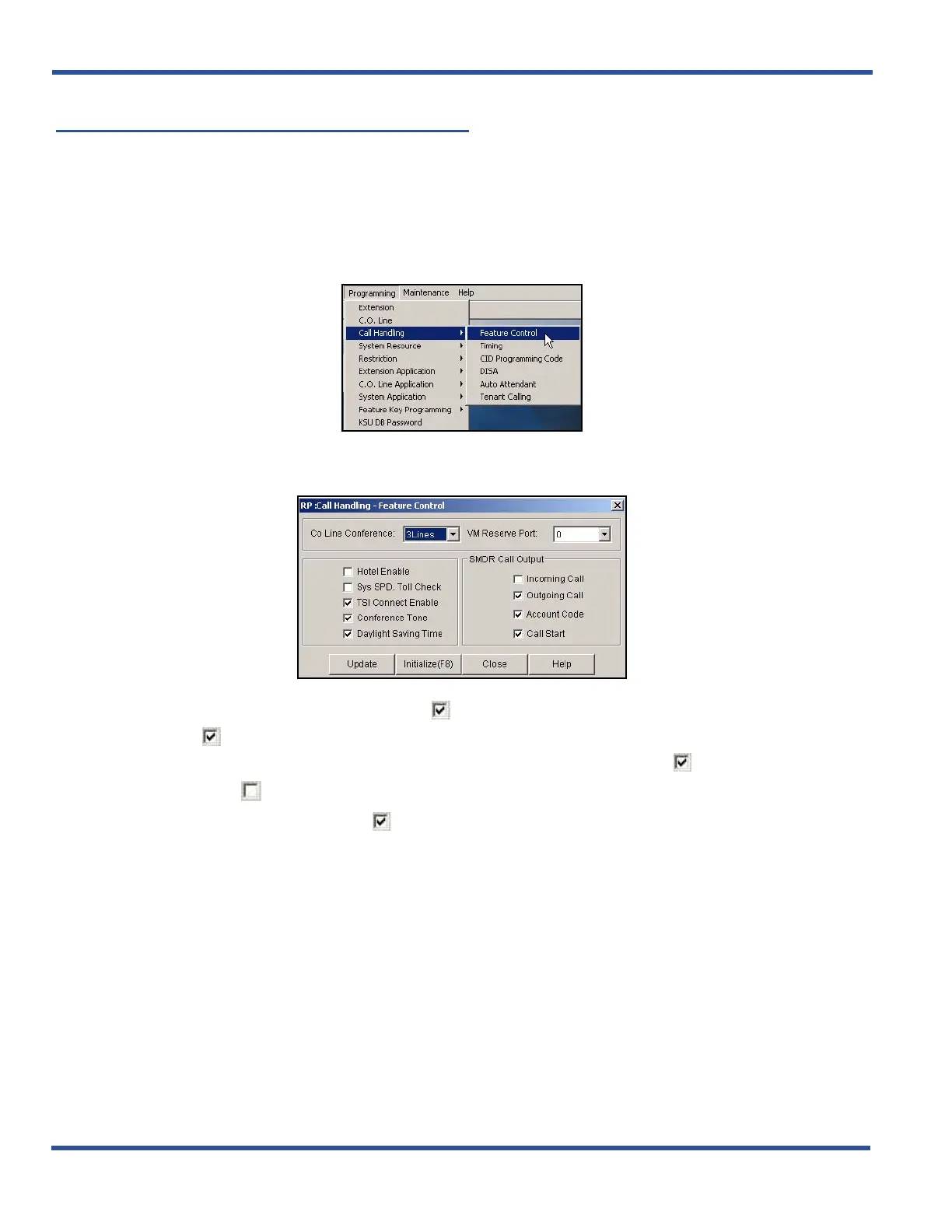
1) Go to ProgrammingXCall HandlingXFeature Control to display the Call Handling—Feature Control
screen.
2) Make sure there is a check in checkbox ( ) next to TSI Connect Enable to enable the TSI Connection
option ( ).
• Clicking on this box toggles the setting between yes/enable (a checkmark ) and no/disable (no
checkmark ).
• The default is on (check mark ).
When you are finished:
3) Click the Update button to store the settings into the database on the local disk.
4) Click the Close button to exit the current screen and return to the PC-DBA main screen.
When you have finished all programming changes:
5) Perform a SEND to copy the database changes to the DX-120 switch system memory.
Enabling/Disabling TSI Connection (continued on next page)



 To Next Page