- 77 -
DX-120 Programming Manual BASIC SYSTEM PROGRAMMING TASKS
Assigning External Page
The system provides external one-way, dedicated paging access to a paging amplifier or multi-zone one-
way page controller. The external paging zone may be accessed individually, or with all eight internal paging
zones as an all-call page.
HINT
To set up individual extensions for pager use, see “Assigning Extensions to Paging
Groups” on page 397.
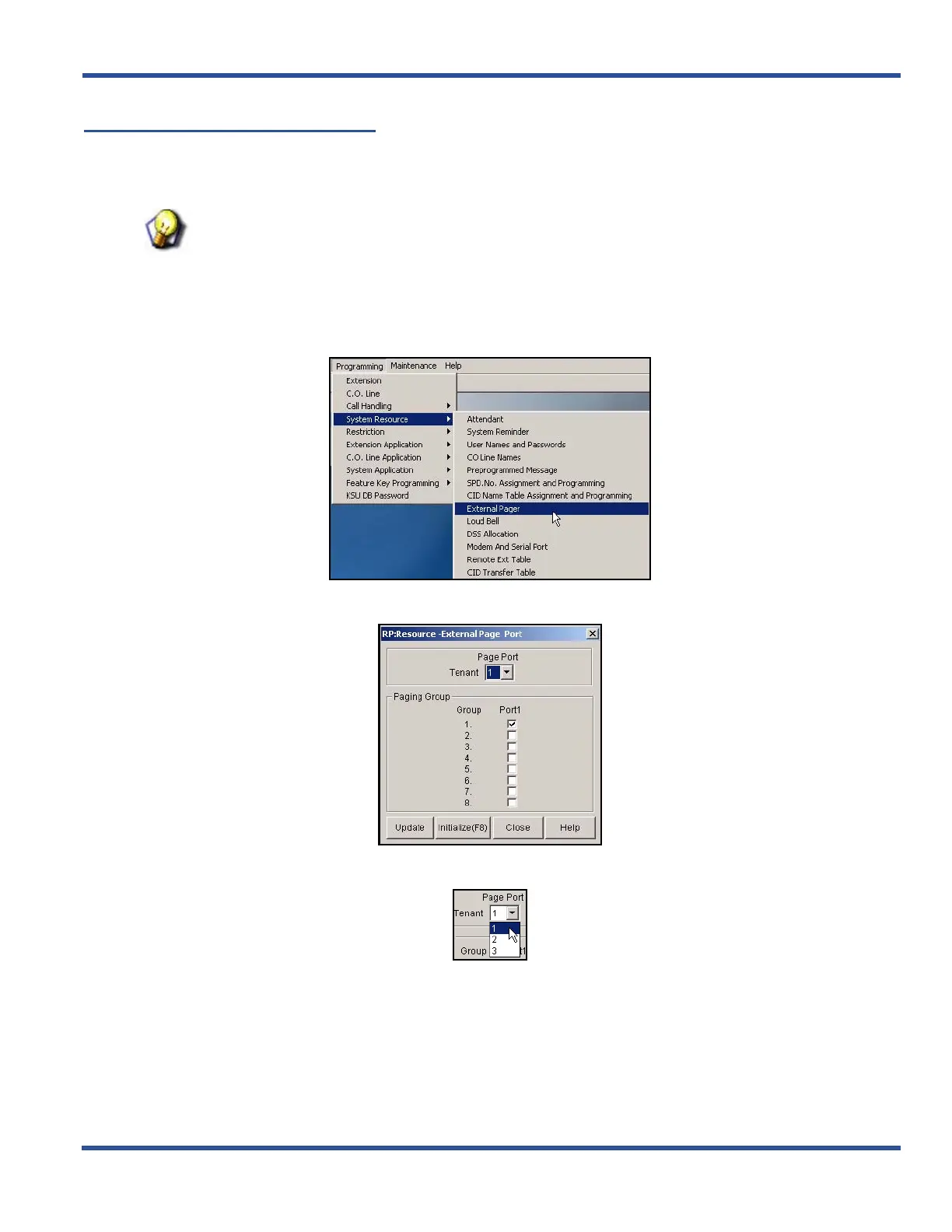
ASSIGNING EXTERNAL PAGING VIA PC-DBA
From the PC-DBA main screen:
1) Go to ProgrammingXSystem ResourceXExternal Page to display the External Page screen.
2) Select the Page Port to which you want to assign groups.
Assigning External Page ID via PC-DBA (continued on next page)
DX-120 Programming Manual
BASIC SYSTEM PROGRAMMING TASKS



 To Next Page