BASIC EXTENSION PROGRAMMING TASKS DX-120 Programming Manual
- 442 -
Assigning Feature Keys
After you are finished setting up the programming for the extensions, go to the individual phone and program its feature
keys (buttons). In addition to the buttons on each telephone, DX-120 console (DSS) has 64 programmable buttons.
All sixty-four buttons can be set up with their own directory types as well as directory numbers.
Although usually considered to be an attendant feature benefit, the DSS console can be assigned to any DX-120 DET.
You can add a maximum of 12 sixty-button Attendant/Extension consoles to the system. Each requires its own
dedicated digital port, and therefore reduces the number of DETs that you can connect to the system on a one-to-one
basis.
• The following conditions apply when assigning DSS port owners.
- Each DSS console has 64 dual-color LED buttons.
- Each DSS console requires its own dedicated cable pair from the KSU.
- You can assign up to 12 DSS consoles in the DX-120 system.
- You can assign to any DET a maximum of four Attendant/extension DSS consoles.
NOTE
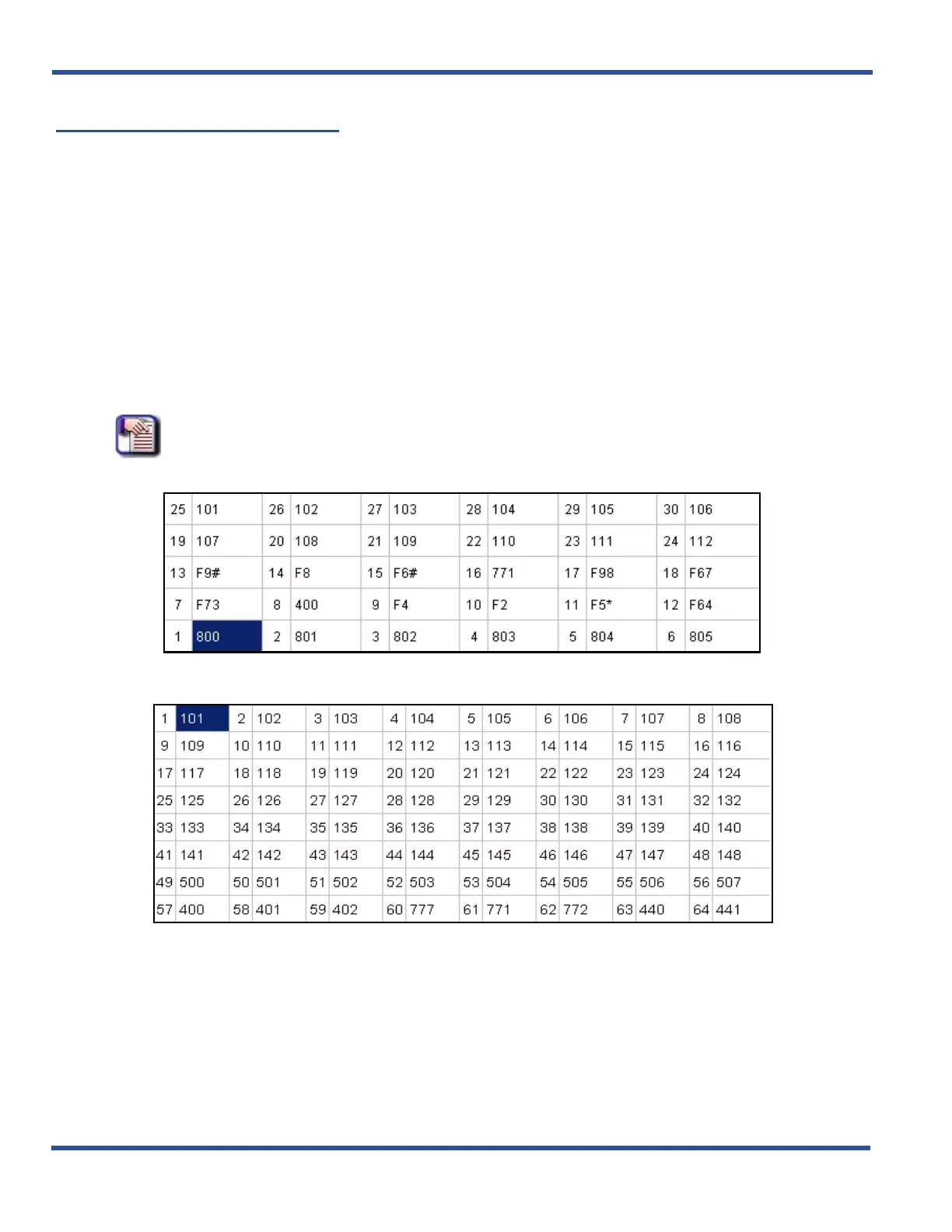
Each extension and DSS are “mapped” with a default button arrangement.
DEFAULT BUTTON ARRANGEMENT - EXTENSION
DEFAULT BUTTON ARRANGEMENT - DSS
Assigning Feature Keys (continued on next page)



 To Next Page