BASIC CO LINE PROGRAMMING TASKS DX-120 Programming Manual
- 148 -
Setting Up the PBX Code and Hunt Method via PC-DBA (continued)
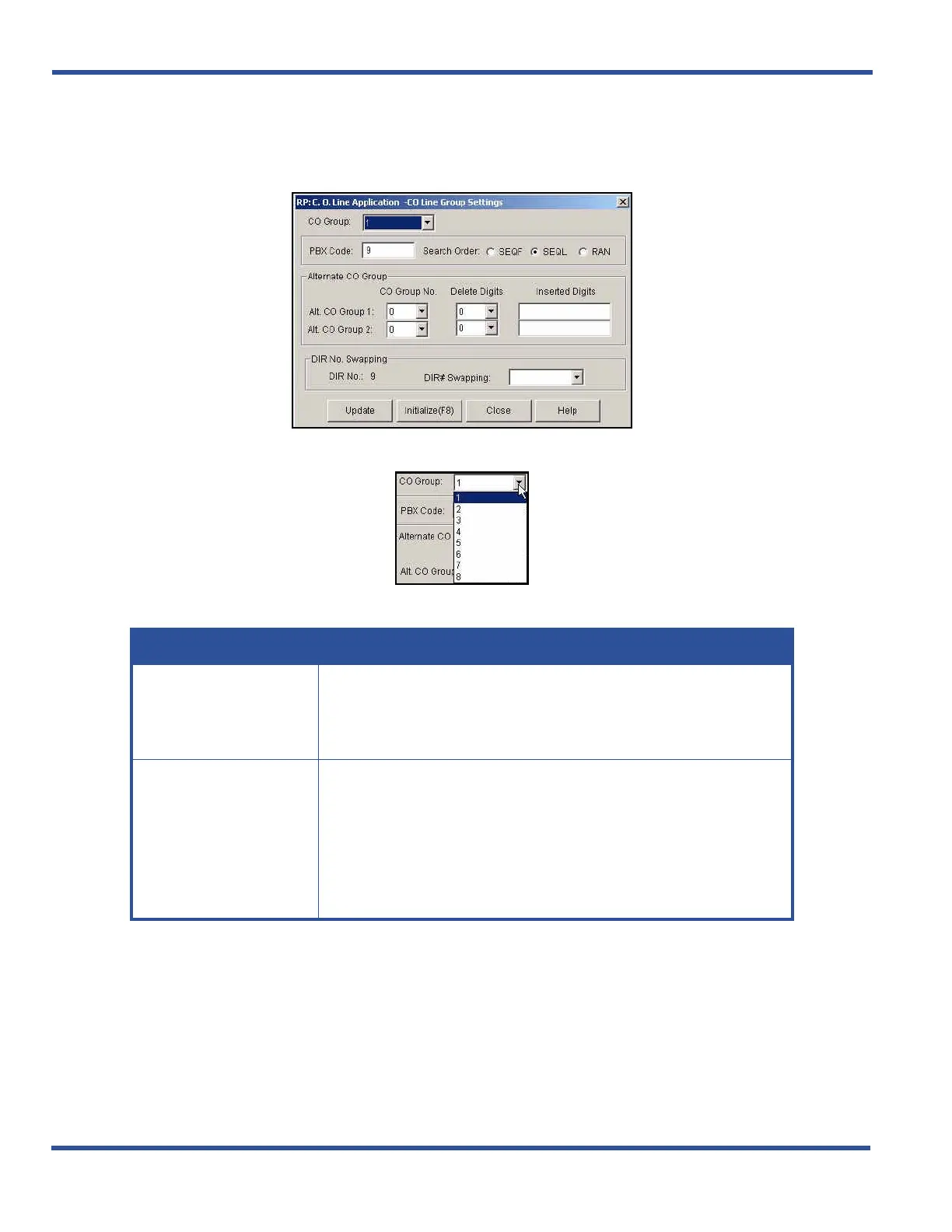
1) Go to ProgrammingXC. O. Line ApplicationXCO Group Settings to display the C. O. Line Application--
CO Group Settings screen.
2) Select the CO group you want to program.
3) Enter/select the information in the fields as described below:
4) Click the Update button to store the settings into the database on the local disk.
• Use the procedure above to assign PBX codes and hunt methods to other CO groups in the system.
When you have finished all programming changes:
5) Click the Close button to exit the current screen and return to the PC-DBA main screen.
6) Perform a SEND to copy the database changes to the DX-120 switch system memory.
Setting Up the PBX Code and Hunt Method (continued on next page)
IN THIS FIELD... DO THIS...
PBX Code
Enter the code required to access a PBX trunk on the CO line circuit in
this group.
• Valid numbers range from 0 to 9999.
• The default is 9.
Search Order
Select the search order (i.e., hunt method) (search order) for the selected
CO line group.
• Valid options are:
- SEQL (SEQuential Last)
- SEQF (SEQuential First)
- RAN (RANdom access)
- The default is SEQL.



 To Next Page