BASIC CALL HANDLING PROGRAMMING TASKS DX-120 Programming Manual
- 190 -
Programming Conference Calls (continued)
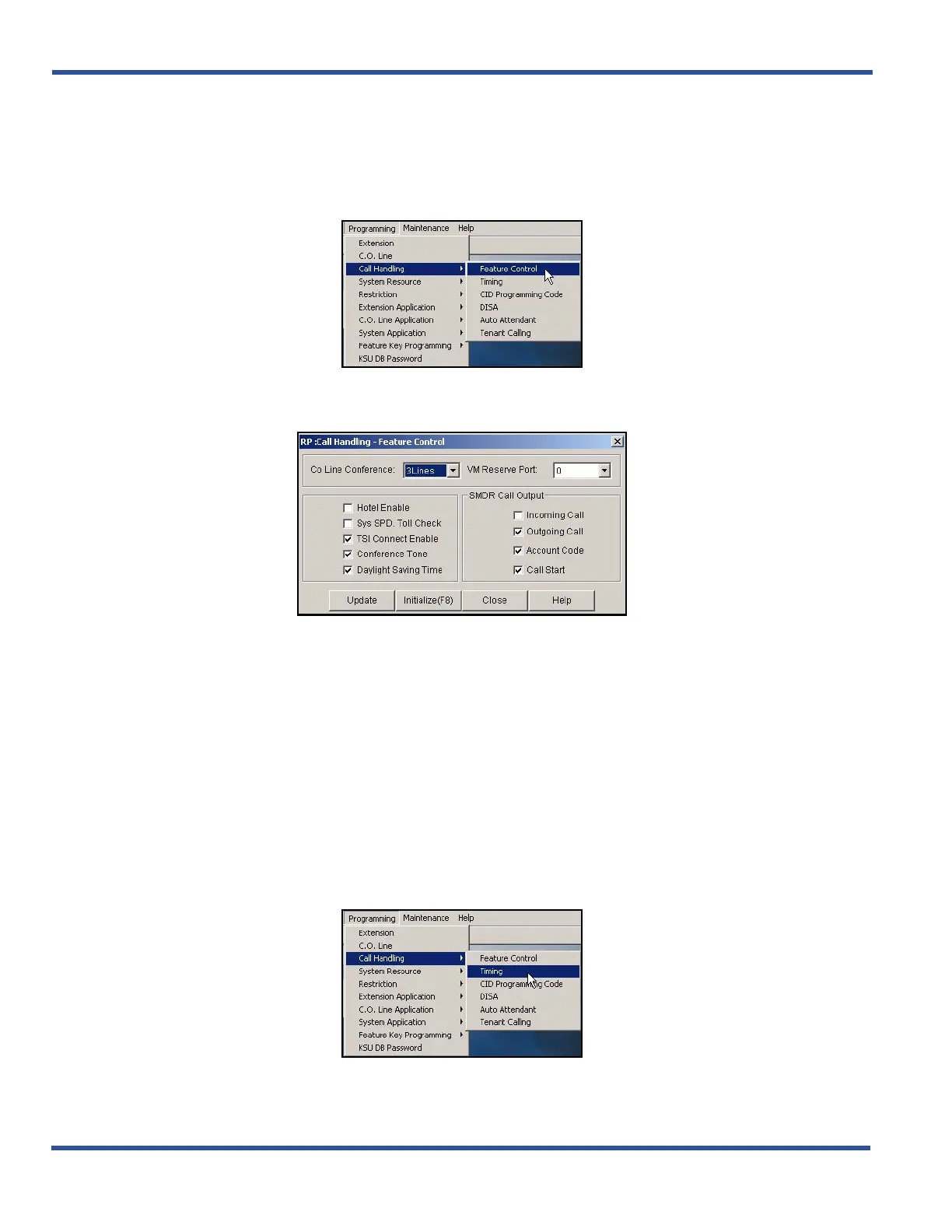
PROGRAMMING CONFERENCE CALLS VIA PC-DBA
From the PC-DBA main screen:
1) Go to ProgrammingXCall HandlingXFeature Control to display the Call Handling—Feature Control
screen.
2) Select the maximum number of lines you want to use for conference combinations from the CO Line
Conference field.
• Options are: No (none), 2Lines, or 3Lines.
• The default is 3Lines.
3) Select whether or not you want to use a Conference Tone (see page “Enabling/Disabling Conference
Tone” on page 256 for more information).
When you are finished making settings as shown above:
4) Click the Update button to store the settings into the database on the local disk.
5) Click the Close button to exit the current screen and return to the PC-DBA main screen.
When you have completed the settings on the Control Features screen (as shown above), from the
PC-DBA main screen:
Programming Confernce Calls via PC-DBA (continued on next page)



 To Next Page