BASIC CALL HANDLING PROGRAMMING TASKS DX-120 Programming Manual
- 194 -
Specifying CO Flash Time (continued)
SPECIFYING CO FLASH TIME VIA PC-DBA
From the PC-DBA main screen:
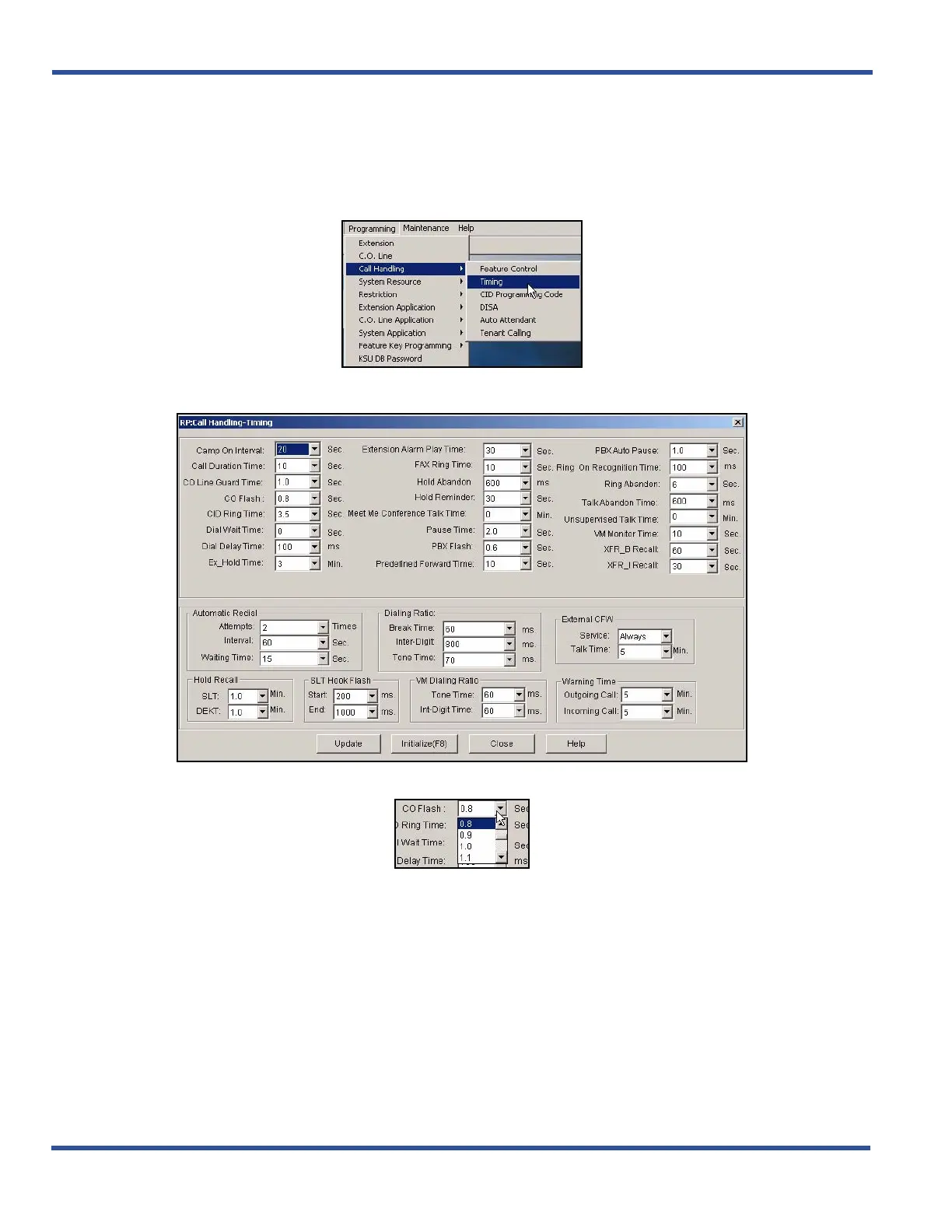
1) Go to ProgrammingXCall HandlingXTiming to display the Call Handling—Timing screen.
In the C.O. Flash field in the first column:
2) Select the CO line hook-flash timing you want to use.
• Valid options are between .1 and 3.0 seconds.
• The default is .8 seconds.
When you are finished:
3) Click the Update button to store the settings into the database on the local disk.
4) Click the Close button to exit the current screen and return to the PC-DBA main screen.
When you have finished all programming changes:
5) Perform a SEND to copy the database changes to the DX-120 switch system memory.
Specifying CO Flash Time (continued on next page)



 To Next Page