BASIC CALL HANDLING PROGRAMMING TASKS DX-120 Programming Manual
- 218 -
Setting Up Hold Recall via PC-DBA (continued)
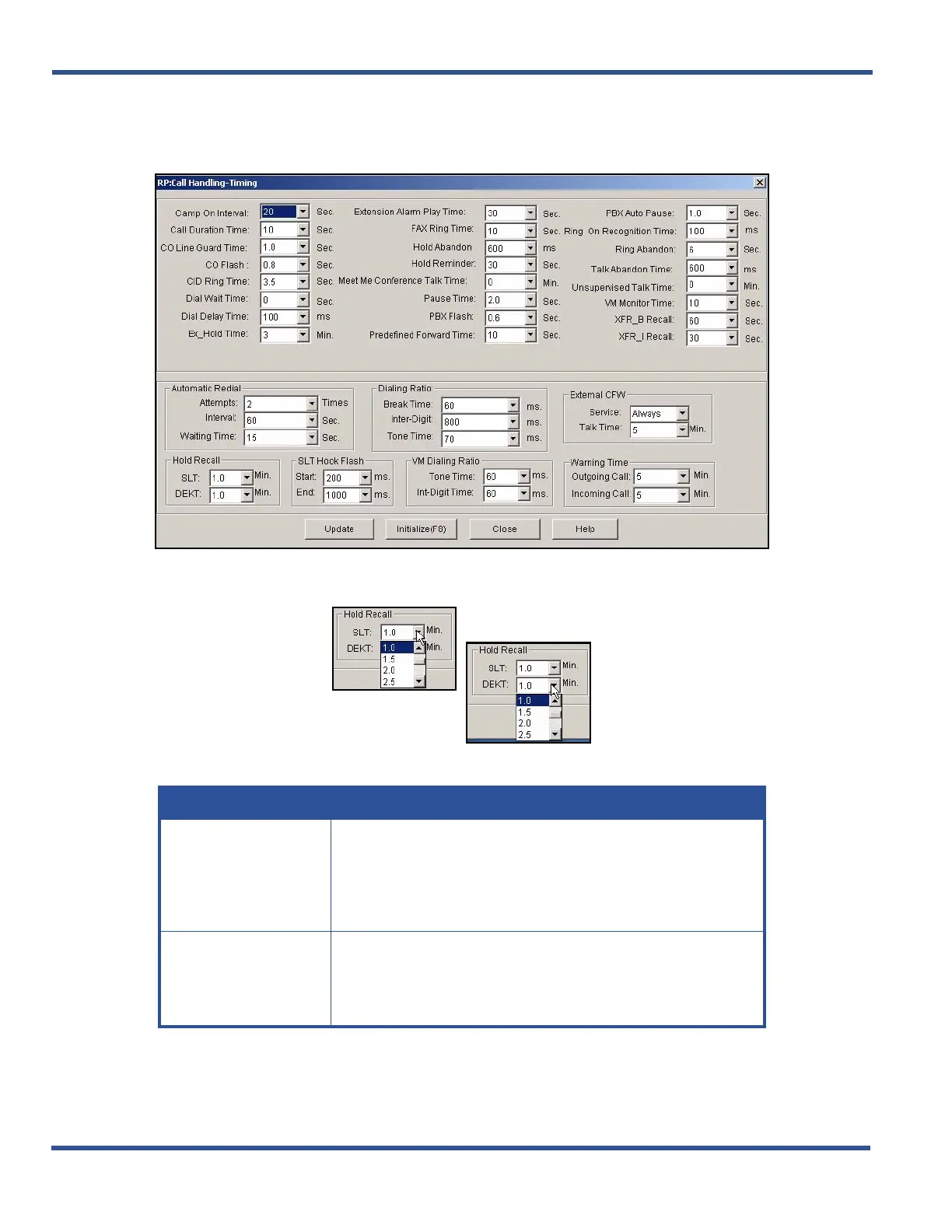
1) Go to ProgrammingXCall HandlingXTiming to display the Call Handling—Timing screen.
In the Hold Recall fields in bottom left corner of the screen:
2) Select settings for the fields as described below:
Setting Up Hold Recall via PC-DBA (continued on next page)
IN THIS FIELD... SELECT...
SLT
The length of time that calls placed on hold at analog devices
remain on hold before ringing-back to the extension that placed
them on hold.
• Valid choices range in increments from 0 to 5.0 minutes.
• The default is 1.0.
DEKT
The length of time calls can be placed on hold at Digital Speaker-
phones, before the system rings back the extension with the call.
• Valid choices range in increments from 0 to 5.0 minutes.
• The default is 1.0.



 To Next Page