BASIC CALL HANDLING PROGRAMMING TASKS DX-120 Programming Manual
- 250 -
Enabling the Hotel Feature (continued)
ENABLING THE HOTEL FEATURE VIA PC-DBA
From the PC-DBA main screen:
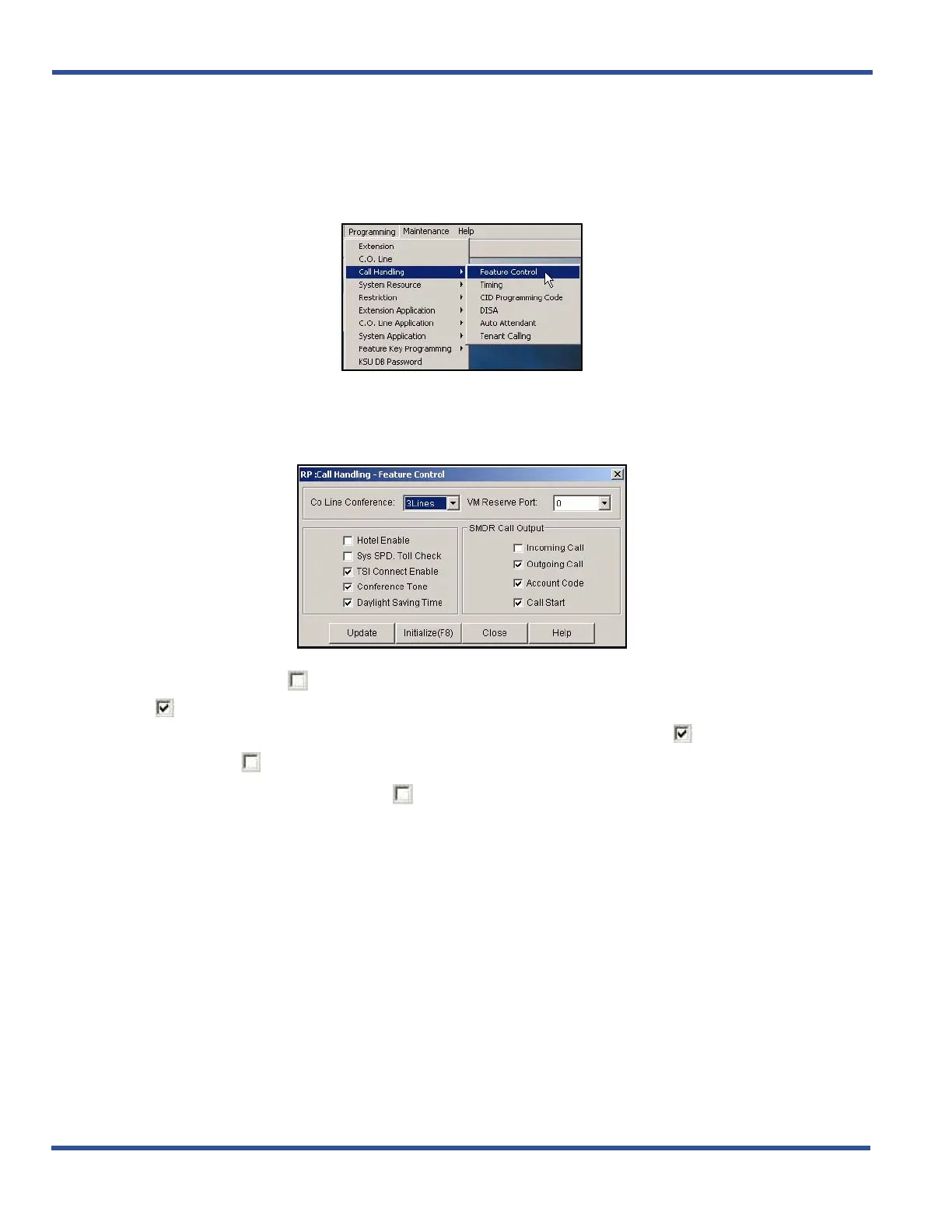
1) EGo to ProgrammingXCall HandlingXFeature Control to display the Feature Control screen.
2) Click the checkbox ( ) next to Hotel Enable to place a check mark there to enable the Hotel Features
( ).
• Clicking on this box toggles the setting between yes/enable (a checkmark ) and no/disable (no
checkmark ).
• The default is off (no check mark ).
When you are finished making the settings:
3) Click the Update button to store the settings into the database on the local disk.
4) Click the Close button to exit the current screen and return to the PC-DBA main screen.
When you have finished all programming changes:
5) Perform a SEND to copy the database changes to the DX-120 switch system memory.
Enabling the Hotel Feature (continued on next page)



 To Next Page