BASIC CALL HANDLING PROGRAMMING TASKS DX-120 Programming Manual
- 262 -
Establishing Warning Time via PC-DBA (continued)
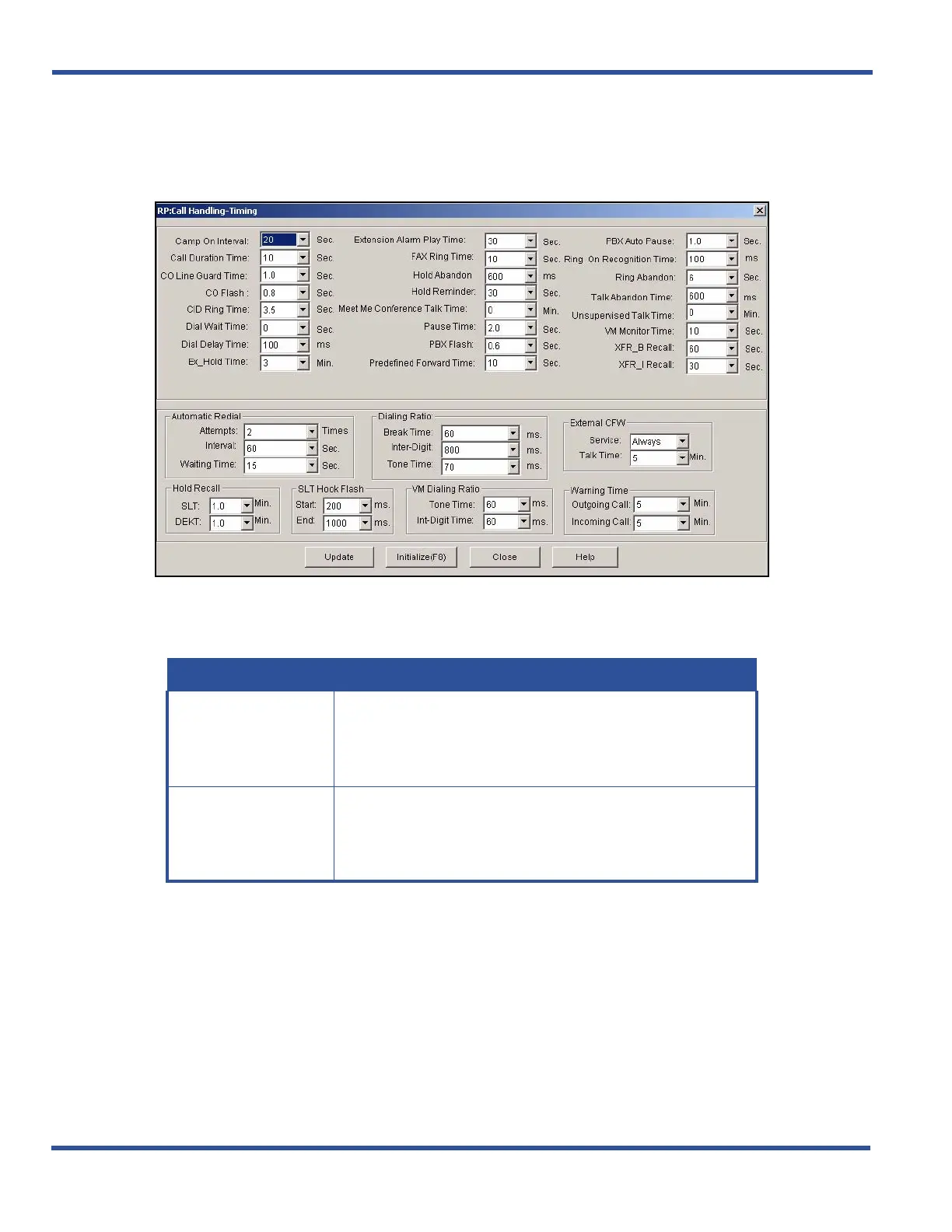
1) Go to ProgrammingXCall HandlingXTiming to display the Call Handling—Timing screen.
In the Warning Time field in the lower right portion of the screen:
2) Select the appropriate information for the fields as shown below:
When times are set:
3) Click the Update button to store the settings into the database on the local disk.
4) Click the Close button to exit the current screen and return to the PC-DBA main screen.
When you have finished all programming changes:
5) Perform a SEND to copy your new database to the DX-120 switch system memory.
Establishing Warning Time via the DET (continued on next page)
FOR THIS FIELD... SELECT...
Outgoing Call
The length of time after the outgoing call begins that you want
the system to sound the warning to the extension user.
• Valid options include 1 through 30 minutes.
• The default is 5 minutes.
Incoming Call
The length of time after the incoming call begins that you want
the system to sound the warning time to the extension user.
• Valid options include 1 through 30 minutes.
• The default is 5 minutes.



 To Next Page