BASIC CALL HANDLING PROGRAMMING TASKS DX-120 Programming Manual
- 272 -
Programming Tenant Groups (continued)
PROGRAMMING TENANT GROUPS VIA PC-DBA
From the PC-DBA main screen:
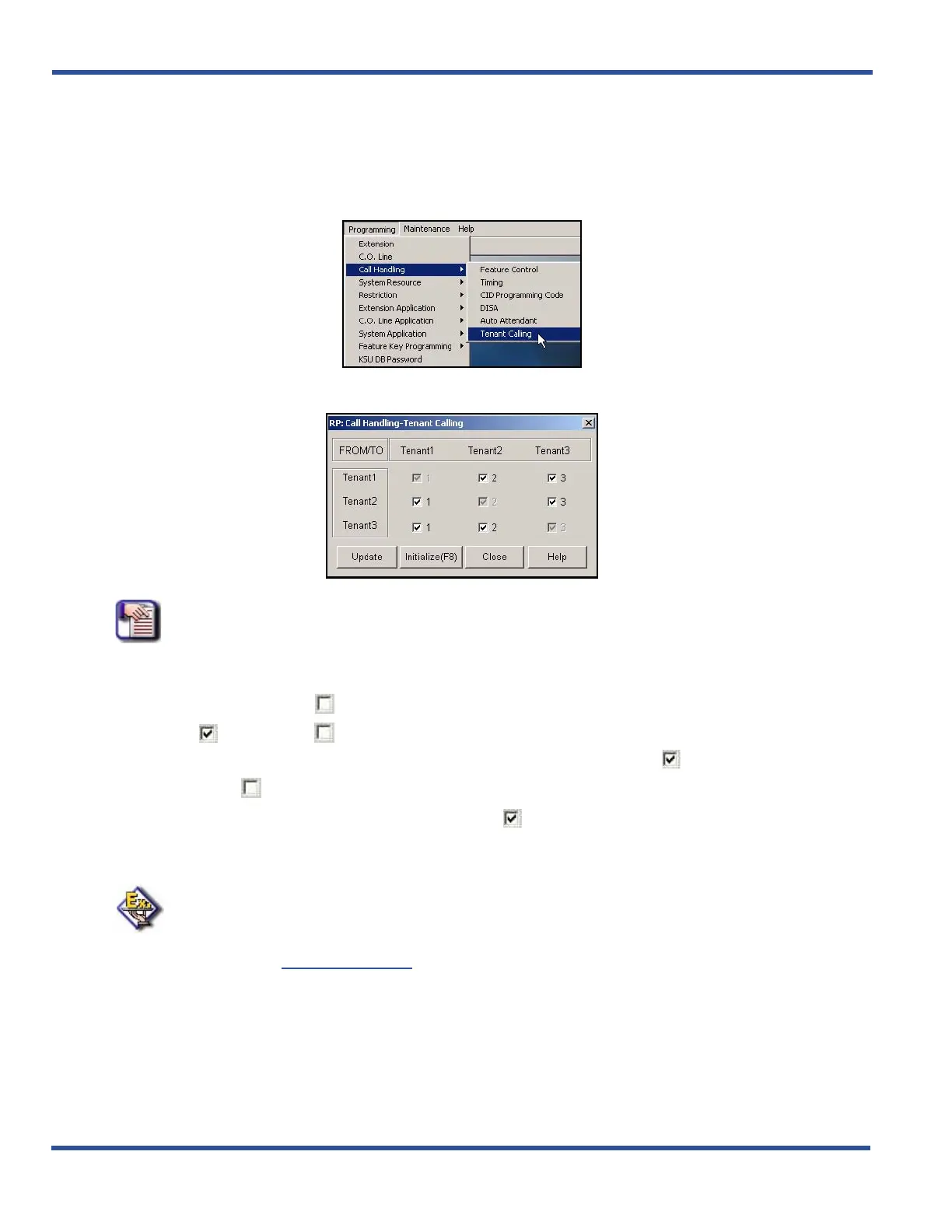
1) Go to ProgrammingXCall HandlingXTenant Calling to display the Call Handling—Tenant Calling screen.
NOTE
The system assumes that intercom calls will be allowed within a tenant group (e. g.,
From Tenant 1/To Tenant 1).
Thus, these entries are checked, but grayed out. They
cannot be changed.
2) Click the checkbox(es) ( ) that correspond to the tenant groups combinations for which you want to
allow ( ) or disallow ( ) intercom calls.
• Clicking on this box toggles the setting between yes/allow (a checkmark ) and no/disallow (no
checkmark ).
• The default for all boxes is yes/allow (checkmark ).
• Remember to allow intercom calls in BOTH directions between tenant groups, you must check BOTH
corresponding settings (i.e., the to and the from for each - see example below).
EXAMPLE
To allow intercom calls between groups 1 and 2, click the second item in the first
column (From Tenant 2/To Tenant 1) and the first item in the second column (From
Tenant 1/To Tenant 2).
Both should have check marks if you wish to allow
intercom calls
in both directions between the groups.
Programming Tenant Groups via PC-DBA (continued on next page)



 To Next Page