- 313 -
DX-120 Programming Manual BASIC CALL HANDLING PROGRAMMING TASKS
Setting DISA (continued)
SETTING DISA VIA PC-DBA
From the PC-DBA main screen:
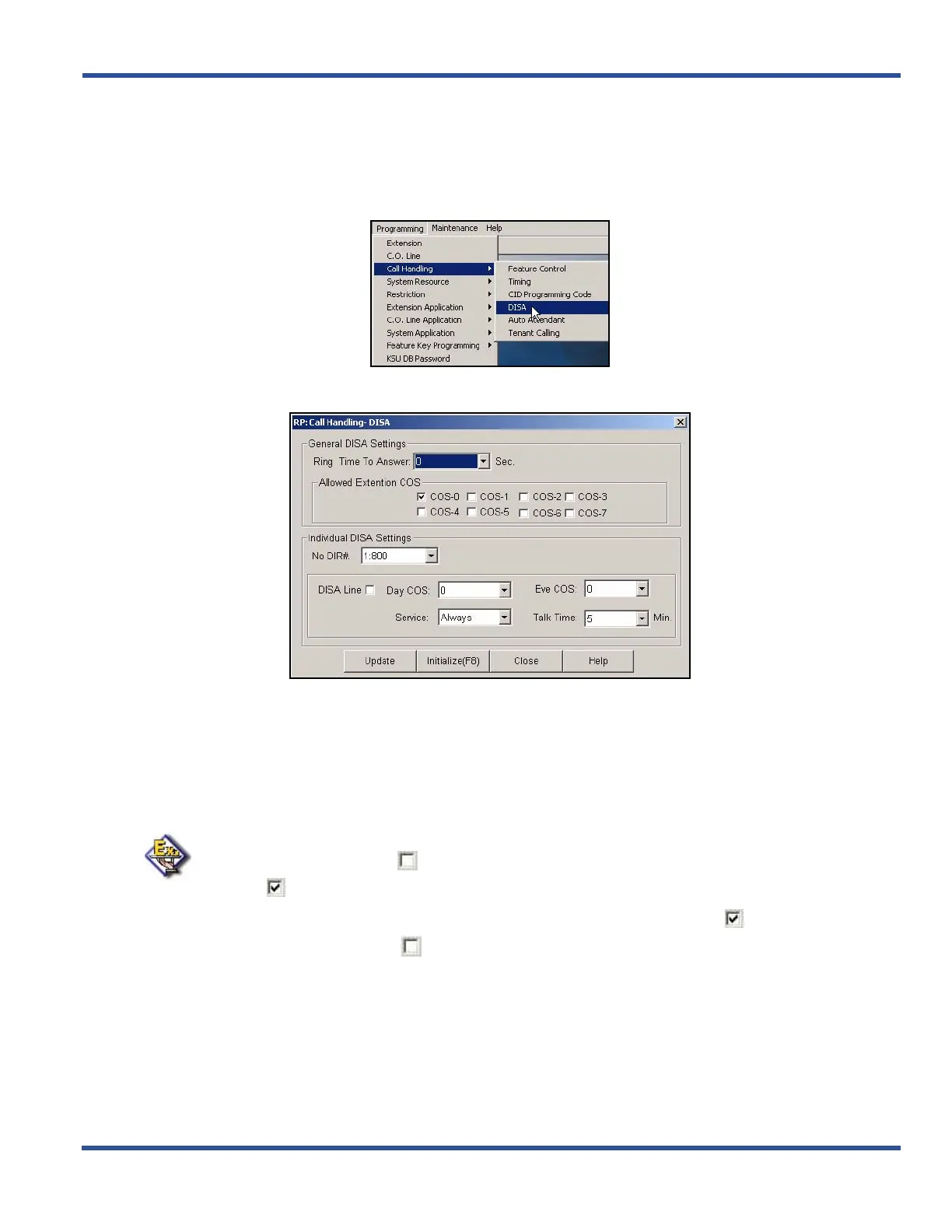
1) Go to ProgrammingXCall HandlingXDISA to display the Call Handling—DISA screen.
2) Select the number of seconds (in the Ring Time to Answer field) that you want the system to wait on an
unanswered incoming call before classifying it as a DISA line.
• Valid options are 0 through 99, in 1 second increments.
• The default is 0 seconds.
3) Use the check boxes under Allowed Extension COS to select which class(es) of service you want to allow
to use the DISA feature to make system CO line calls.
EXAMPLE
• Make sure the checkbox ( ) next to COS 0 has a check mark to allow COS 0 to
DISA ( ).
• Clicking on this box toggles the setting between yes/enable (a checkmark ) and
no/disable (no checkmark ).
• The default is COS-0 allowed (i.e., checkmark) while all others are not allowed
(i.e., no checkmark).
Setting DISA via PC-DBA (continued on next page)



 To Next Page