BASIC EXTENSION PROGRAMMING TASKS DX-120 Programming Manual
- 388 -
Assigning a User Password, Password Length,and/or Name to Extensions (continued)
ASSIGNING A PASSWORDS, PASSWORD LENGTH,
AND USER NAMES TO EXTENSIONS VIA PC-DBA
From the PC-DBA main screen:
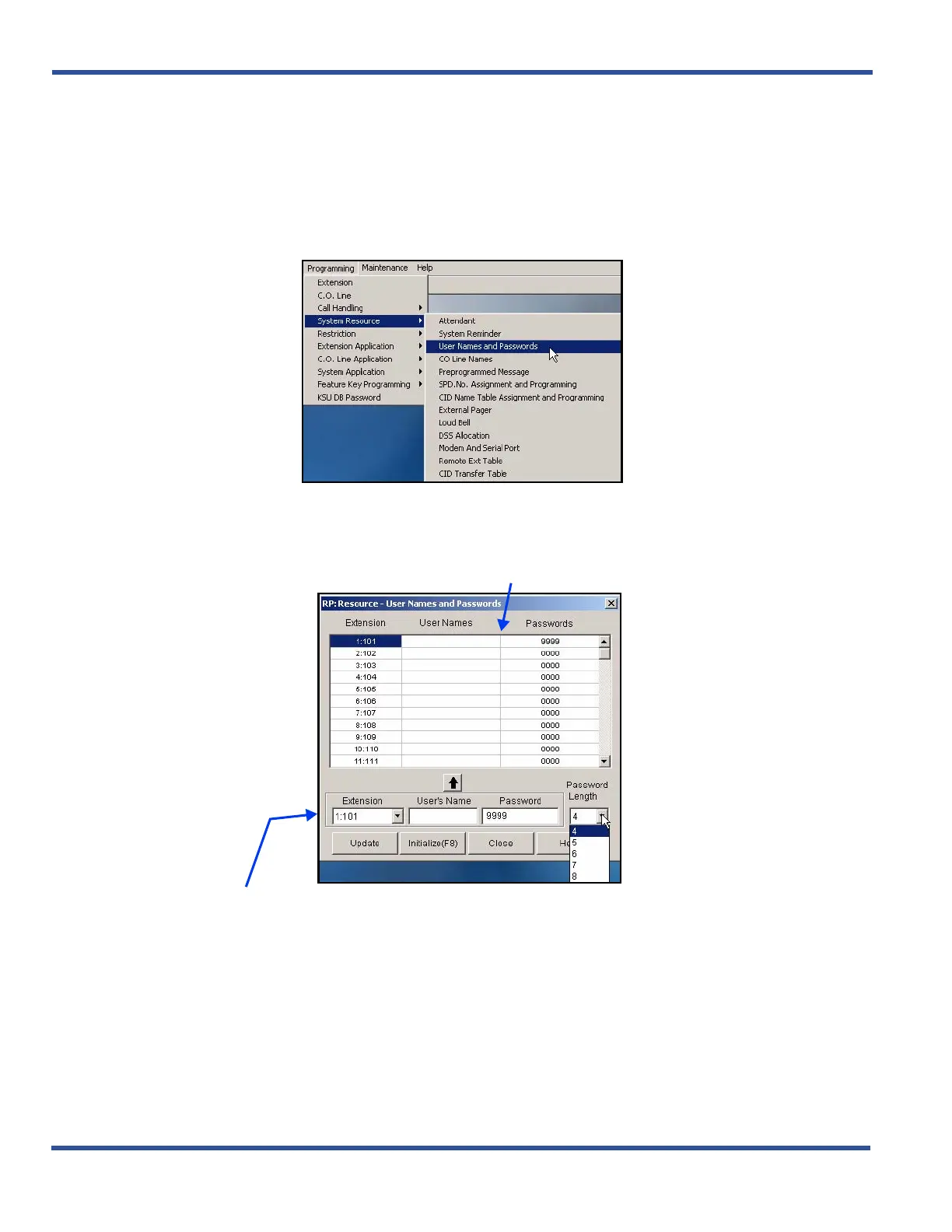
1) Go to ProgrammingXSystem ResourceXUser Names and Passwords to display the User Names and
Passwords screen.
2) Click on the line of the scrolling table for which you wish to enter a user password and/or name.
• The Extension that appears on the entry line now matches that on the table line you selected.
3) Set the appropriate password length, as needed.
• Valid entries are from 4 to 8 characters.
• The default is 4 characters.
AND/OR
Assigning a User Password, Password Length,and/or Name to Extensions via PC-DBA (continued on next page)
a scrolling table of user names and passwords
an entry line you use to the name, password, and password length for each
extension.
THIS SCREEN IS COMPOSED OF TWO MAJOR PARTS:



 To Next Page