Videojet DataFlex 6530 Operator Manual - Rev AA 5-17
CLARiTY Operating System
Using the iAssure Screen
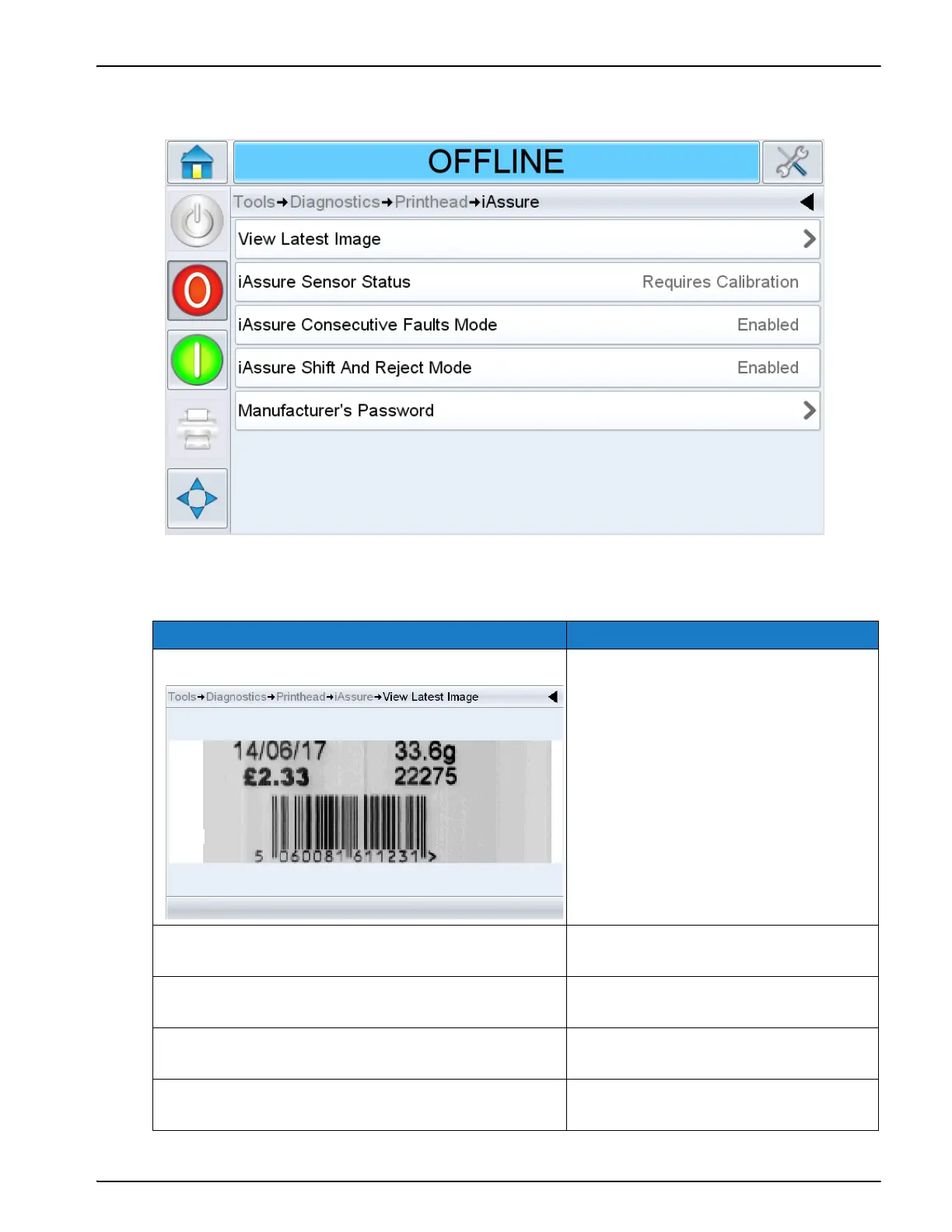
Touch iAssure on the Printhead screen to access the iAssure parameters (Figure 5-12).
The iAssure screen provides access to the following parameters:
Option Description
View Latest Image The last image captured by iAssure.
Note: The last image captured image is
updated in real time for each print
iAssure Sensor Status Displays whether the iAssure sensor
requires calibration or not.
iAssure Consecutive Faults Mode Displays the status of the consecutive
faults mode.
iAssure Shift And Reject Mode Displays the status of the shift and
reject mode.
Manufacturer’s Password Enter the manufacturer’s password to
enable higher level options.
Table 5-13: iAssure Screen Description
Figure 5-12: iAssure Screen



 To Next Page