5-20 Videojet DataFlex 6530 Operator Manual - Rev AA
CLARiTY Operating System
Using the Encoder Profiles Screen
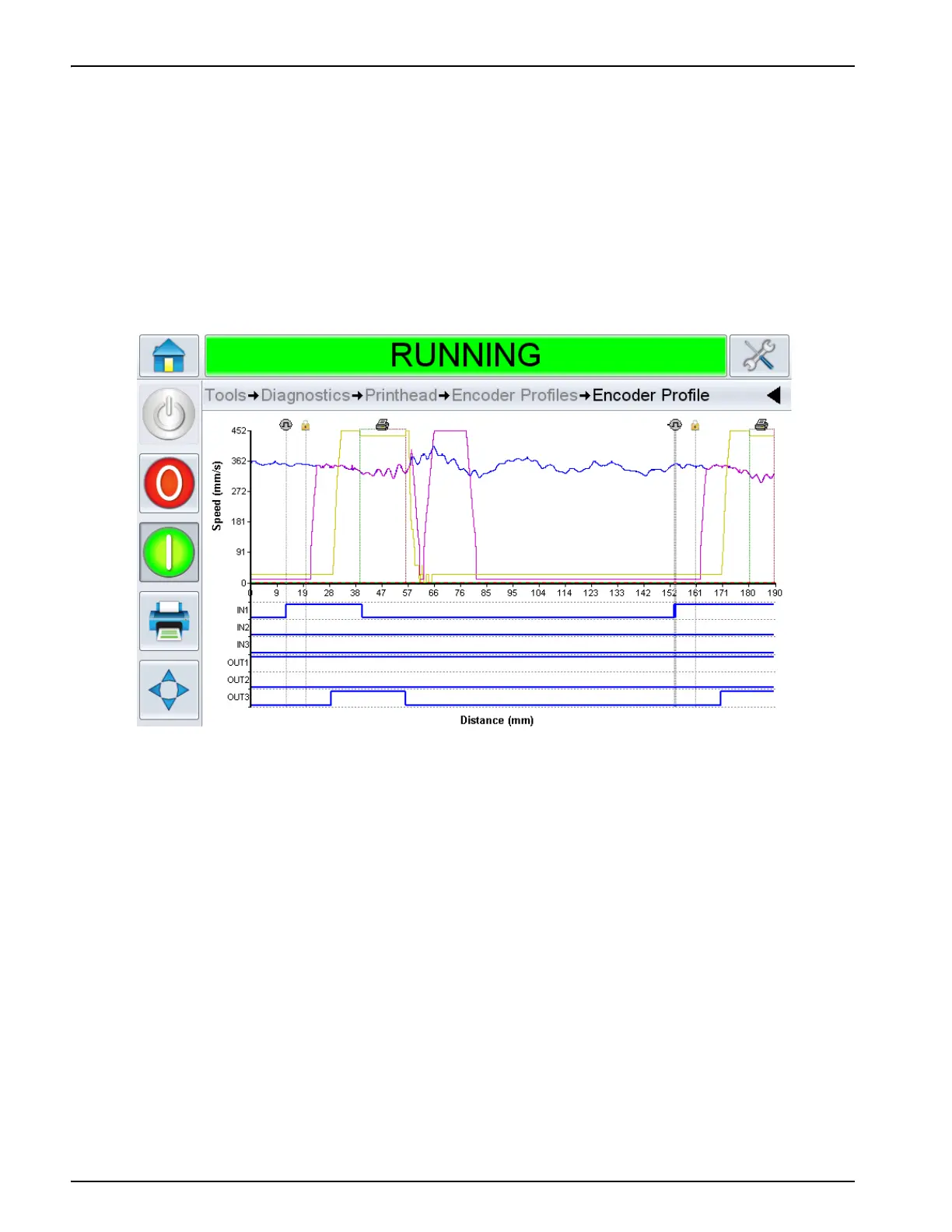
Encoder profiling is designed for continuous motion applications.
Encoder profiling allows the printer to capture the behavior of the packaging film from the
encoder and plot the information onto a useful CLARiTY screen which also shows an 'on-line
oscilloscope' of the machine inputs and outputs at the same time. The printer can be optimised
for print performance by avoiding areas of the host machine cycle that have excessive linear
speeds or rapid changes in speed.
Figure 5-15 shows a typical screen display of an encoder profile.
The graph displayed on the CLARiTY Operator Interface takes into account, settings for
'Maximum Print Speed', current 'Registration' settings and the image size printed.
Using these values, the graph shows where the print signal was received and where the print
would occur within the profile, as shown in Figure 5-15.
This feature can be used to solve problems such as, drifting print registration caused by the
packaging film travelling above the maximum print speed of the printer during the registration
phase.
Figure 5-15: Encoder Profile Graph



 To Next Page