Videojet DataFlex 6530 Operator Manual - Rev AA 5-21
CLARiTY Operating System
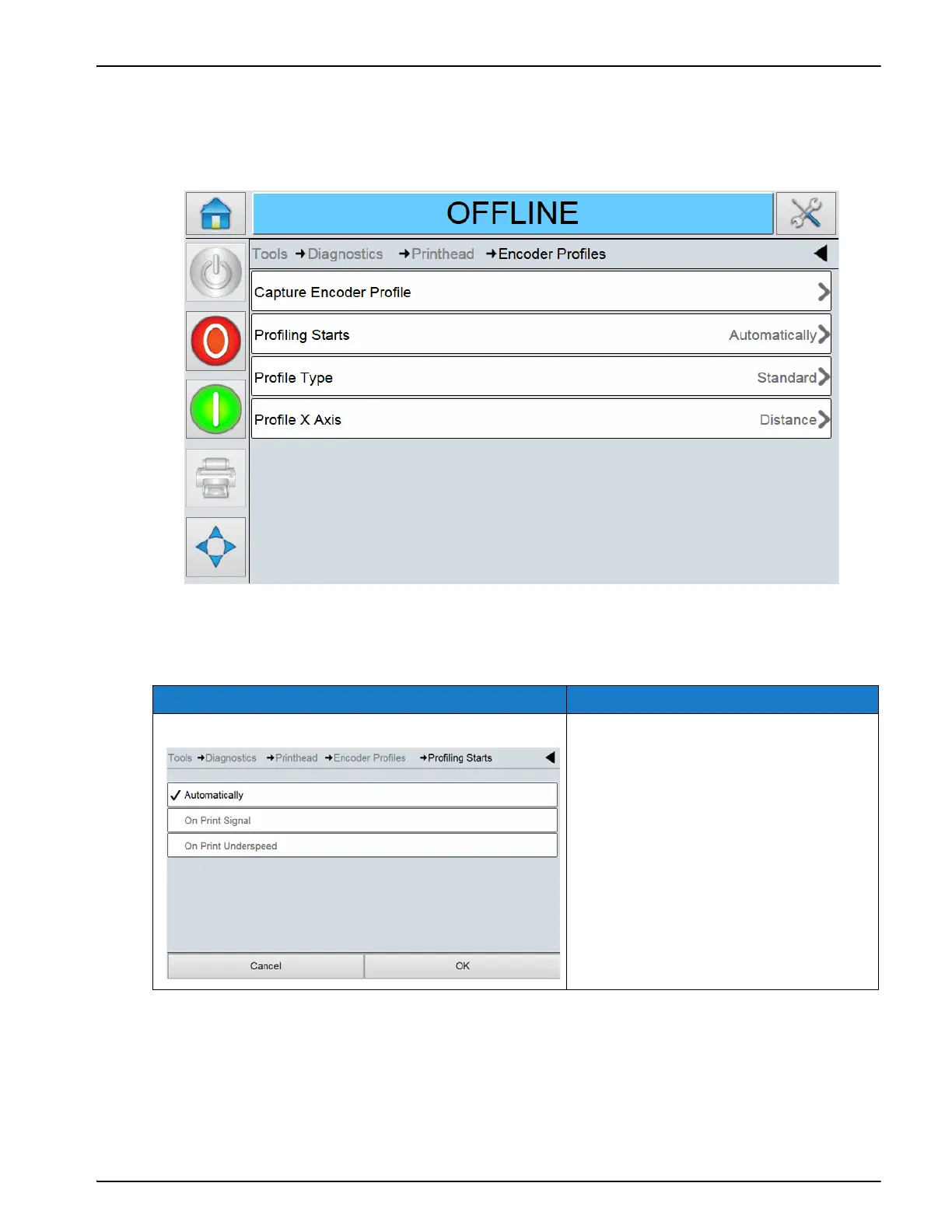
To capture the Encoder profiling on the CLARiTY screen, proceed as follows:
1. Touch Encoder Profiles on the Printhead screen to access the Encoder Profiles parameters
(Figure 5-16).
2. To set up the options for the profile you want to capture, configure the settings for the
following options:
Option Description
Profiling Starts The following options are available
• Automatically: Captures the
profile automatically after
touching the Capture Encoder
Profile button.
• On Print Signal: Captures a profile
only after a print signal has been
received.
• On Print Underspeed: Captures a
profile only if the film speed drops
below the minimum limit of the
printers specification.
Table 5-16: Encoder Profile Screen Description
Figure 5-16: Encoder Profiles Screen



 To Next Page