Maintenance and Troubleshooting Yamatake Corporation
7-20 ST3000 Smart Transmitter Series 900 Electronic Differential Pressure/Pressure Transmitter
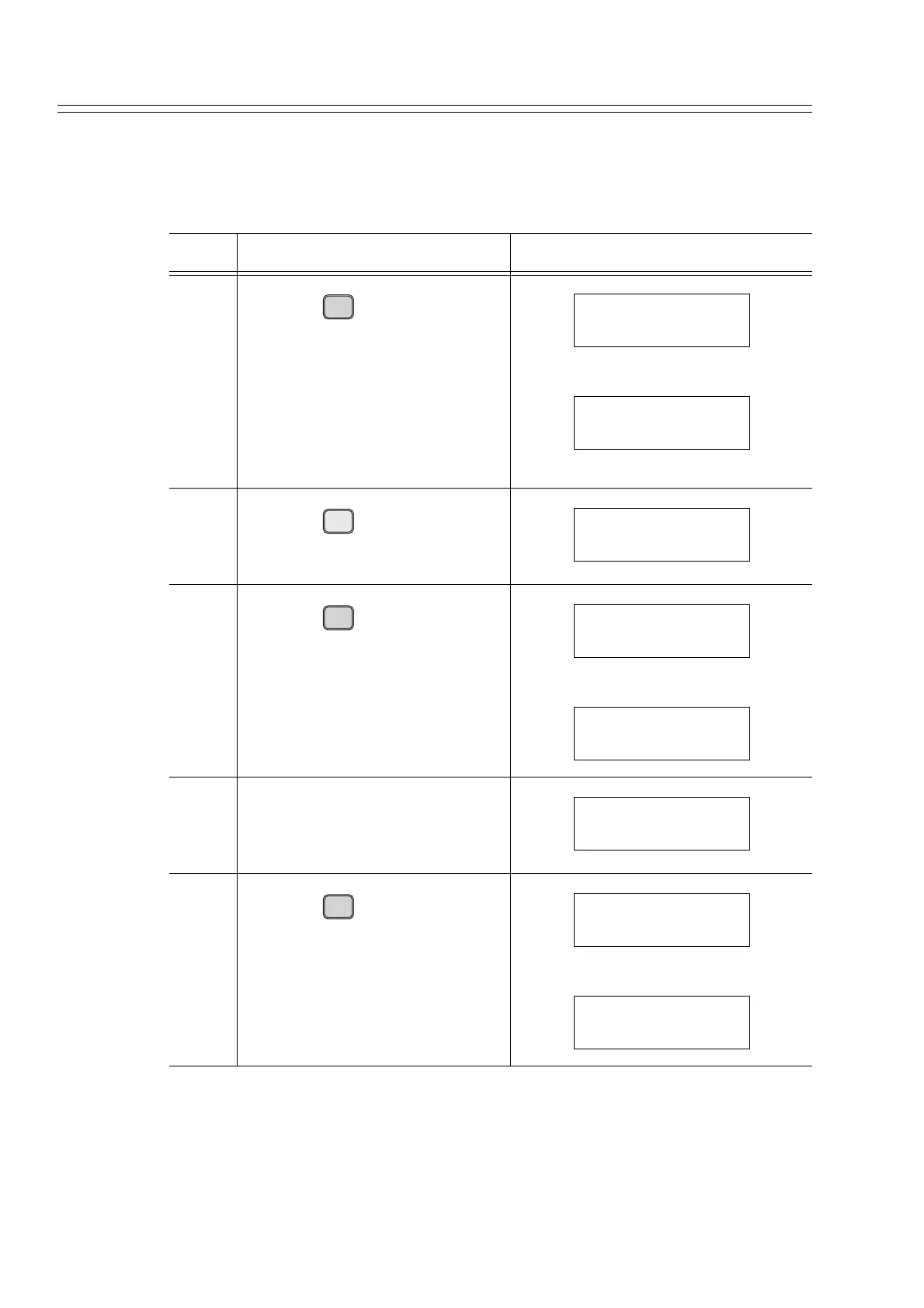
7-4-2-2 Calibrating Output Signal 0%
Set the output to 0% and calibrate the transmitter so that the ammeter indicates 4 mA:
Step Description SFC screen
1
Press the key.
(The current output is displayed.)
2
Press the key.
3
Press the key.
• The transmitter has been set to
the 4 mA (0%) constant current
mode.
• # is displayed on the screen dur-
ing the constant current mode.
4 Ensure that the ammeter indicates
4 mA.
5
Press the key.
OUT-
J
PUT
INPUT
OUTPUT FIT-1234
WORKING...
OUTPUT FIT-1234
0.00 %
Z
0
ACT PR
OUTPUT FIT-1234
0 %
ENTER
( Yes )
NON-VOL
OUTPUT FIT-1234
WORKING...
OUTPUT FIT-1234
0.00 % #
OUTPUT FIT-1234
0.00 % #
OUT-
J
PUT
INPUT
OUTPUT FIT-1234
WORKING...
OUTPUT FIT-1234
0.00 % #



 To Next Page