10.1 List of Parameters
10-7
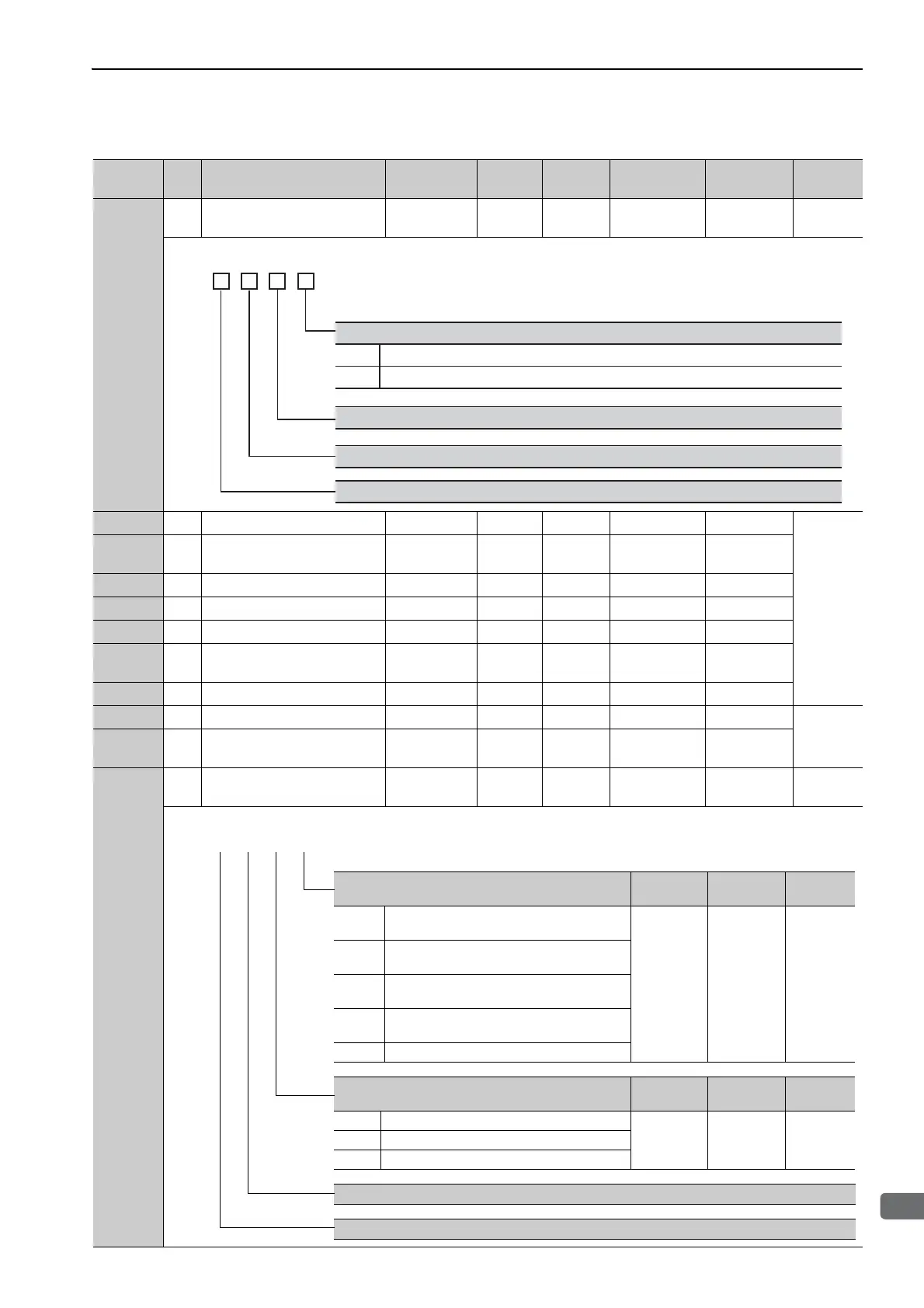
Pn081
2
Application Function Select
Switch 81
0000 to 1111 − 0000 After restart Setup 8.1.5
Pn100 2 Speed Loop Gain 10 to 20000 0.1 Hz 400 Immediately Tuning
5.8.1
Pn101 2
Speed Loop Integral Time
Constant
15 to 51200 0.01 ms 2000 Immediately Tuning
Pn102 2 Position Loop Gain 10 to 20000 0.1/s 400 Immediately Tuning
Pn103 2 Moment of Inertia Ratio 0 to 20000 1% 100 Immediately Tuning
Pn104 2 2nd Speed Loop Gain 10 to 20000 0.1 Hz 400 Immediately Tuning
Pn105 2
2nd Speed Loop Integral Time
Constant
15 to 51200 0.01 ms 2000 Immediately Tuning
Pn106 2 2nd Position Loop Gain 10 to 20000 0.1/s 400 Immediately Tuning
Pn109 2 Feedforward Gain 0 to 100 1% 0 Immediately Tuning
5.9.1
Pn10A 2
Feedforward Filter Time
Constant
0 to 6400 0.01 ms 0 Immediately Tuning
Pn10B
2
Application Function for Gain
Select Switch
0000 to 5334 − 0000 −−−
(cont’d)
Parameter
No.
Size
Name
Setting
Range
Units
Factory
Setting
When
Enabled
Classification
Reference
Section
Reserved (Do not change.)
n.
Reserved (Do not change.)
0
1
Phase-C Pulse Output Selection
Outputs phase-C pulse only in forward direction.
Outputs phase-C pulse in forward and reverse direction.
Reserved (Do not change.)
4th
digit
3rd
digit
2nd
digit
1st
digit
Mode Switch Selection
When
Enabled
Classification
Reference
Section
0 Uses internal torque reference as the condition
(Level setting: Pn10C).
Immediately Setup
5.9.2
1 Uses speed reference as the condition (Level
setting: Pn10D).
2 Uses acceleration as the condition (Level setting:
Pn10E).
3 Uses position error as the condition (Level setting:
Pn10F).
4 No mode switch function available.
Speed Loop Control Method
When
Enabled
Classification
Reference
Section
0 PI control
After restart Setup
−
1 I-P control
2 or 3 Reserved (Do not set.)
Reserved (Do not change.)
Reserved (Do not change.)
4th 3rd 2nd 1st
digit digit digit digit
n.



 To Next Page