10 Appendix
10-8
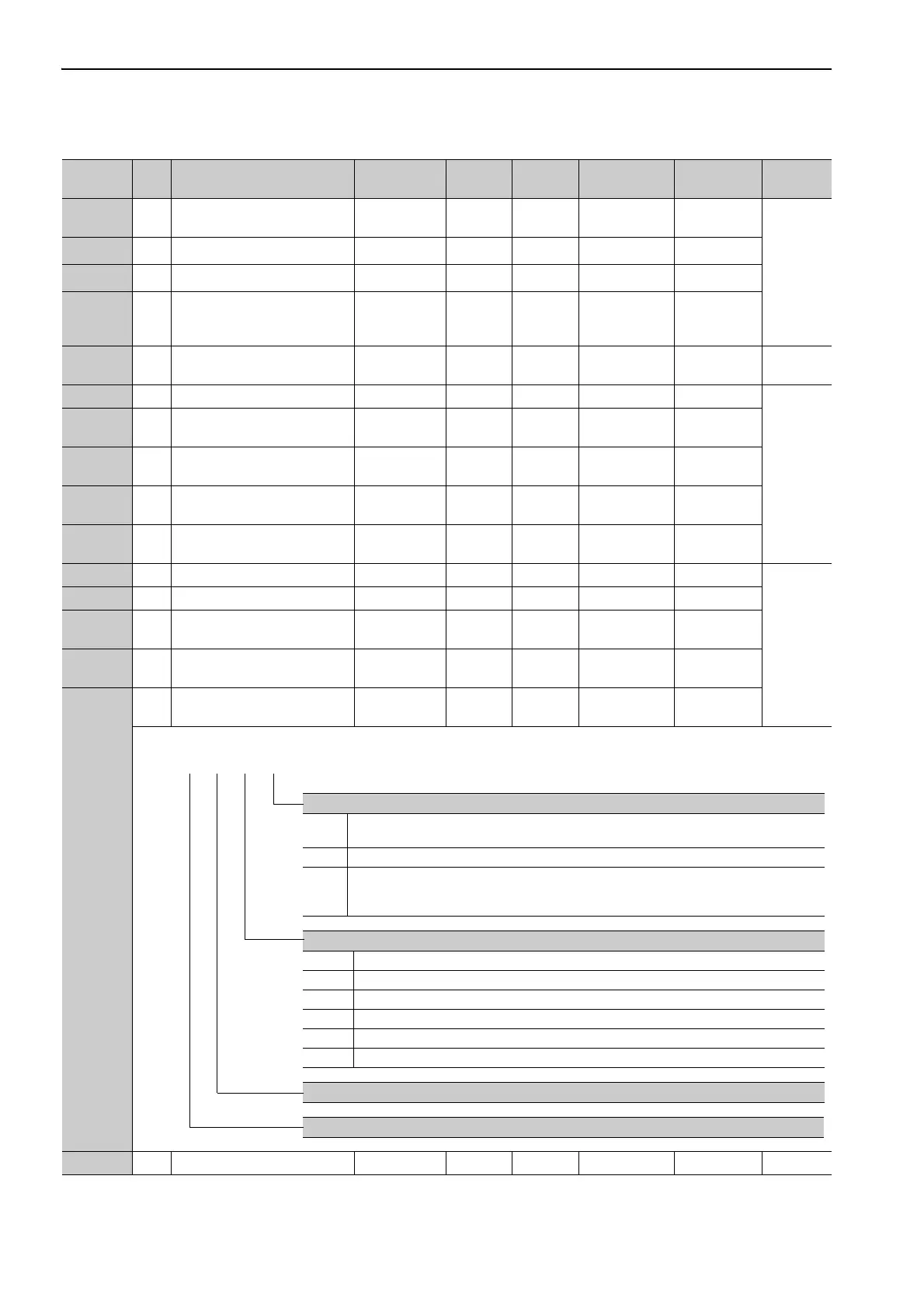
Pn10C 2
Mode Switch
(torque reference)
0 to 800 1% 200 Immediately Tuning
5.9.2
Pn10D 2 Mode Switch (speed reference) 0 to 10000
1 min
-1
0 Immediately Tuning
Pn10E 2 Mode Switch (acceleration) 0 to 30000
1 min
-1
/ s
0 Immediately Tuning
Pn10F 2 Mode Switch (position error) 0 to 10000
1
reference
unit
0 Immediately Tuning
Pn11F 2
Position Integral Time
Constant
0 to 50000 0.1 ms 0 Immediately Tuning 5.9.4
Pn121 2 Friction Compensation Gain 10 to 1000 1% 100 Immediately Tuning
5.8.2
Pn122 2
2nd Gain for Friction
Compensation
10 to 1000 1% 100 Immediately Tuning
Pn123 2
Friction Compensation
Coefficient
0 to 100 1% 0 Immediately Tuning
Pn124 2
Friction Compensation
Frequency Correction
-10000 to
10000
0.1 Hz 0 Immediately Tuning
Pn125 2
Friction Compensation Gain
Correction
1 to 1000 1% 100 Immediately Tuning
Pn131 2 Gain Switching Time 1 0 to 65535 1 ms 0 Immediately Tuning
5.8.1
Pn132 2 Gain Switching Time 2 0 to 65535 1 ms 0 Immediately Tuning
Pn135 2
Gain Switching Waiting Time
1
0 to 65535 1 ms 0 Immediately Tuning
Pn136 2
Gain Switching Waiting Time
2
0 to 65535 1 ms 0 Immediately Tuning
Pn139
2
Automatic Gain Changeover
Related Switch 1
0000 to 0052 − 0000 Immediately Tuning
Pn13D 2 Current Gain Level 100 to 2000 1% 2000 Immediately Tuning 5.8.4
(cont’d)
Parameter
No.
Size
Name
Setting
Range
Units
Factory
Setting
When
Enabled
Classification
Reference
Section
Gain Switching Selection Switch
0 Manual gain switching
Changes gain manually using G-SEL of OPTION field.
1 Reserved (Do not set.)
2 Automatic gain switching pattern 1
Changes automatically 1st gain to 2nd gain when the switching condition A is satisfied.
Changes automatically 2nd gain to 1st gain when the switching condition A is not satisfied.
Gain Switching Condition A
0 Positioning completion signal (/COIN) ON
1 Positioning completion signal (/COIN) OFF
2 Positioning near signal (/NEAR) ON
3 Positioning near signal (/NEAR) OFF
4 Position reference filter output = 0 and position reference input OFF
5 Position reference input ON
Reserved (Do not change.)
Reserved (Do not change.)
4th 3rd 2nd 1st
digit digit digit digit
n.



 To Next Page