7 Troubleshooting | 7.2 Column ZEISS
7.2.2.1 Preparing Filament Exchange
The preparations for filament exchange are the same for all filament types.
This procedure consists of the following steps:
1. Venting the Gun and the Specimen Chamber [
}
124]
2. De-energizing the Microscope [
}
125]
3. Disassembling the Gun [
}
126]
4. Disassembling the Firing Unit [
}
127]
5. Cleaning the Firing Unit [
}
128]
6. Cleaning the Anode [
}
130]
7.2.2.1.1 Venting the Gun and the Specimen Chamber
In order to replace the filament, you need to disassemble the gun. Before you can disassemble the
gun, you need to prepare the microscope: You need to switch off the gun and to vent the micro-
scope. In SmartSEM, you need to select the filament type that you want to install.
Prerequisite
ü
The vacuum system is operating.
Procedure
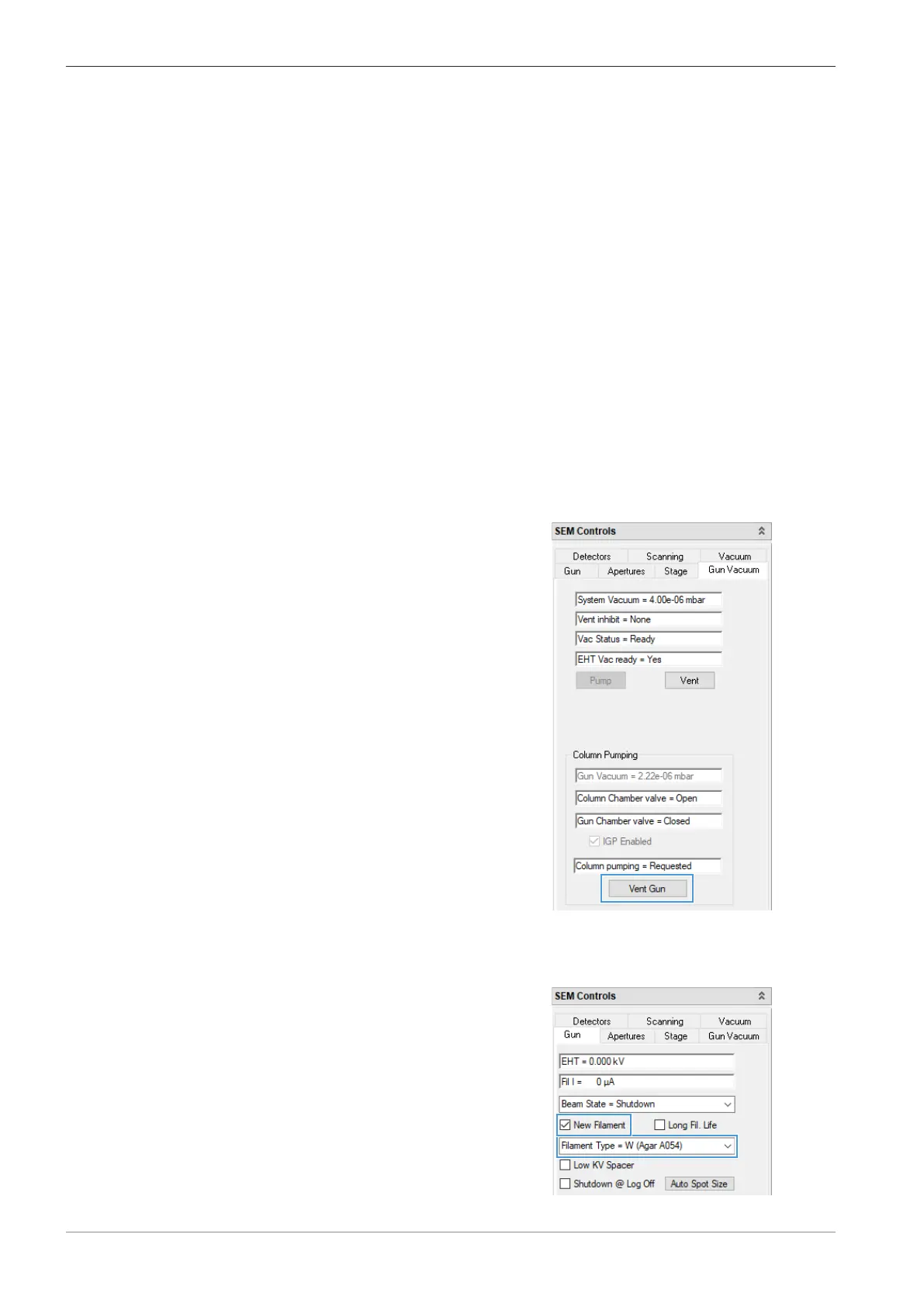
1. In the SEM Controls panel, select the Gun Vacuum tab.
2. Click Vent Gun.
à The Vent Gun window is displayed.
3. Click Yes to completely vent the system.
4. In the Gun tab, select the correct Filament Type.
5. Activate the New Filament checkbox.
124 Instruction Manual ZEISS EVO | en-US | Rev. 10 | 354706-0780-006



 To Next Page