7713395 R2 105
4.8.4 Moisture Calibration
Note
For grains requiring lower range moisture sensing (e.g. 8% for rape seed) contact your dealer for
instructions on how to re-calibrate the moisture sensor, or order the low range moisture sensor
#059250WLR
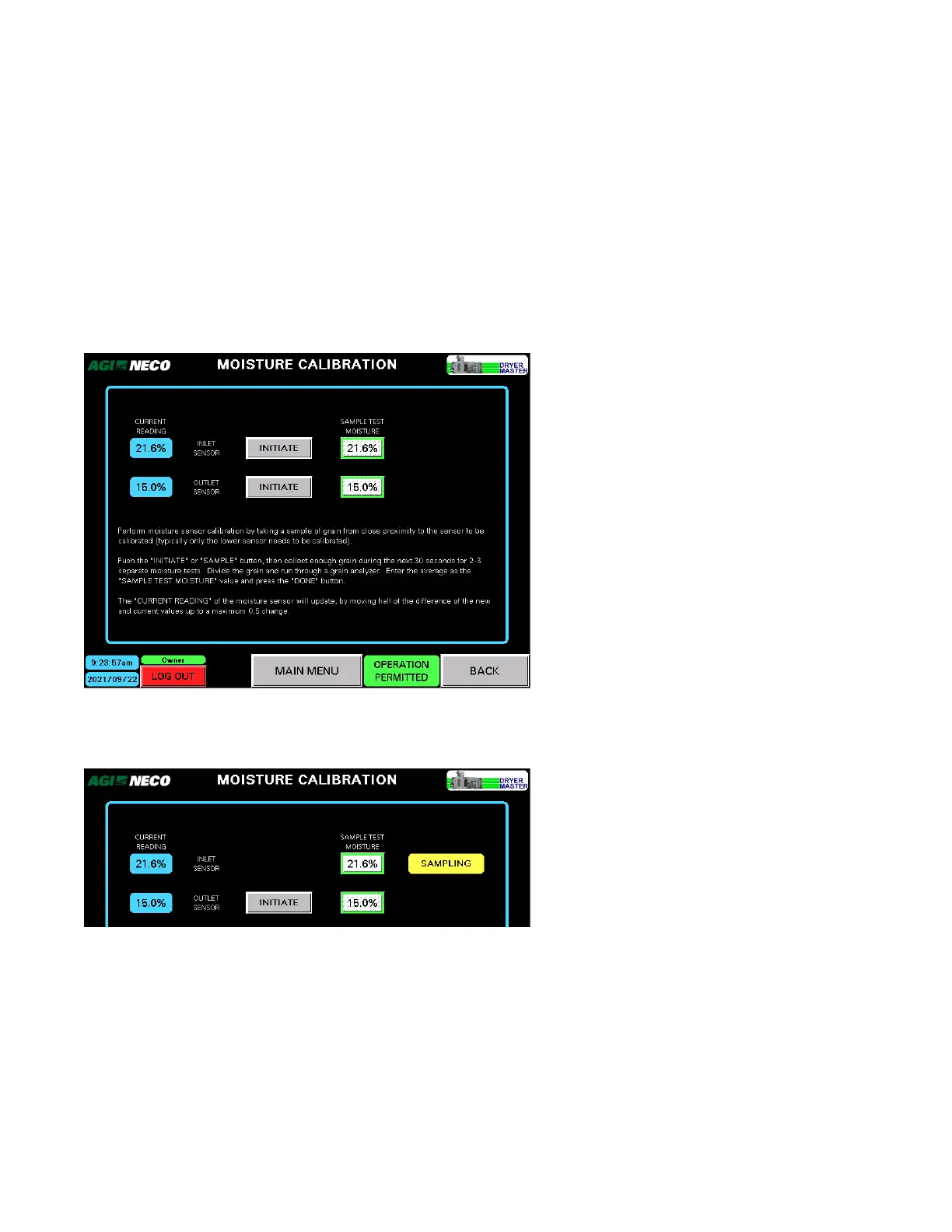
On the MOISTURE CALIBRATION screen:
• Start the INLET SENSOR calibration routine by tapping its associated INITIATE button.
• Start the OUTLET SENSOR calibration routine by tapping its associated INITIATE button, or by pressing the
SAMPLE button located at the rear of the dryer, near the grain exit chute.
Figure 124. The MOISTURE CALIBRATION screen
• Upon starting the calibration routine for either sensor, the SAMPLING indicator will be displayed.
Figure 125. SAMPLING in progress
• The DryerMaster obtains an average of moisture readings for the next 30 seconds.
• During this same time period, collect several grain samples near the sensor being calibrated.
• When the automated sampling period ends, the DONE indicator appears.
CONTINUOUS MIXED-FLOW GRAIN DRYER WITH COMMANDER CONTROL SYSTEM 4. OPERATION



 To Next Page