7713395 R2 135
8.6. Updating the PLC and HMI Programs
Program Update Instructions
Note
Updating the PLC and HMI programs results in the loss of certain setup configuration data. Settings on
various screens will need to be manually re-entered. Make a copy of the Section 8.5 – PLC and HMI
Recorded Data Sheet on page 134 to record the necessary data.
Note
It is best and easiest to take photos of each screen prior to updating the PLC and HMI programs.
• Update the PLC unit first. Then follow with the HMI update.
• In order to access and re-enter data, you must be logged in as:
User = N e c o T e c h
Password = (Contact your dealer for the required password)
Install PLC and HMI Program
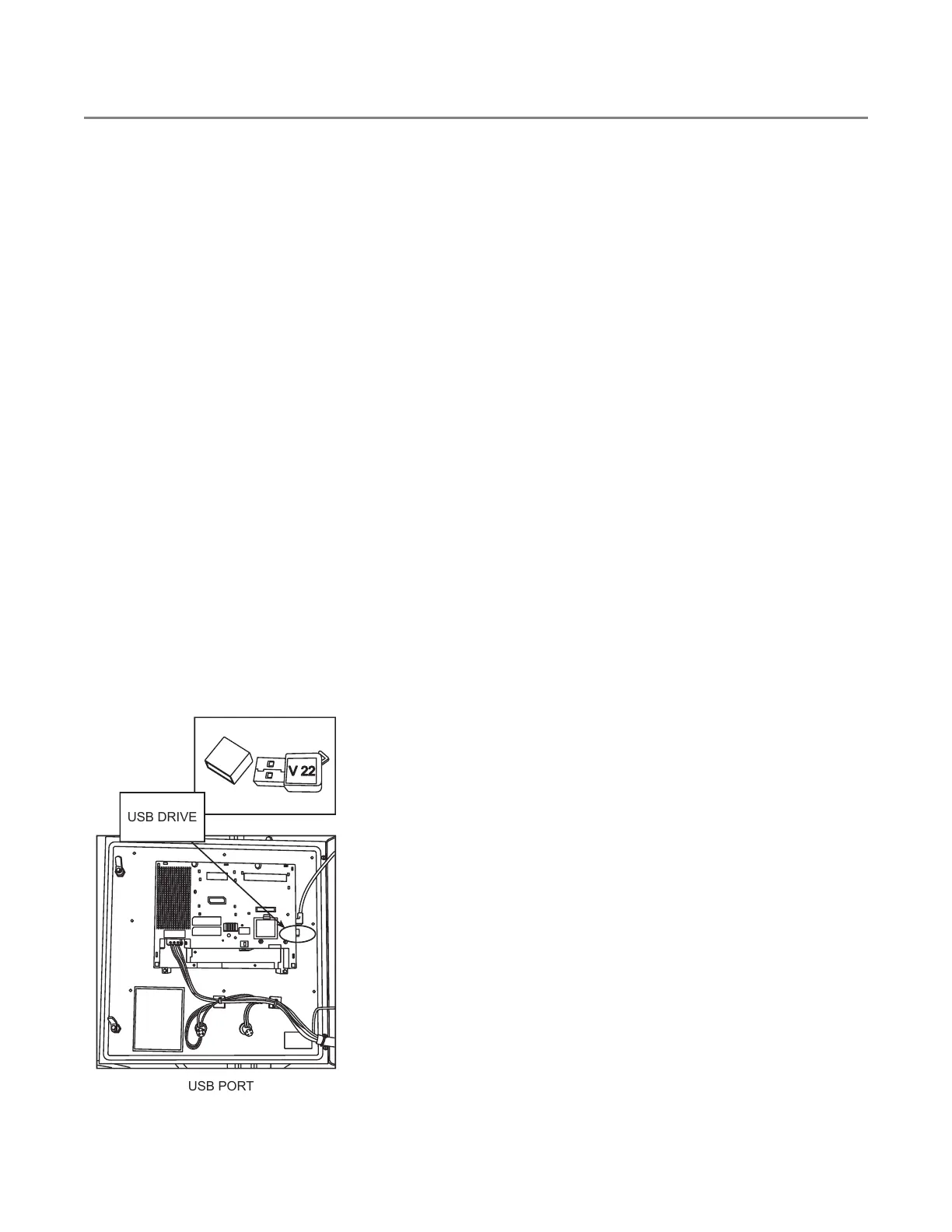
• Installing the XBTGT6330 screen software
1. Keep the HMI power on.
2. Install the new single install USB drive with the new files.
3. When prompted, press the “Yes” icon to begin installing.
4. Do not remove the USB drive.
5. When prompted press the “Restart” icon.
6. Leave this USB in the HMI when finished (do not remove).
Figure 152. XBTGT Series
CONTINUOUS MIXED-FLOW GRAIN DRYER WITH COMMANDER CONTROL SYSTEM 8. APPENDIX



 To Next Page