94 7713395 R2
• Tap RESTART DRYER to go to the START DRYER – MAIN screen. This enables the operator to continue drying
using either BATCH or AUTO mode.
4.8. Auto Drying Mode
4.8.1 Auto Drying Pre-Conditions
For the START AUTO DRYING button to be available, the following two conditions must be met:
1. The dryer status must display DRYER FULL or DRYER LEVEL OK. If neither of these are displayed:
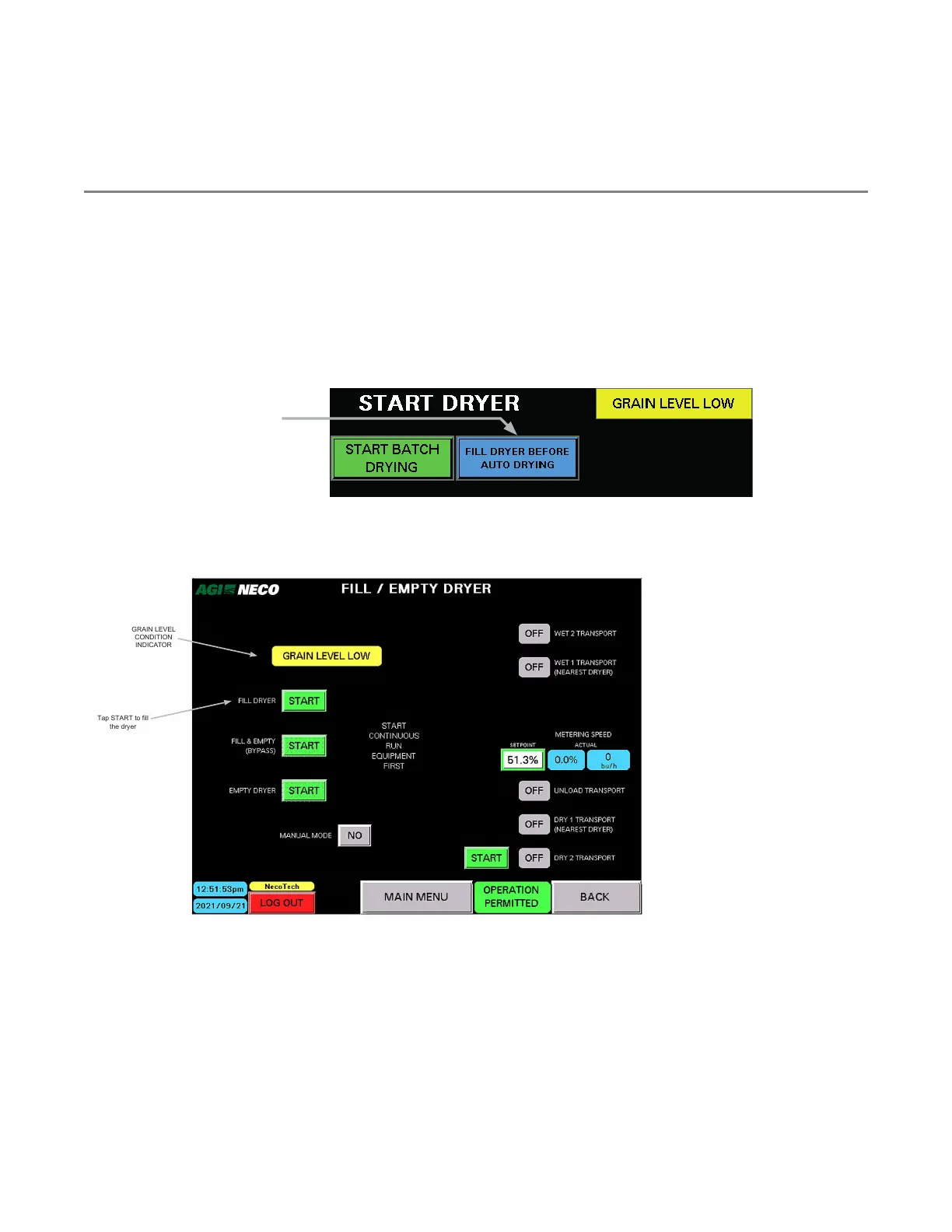
a. Tap the FILL DRYER button.
Figure 111. Tap the FILL DRYER button
Tap the FILL DRYER button to
display the FILL/EMPTY DRYER
screen
The FILL/EMPTY DRYER screen appears.
Figure 112. The FILL/EMPTY DRYER screen
BACK
Tap START to fill
the dryer
GRAIN LEVEL
CONDITION
INDICATOR
b. Tap the START button to fill the dryer. The dryer must fill past the level of the LOW LEVEL sensor. When
it does, the dryer status indicator displays DRYER LEVEL OK or DRYER FULL.
2. All required transports must be started prior to initiating AUTO DRYING MODE. If transports are enabled,
but not running, the START TRANSPORTS indicator will appear.
4. OPERATION CONTINUOUS MIXED-FLOW GRAIN DRYER WITH COMMANDER CONTROL SYSTEM



 To Next Page