7713395 R2 93
B. Cooling
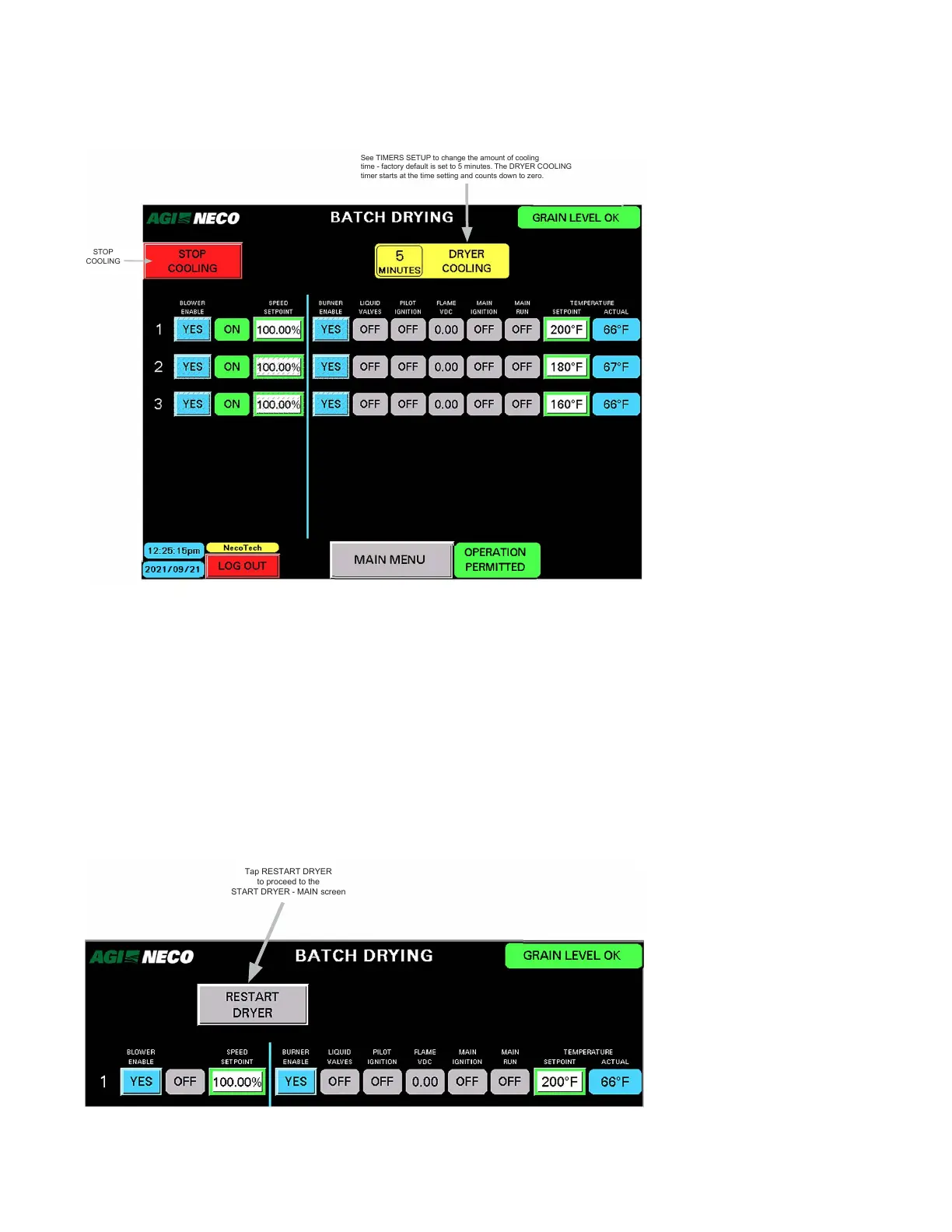
Figure 109. Cooling
2021/09/21
STOP
COOLING
See TIMERS SETUP to change the amount of cooling
time - factory default is set to 5 minutes. The DRYER COOLING
timer starts at the time setting and counts down to zero.
Minutes
• This field displays the cooling mode time remaining
Stop Cooling
• Tapping STOP COOLING shuts down all blowers. The RESTART DRYER button appears.
Start Batch Drying
• Tapping START BATCH DRYING restarts the process without stopping the blowers. The START DRYER screen
appears and displays the blower starting process.
C. Restart
Figure 110. Restart
Tap RESTART DRYER
to proceed to the
START DRYER - MAIN screen
CONTINUOUS MIXED-FLOW GRAIN DRYER WITH COMMANDER CONTROL SYSTEM 4. OPERATION



 To Next Page