7713395 R2 95
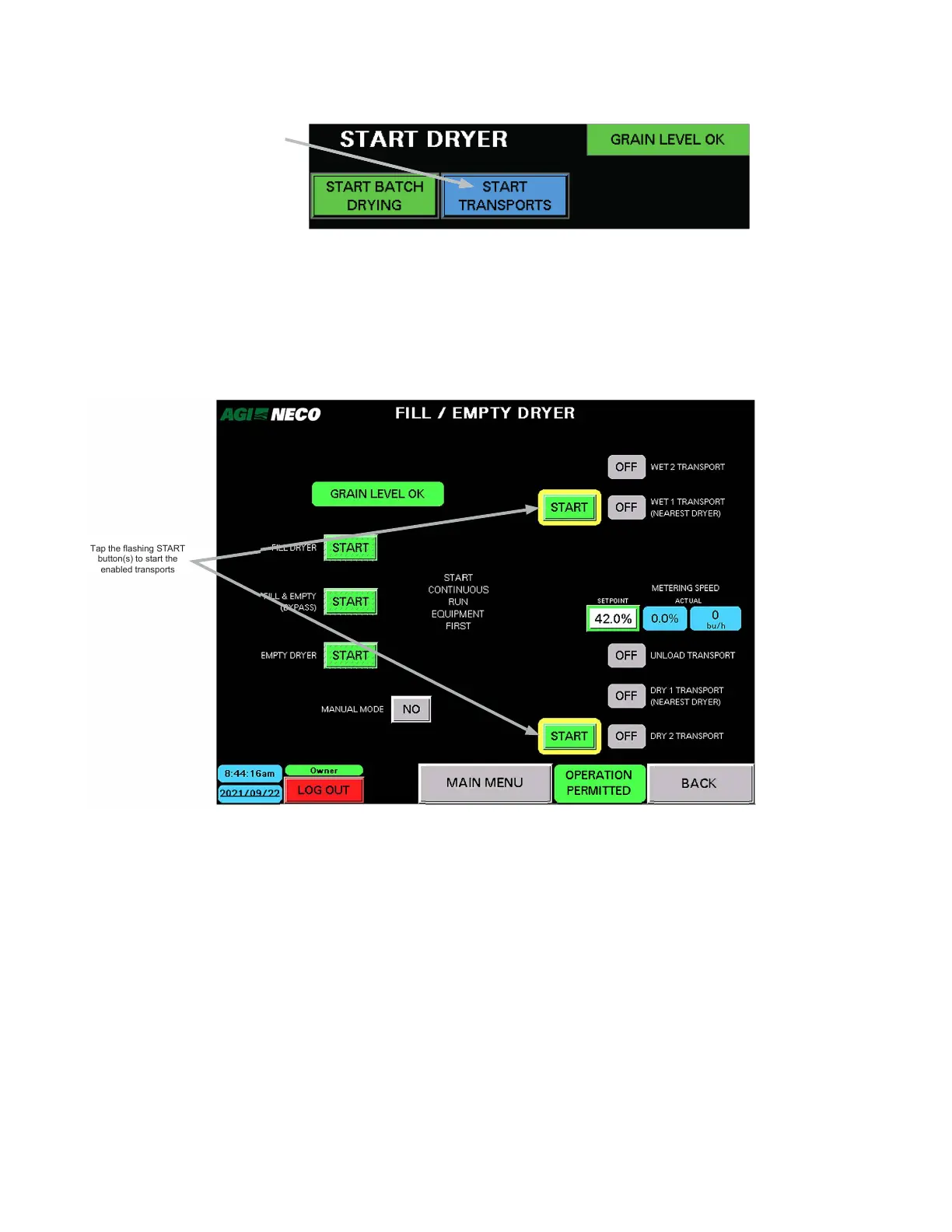
Figure 113. The START TRANSPORTS indicator/button
Tap the START TRANSPORTS
button to display the
FILL/EMPTY DRYER screen
The FILL/EMPTY DRYER screen appears.
a. Tap the START button to fill the dryer.
b. Allow the dryer to fill past the top level indicator.
c. When ready, the dryer status indicator displays DRYER LEVEL OK or DRYER FULL.
Figure 114. Transports START buttons
BACK
Tap the flashing START
button(s) to start the
enabled transports
4.8.2 Auto Drying Overview
• Refer to the following sections (designated A, B, C, etc.) to set up and operate in Auto Drying Mode:
– Section – A. Manual Speed on page 98: (DryerMaster collecting data) Burner setup is available
– Section – B. Auto First Load on page 99 : Burner setup is available
– Section – C. DryerMaster Controlling on page 100: Burner setup is available
– Section – D. Cooling on page 100
– Section – E. Restart on page 101
CONTINUOUS MIXED-FLOW GRAIN DRYER WITH COMMANDER CONTROL SYSTEM 4. OPERATION



 To Next Page