64 7713395 R2
Prior to logging in, the following controls are available:
SETUP
• Tapping the SETUP button opens the SETUP screen. However, none of the controls on the SETUP screen are
available until logging in is complete. Tapping the MAIN MENU button on the SETUP screen returns you to
the MAIN MENU screen.
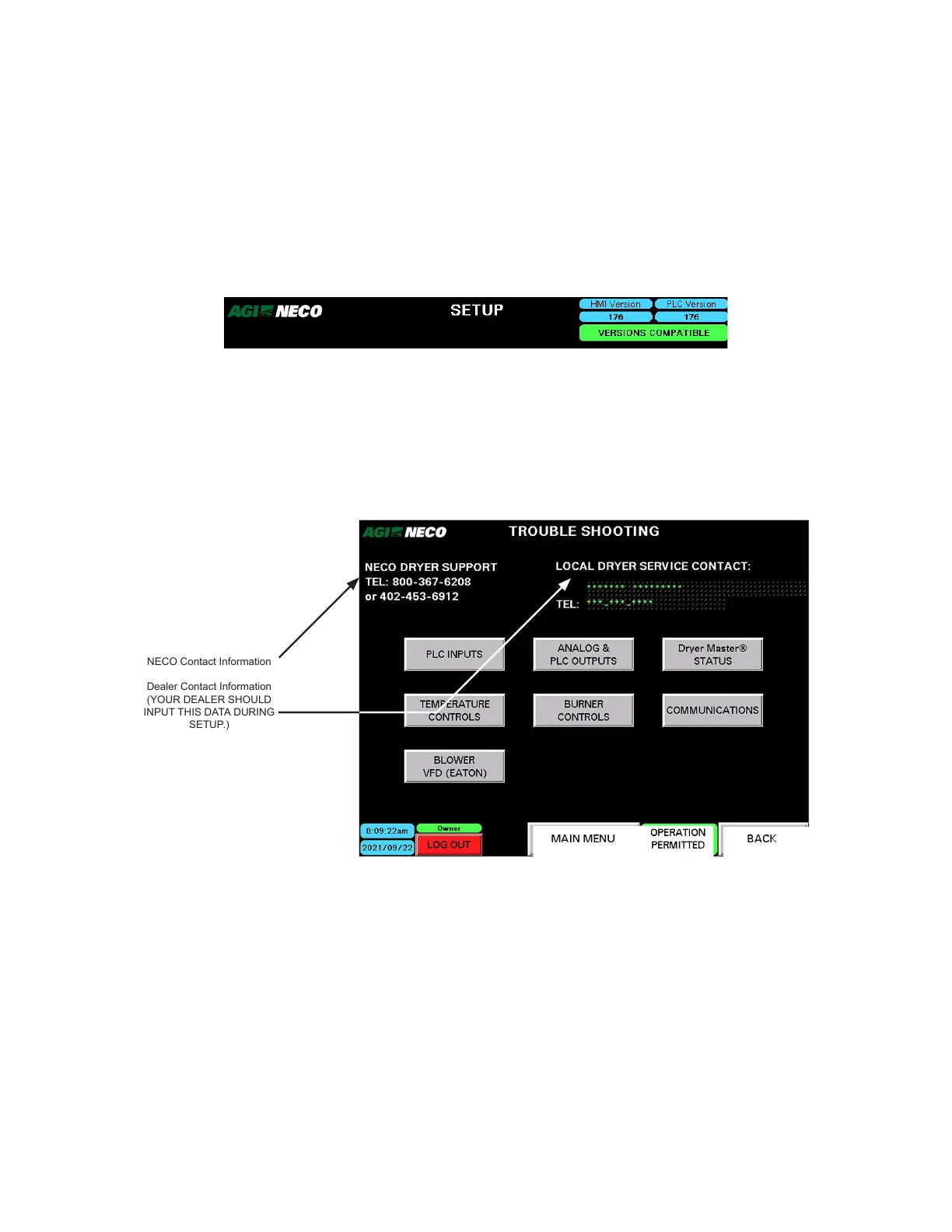
• The HMI and PLC software version numbers appear in the upper-right corner of the SETUP screen. These
numbers must be compatible.
Figure 76. Versions compatible (SETUP Screen)
TROUBLESHOOTING
• Tapping the TROUBLESHOOTING button opens the TROUBLESHOOTING screen. NECO and dealer contact
information appears on the TROUBLESHOOTING screen.
• None of the controls on the TROUBLESHOOTING screen are available until logging in is complete. Tap the
MAIN MENU button to return to the MAIN MENU screen.
Figure 77. Main menu screen
BACK
NECO Contact Information
Dealer Contact Information
(YOUR DEALER SHOULD
INPUT THIS DATA DURING
SETUP.)
Prior to logging in, the following controls are NOT available:
• ALARMS
• DATA
• FILL/EMPTY DRYER
• GO TO START DRYER
Logging In
1. Tap the LOG IN TO OPERATE button.
4. OPERATION CONTINUOUS MIXED-FLOW GRAIN DRYER WITH COMMANDER CONTROL SYSTEM



 To Next Page