76 7713395 R2
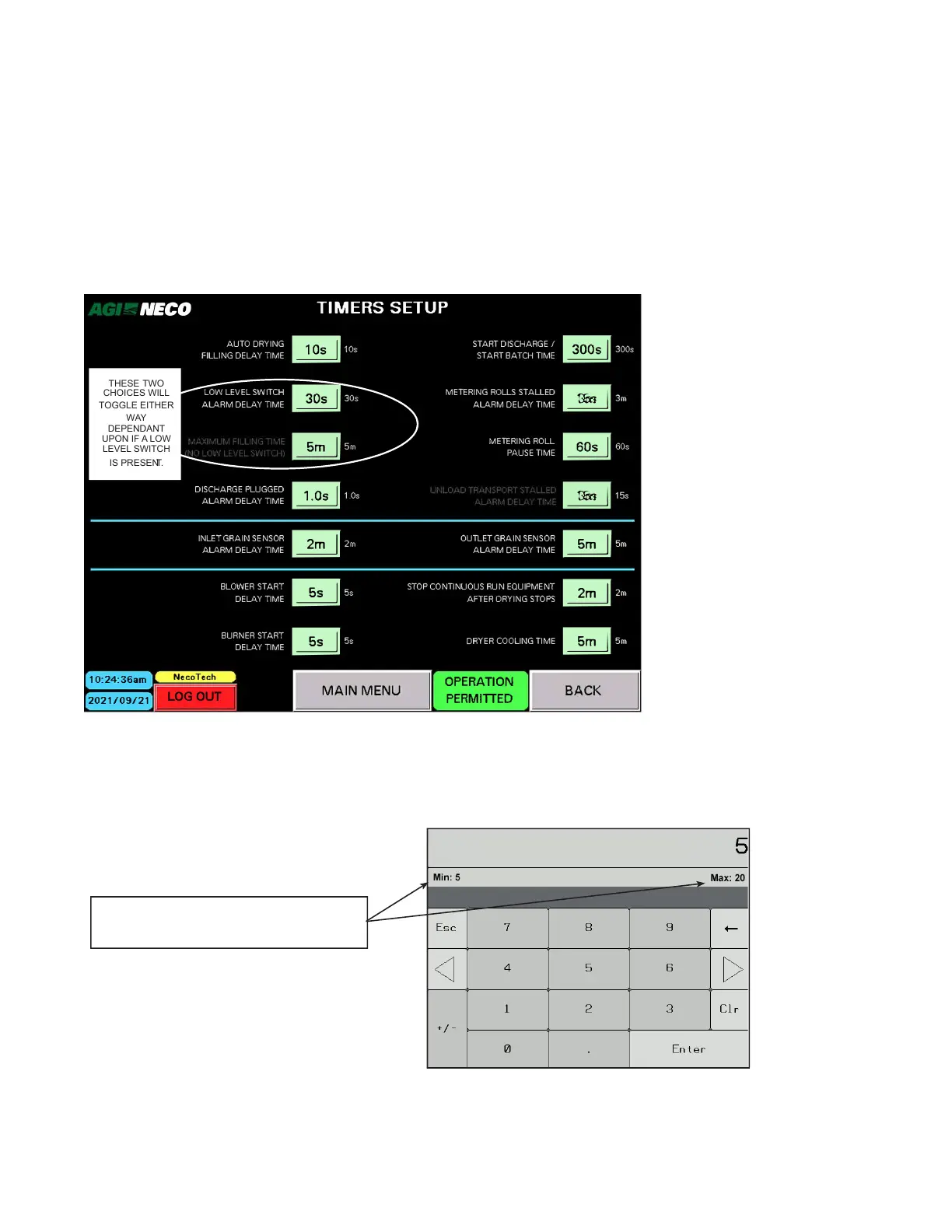
Timers Setup
• Default timer values are set within the NECO program. These are to be considered a starting point only. The
default data may require fine tuning for your specific equipment configuration. Your dealer will assist with
this during startup, etc.
• Depending on the equipment configuration, some timer functions may not be used. These are unavailable
and cannot be selected.
• Use the Section 8.5 – PLC and HMI Recorded Data Sheet on page 134 to record this information.
Figure 94. Timers Setup screen
NECO
NecoTech
LOGOUT
BACK
THESE
TWO
CHOICES
WILL
TOGGLE EITHER
WAY
DEPENDANT
UPON IF A LOW
LEVEL SWITCH
IS PRESEN
T.
To enter or edit Timer data:
1. Tap the field (box) for the data to be changed. The on-screen numeric keypad appears.
Figure 95. On—screen numeric keypad
NOTE: Any restrictions for MINIMUM or
MAXIMUM data values will be shown.
2. Enter the required data.
4. OPERATION CONTINUOUS MIXED-FLOW GRAIN DRYER WITH COMMANDER CONTROL SYSTEM



 To Next Page