7713395 R2 81
Note
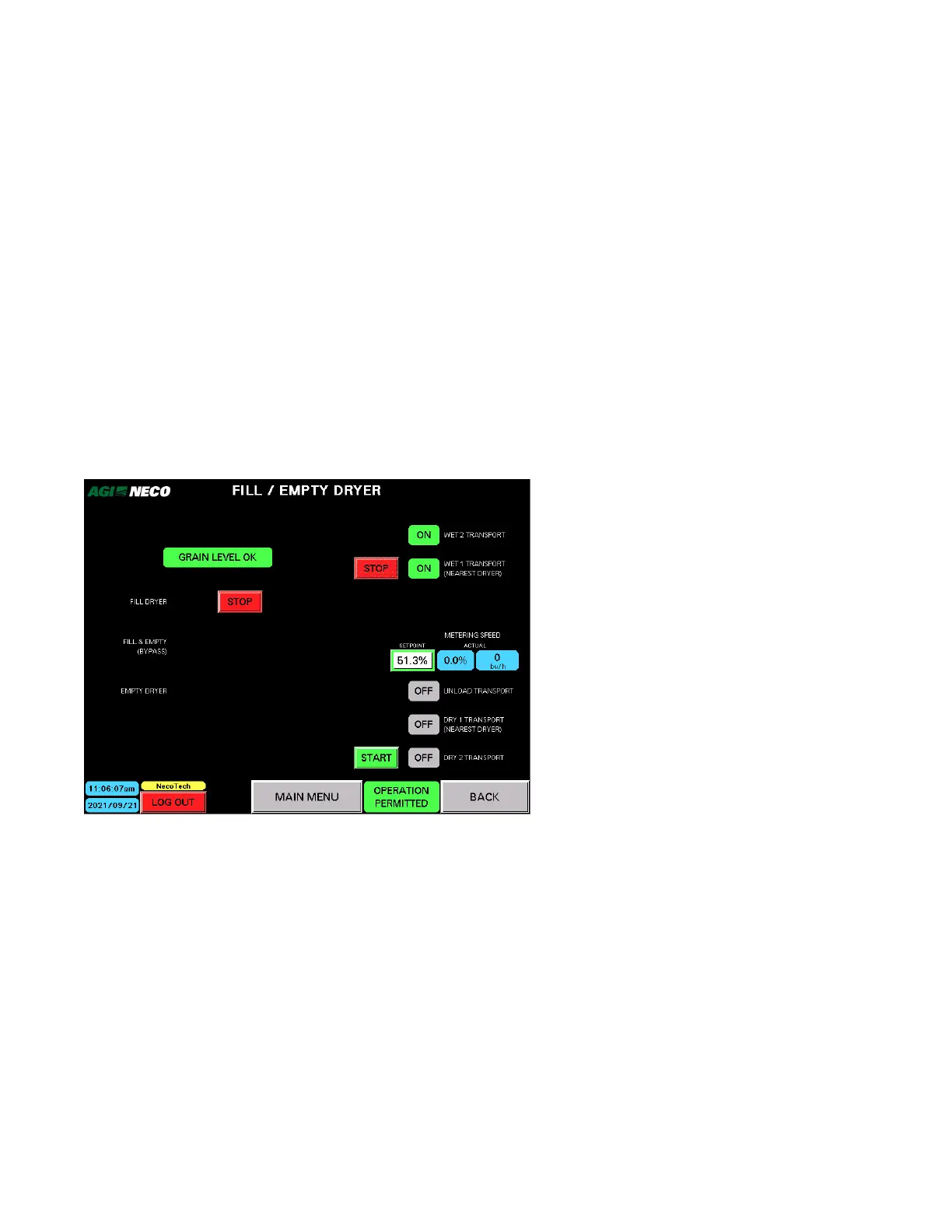
Only the equipment identified in SETUP — FILL/EMPTY will show up in this list. Status indicator is ON
or OFF. If the equipment fails to run or a motor overload trips, a fault indicator appears. Once the
problem is solved, the alarm indicator goes out. If OFF, push START or if ON, push OFF to start the
delay timer for that piece of equipment?
• Wet Transport 2 (farthest from dryer)
• Wet Transport 1 (nearest to dryer)
• Level Auger
• Unload Auger
• Dry Transport 1 (nearest to dryer)
• Dry Transport 2 (farthest from dryer)
Fill Dryer
• Used to initially fill the dryer with grain.
• Tap START to start filling; tap STOP to stop filling. Filling will stop automatically when the Fill switch is
activated.
Fill & Empty (Bypass)
• Used if the grain must pass through the dryer, but not actually be dried.
• Tap START to start; tap STOP to stop.
Note
Turn on the Maintain Minimum Grain Dryer Level to prevent grain from bouncing out of the dryer
ducts.
CONTINUOUS MIXED-FLOW GRAIN DRYER WITH COMMANDER CONTROL SYSTEM 4. OPERATION



 To Next Page