22
We reserve the right to make technical changes.
83052300eUK © ait-deutschland GmbH
settIng the heatIng curves of the heatIng
cIrcle
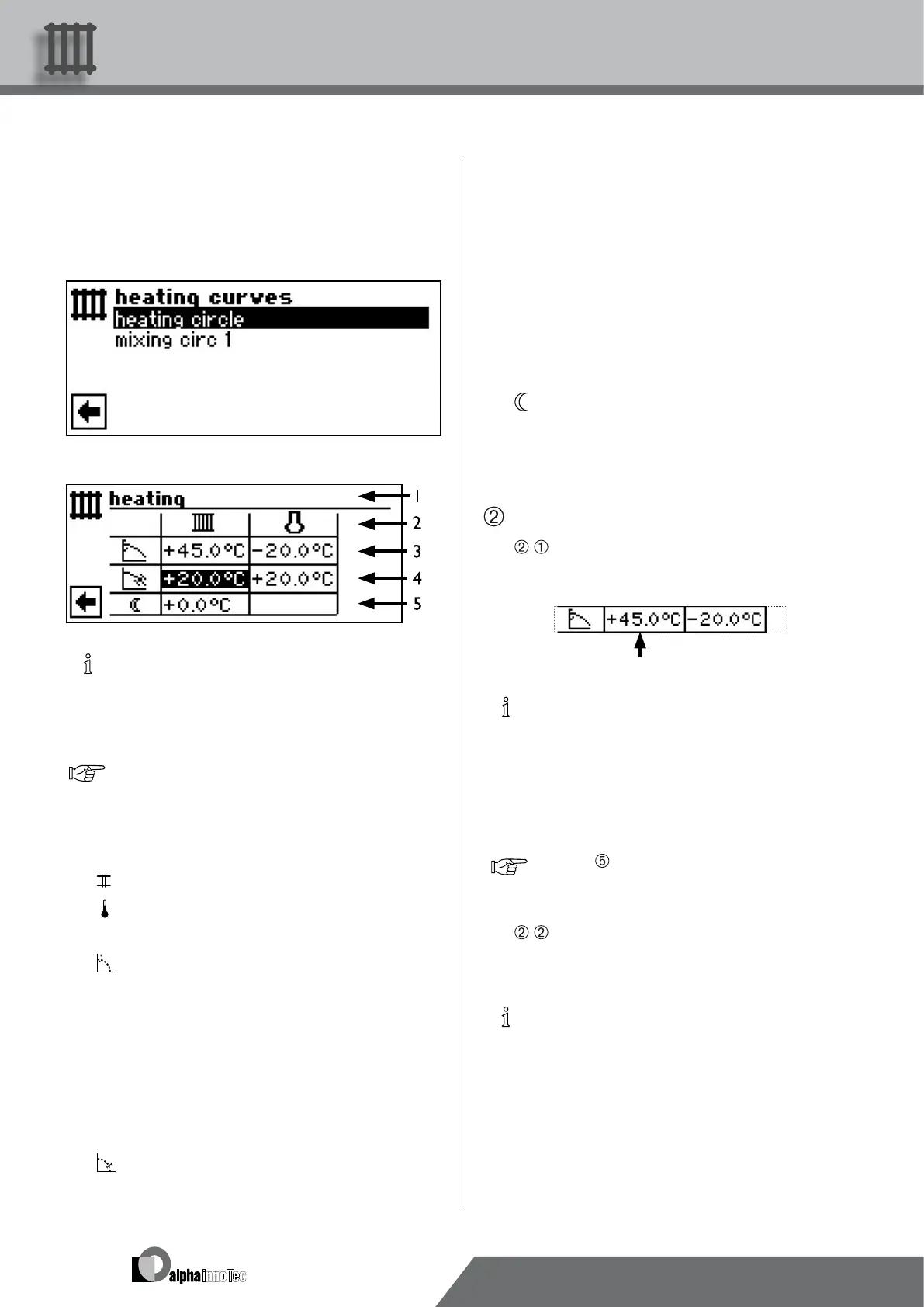
Depending on the system setting (mixing circle = “Dis-
charge“), the screen switches either to the menu “Heating
curves”….
…or directly to the menu “Heating curves heating circle:”
NOTICE
If the menu “Heating curves” appears, select the
menu eld “Heating circle”. The heating curves for
the heating circle can be programmed if no xed
temperature is set.
page 25, „Setting a xed temperature“
1 Symbol for program area “Heating” and menu
title
2 Column title of the table
Return ow temperature of heating circle
Reference value for external temperature
3 Table line „Heating curve end point“
Symbol for “Heating curve end point”
45 °C Table eld “Heating curve end point”
Example value here: 45 °C
-20 °C Table eld “Reference value for external tem-
perature” (= program setting that cannot be
changed)
The example shows means that the hot water
return ow temperature is to be 45 °C at an
external temperature of -20 °C.
4 Table line “Parallel offset”
Symbol for “Parallel offset”
20 °C Table eld “Parallel offset”.
Example value here: 20 °C (neutral)
20 °C Table eld “Reference value for external tem-
perature”
20 The example shown indicates that the base
of the heating curve is to be 20 °C at an ex-
ternal temperature of 20 °C.
An increase in the temperature value in the
table eld “Parallel offset” to, for example,
22 °C causes a parallel offset of the heating
curve by 2 °C upwards, while a reduction to,
for example, 18 °C causes a parallel offset of
the heating curve by 2 °C downwards.
5 Table line “Night reduction”
Symbol for night mode: Heating is lowered
-5 °C Table eld “Difference temperature”
The example shown indicates that the heating
in night mode is lowered by 5 °C in compari-
son to day mode.
Determine the heating curve end point…
•
Select table “Heating curve end point”…
NOTICE
The heating curve end point always refers to an ex-
ternal temperature of -20 °C. If the heat pump is
used in a climatic zone in which the external tem-
perature value of -20 °C is not reached, you need
to equalise the heating curve end point with the re-
gional standard design temperature.
page 24, Equalisation of the heating curve end
point with the regional standard design tempera-
ture
•
Set the return ow temperature value in the table eld
“Heating curve end point”…
NOTICE
The temperature values refer to the return ow.
You need to subtract the spread for ow tempera-
tures.



 To Next Page