54
We reserve the right to make technical changes.
83052300eUK © ait-deutschland GmbH
ventIlatIng the system
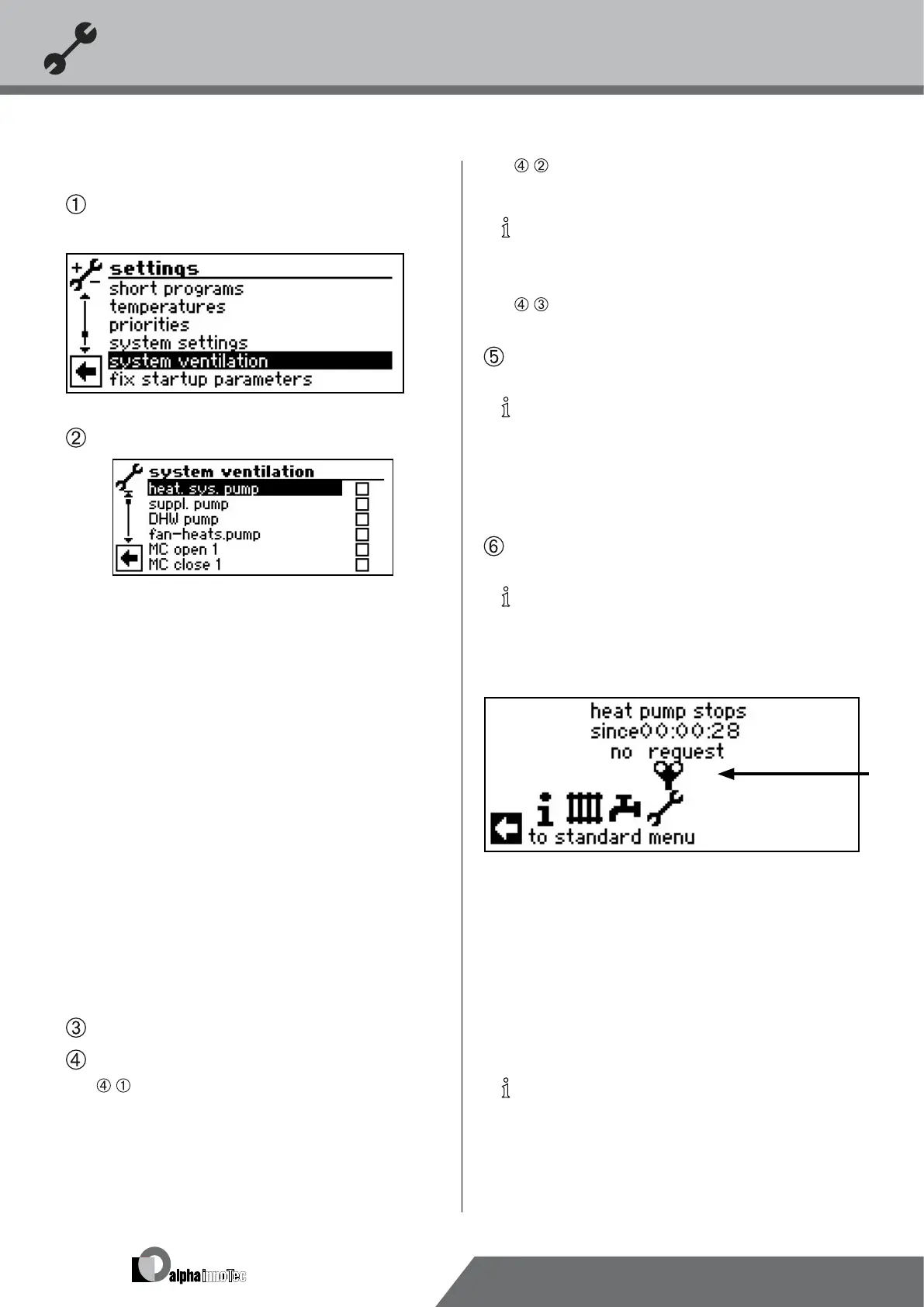
In the menu “Service Settings”, select and activate the
menu eld “System Ventilation”…
The screen changes to the menu “System Ventilation”…
Heat. sys. pump
Heating and oor heating circulating pump
suppl. pump
additional circulating pump
Hot water pump
Domestic hot water circulation pump
Fan-heats.pump
Fan, well or brine circulation pump
MC open 1
Mixer 1 OPEN
MC close 1
Mixer 1 CLOSE
CP
Additional circulating pump, circulation pump
Duration
Running time of the ventilation
Ex-valve man.open
In LWD… and SWP371-SWP691 and SWP291H-
SWP561H the expansion valve opens completely for
the set running time
Activate and select system part(s) to be ventilated…
Set running time of the ventilation program…
•
Activate and select menu eld “Running time”. The
entry eld for the time indication assumes a dark back-
ground…
•
Set running time (hour cycle)…
NOTICE
Value range for running time = 1 – 24 hours
Factory setting: 1 hour
•
Finish entry…
Cancel or save the settings…
NOTICE
If circulating pumps are selected, the ventilation
program will start immediately after the settings
have been saved.
The ventilation pauses after one hour for 5 minutes
and then automatically continues afterwards.
Return to menu “Service Settings”.
NOTICE
As long as the ventilation program is active, the cor-
responding program symbol will appear in the navi-
gation screen:
settIng startup parameters
You can save the settings you made during startup (= setting
startup parameters). This allows you to quickly and easily
reset the system to the status it had at startup.
The data is stored on the circuit board of the control ele-
ment.
NOTICE
The function “Setting startup parameters” requires
customer service access.


 To Next Page