64
We reserve the right to make technical changes.
83052300eUK © ait-deutschland GmbH
NOTICE
All settings that are related to the “Remote mainte-
nance” function, may only be handled by authorised
service personnel.
The “Remote maintenance” function enables direct access
to the the heating and heat pump regulators on the remote
maintenance server of the manufacturer.
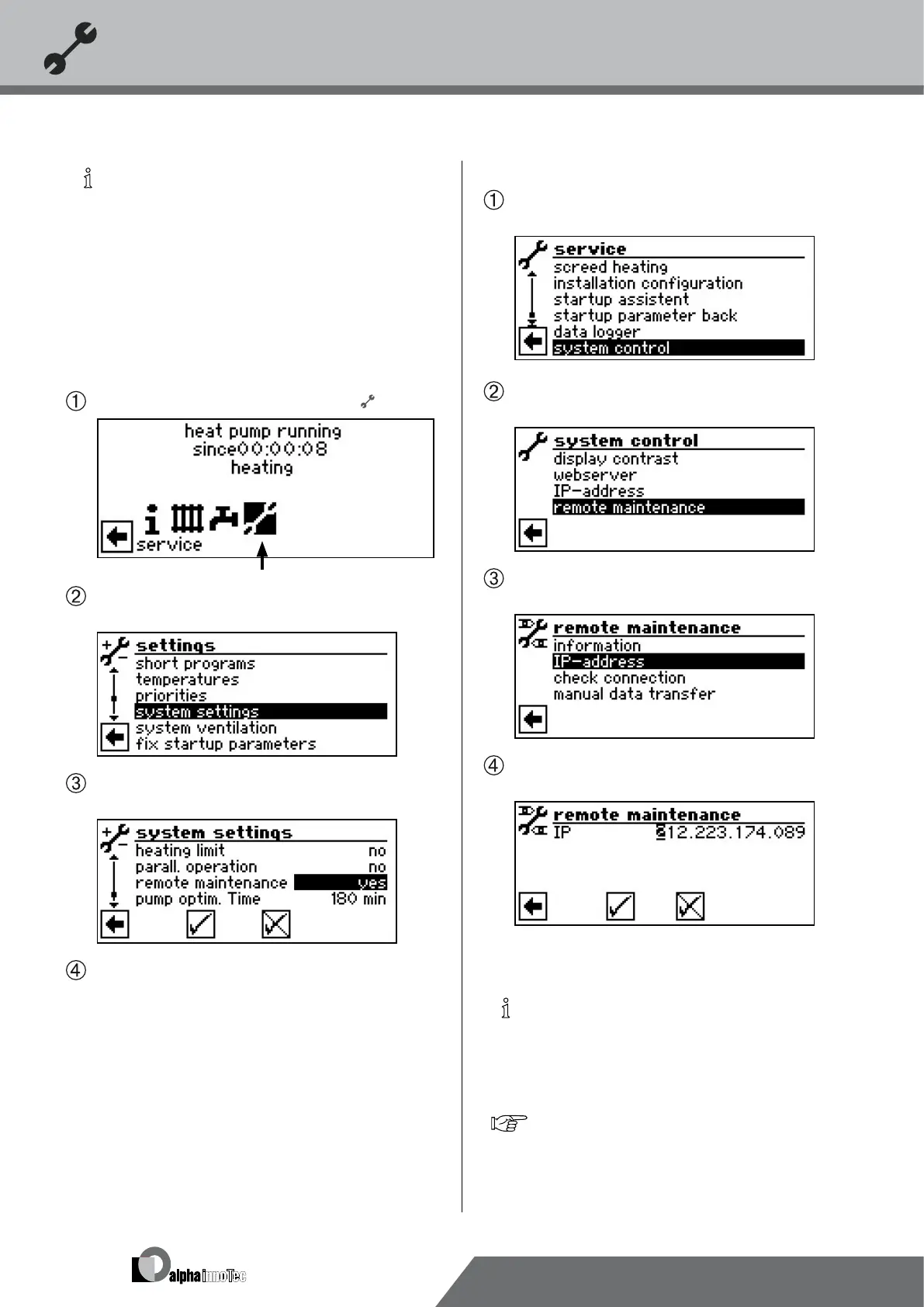
sWItch on the remote maIntenance functIon
In the navigation screen, select the symbol .
The screen switches to the “Service” menu. Here,
select the menu item “Settings”…
Here, scroll down the menu and select the menu item
”Remote maintenance”.
Save settings and return to the “Service” menu.
adjust the remote maIntenance functIon
In the “Service” menu select the menu item “System
control”.
The screen switches to the “System control” menu.
Here, select the menu item “remote maintenance”…
The screen switches to the “Remote maintenance”
menu. Here, select the menu item “IP address”…
The screen changes to the menu “Remote maintenance
IP address”…
Enter the IP address of the remote maintenance
server here (currently: 212.223.174.089)…
NOTICE
Once successfully connected with the remote
maintenance server, the IP address may no longer
be changed.
The router must be set up as a gateway.
page 62, „Web server“


 To Next Page