52
We reserve the right to make technical changes.
83052300eUK © ait-deutschland GmbH
2.1
min defrost cycle Defrost cycle time,
minimum timebetween two defrost processes
Option only available on L/W appliances
Take the time to be set from the instructions for
use for the respective L/W appliance.
TDI Message Thermal disinfection signal
If set to NO, then the fault signal/message does not
arrive, otherwise see error message 759
release 2hg Release second heat generator
Time until the second heat generator is switched on
cancel or save settings. Return to the “Service Set-
tings” menu
aux. heat. hot water Hot water reheating
Deactivated in the factory (Display = No).
If activated (Display = Yes), the required hot water
value becomes the hot water target value (see page
29)
aux.serv.water max maximum time period for
hot water reheating
maximum time period, during which the hot water
should be reheated. If this time period is exceeded
the hot water reheating is cancelled.
Save settings or cancel. Return to menu “Service Set-
tings”.
heat meter / energy effIcIency pump
(only WIth luxtronIk 2.1)
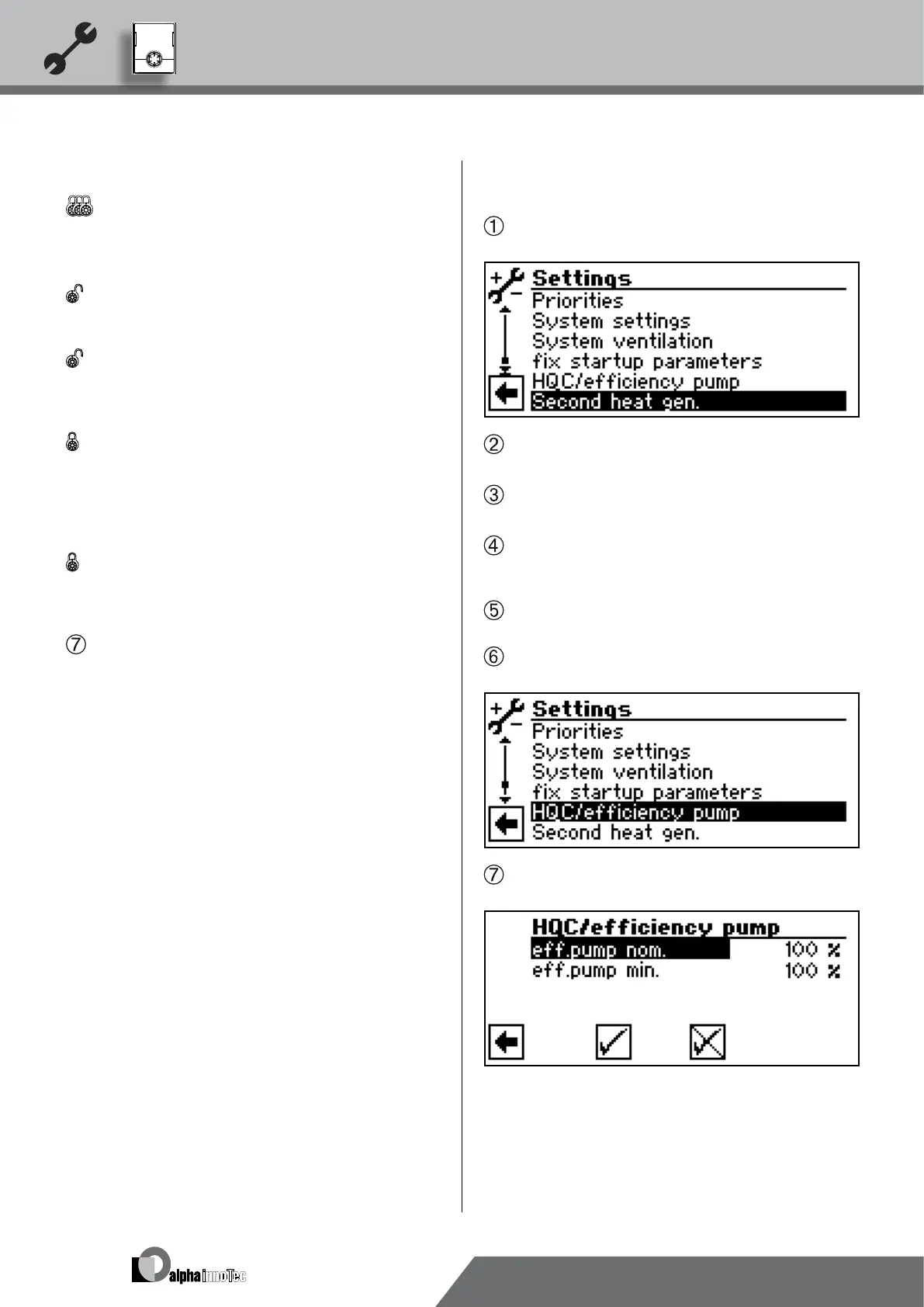
In the menu “Service Settings”, select and activate the
menu eld “Second heat gen.”…
The screen changes to the menu “Service settings
system”…
Select and activate the menu eld “efciency pump”.
Set parameter to “Yes”……
Select and activate the menu eld “heat quantity”. Set
the “heat quantity” as described in the corresponding
operating manual of the heat pump…
Scroll down to the bottom of the menu, conrm your
entries and return to the “Service settings” menu…
Select and activate the menu eld “HQC/efciency
pump”…
The screen changes to the menu “HQC/efciency
pump”…
In this menu you can adjust the free pressure of the cir-
culation pump (controlled via the PWM signal):
eff.pump nom. Efciency pump, nominal operation
This value is set if the compressor
is running


 To Next Page