Set OffOff to stop the error insertion.
Burst lengthBurst length
If 'Insertion' is set to ManualManual, touch the button and set the number of errors to
insert.
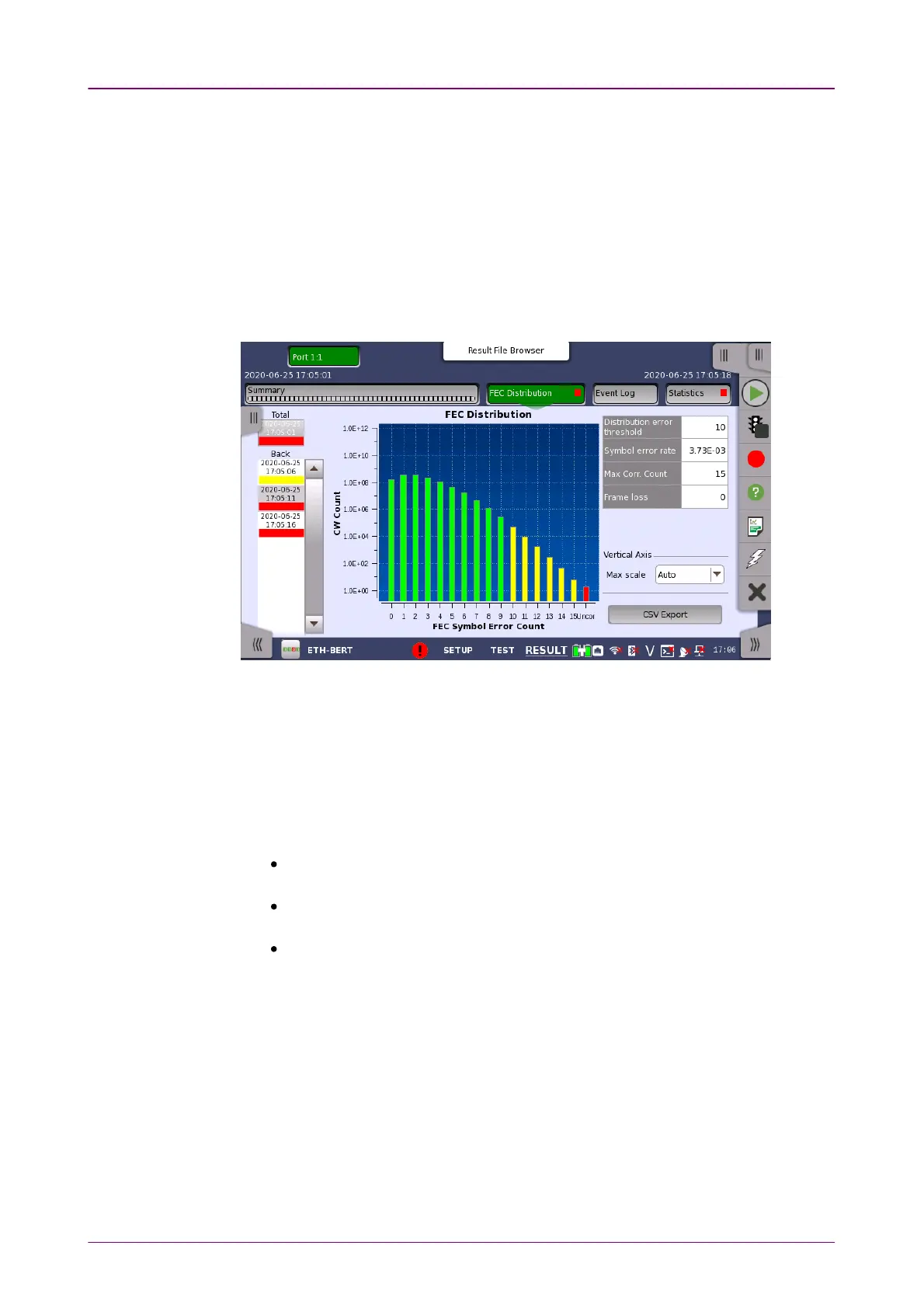
66..22..33..22 FEC DistributionFEC Distribution
When the interface is QSFP56, QSFP-DD or OSFP, FEC DistributionFEC Distribution is
displayed in the navigation area.
This page displays the analysis results of the errors occurred in PAM4 symbols.
HistogramHistogram
The number of Codewords in which a symbol error has occurred is displayed
in a graph according to the number of symbol errors A graph with 0 on the
horizontal axis indicates the number of Codewords in which no symbol error
has occurred.
Uncorr.: Uncorrected Codewords
Green: Corrected codewords whose symbol error count is less than the
threshold value
Yellow: Corrected codewords whose symbol error count is equal to the
threshold value or greater.
Red: Uncorrectable codewords
66..22..33..33 IEEE1588v2 LogIEEE1588v2 Log
Touching the IEEE1588v2 LogIEEE1588v2 Log button in the navigation area will display the
screen shown below.



 To Next Page