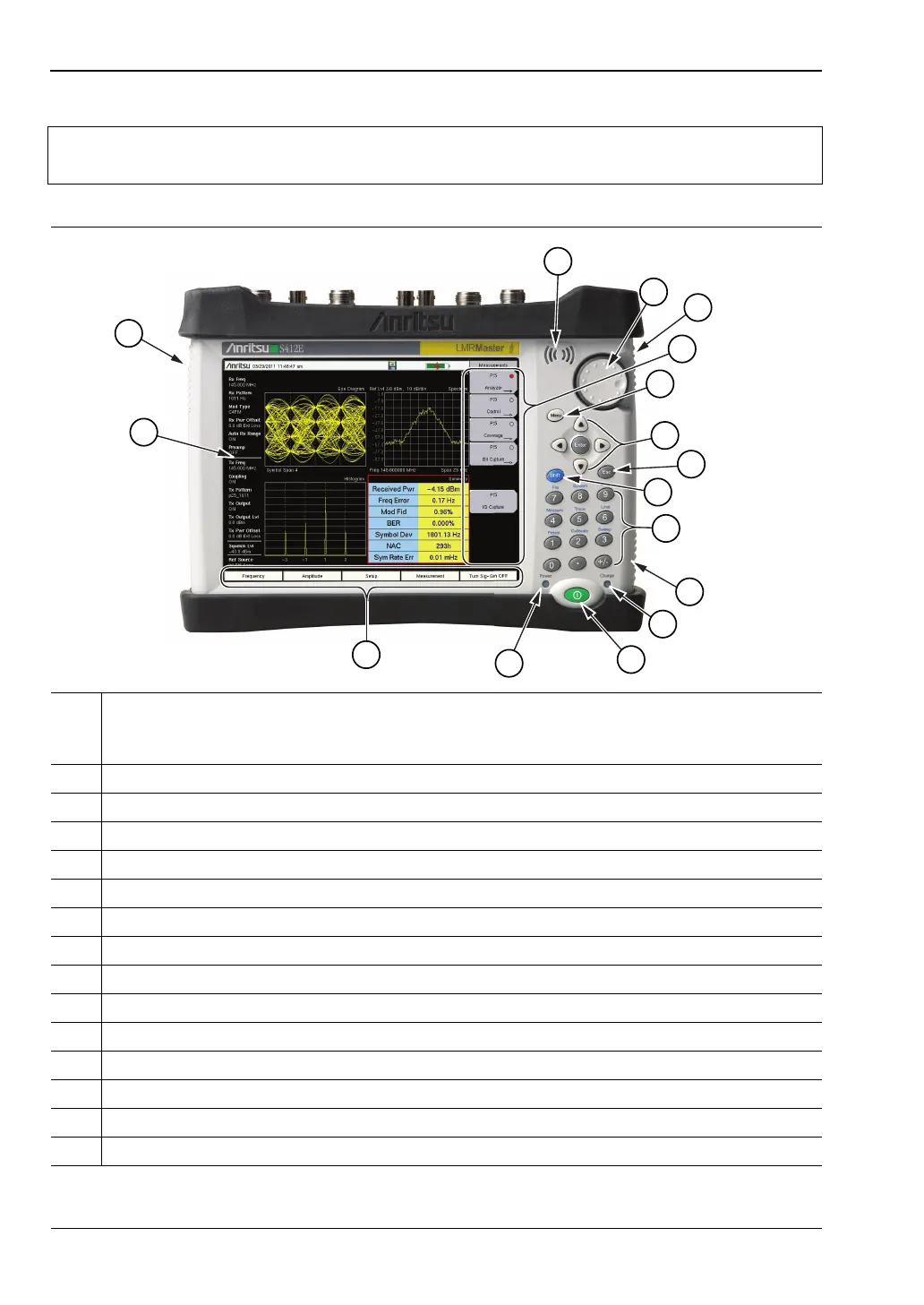
2-3 Front Panel Overview Instrument Overview
2-2 PN: 10580-00318 Rev. P S412E UG
Note
Keep the fan inlet and exhaust ports clear of obstructions at all times for proper
ventilation and cooling of the instrument.
1 Instrument Settings Summary (unique to each trace). Many of displayed settings are used
as menu shortcuts. Select a setting using the touch screen to display the menu and set the
parameter for editing.
2 Fan Exhaust Port
3 Speaker
4 Rotary Knob
5, 12 Fan Inlet Port
6 Touch Screen Submenu Keys
7 Menu Key
8 Enter Key and Arrow Keys
9 Esc (Escape) Key
10 Shift Key
11 Numeric Keypad and Shift Menu Keys (printed in blue above 1 through 9)
13 Charge LED
14 On/Off Button
15 Power LED
16 Touch Screen Main Menu Keys
Figure 2-1. LMR Master Overview



 To Next Page