A7 Plus – OPERATOR'S MANUAL
5.1.1.1. OPERATOR SELECTION
The console allows managing 4 different operators.
The following data can be set for each single operator:
• Name of operator.
• Turbine and scaler power adjustment.
• 3 operating modes for electric micromotor.
• 4 operating modes for scaler.
• Turning on and adjustment of the fibre optics of each single instrument.
• Turbine and scaler incremental power control or ON/OFF.
• Dental chair movement automatic programmes.
• Water unit setting parameters.
• Favourite buttons.
• Time set in stopwatch.
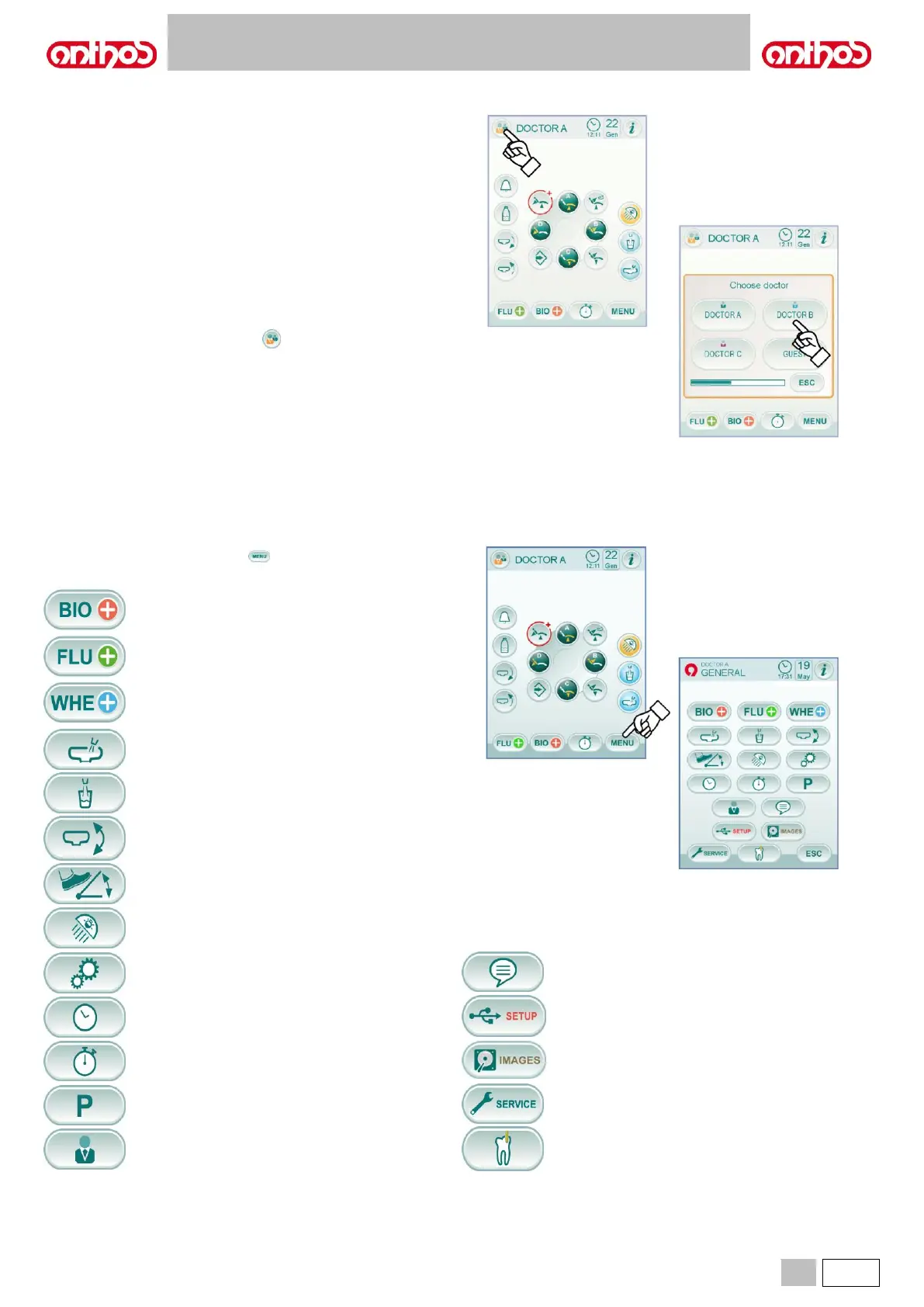
Operator selection.
From main screen, touch icon button and then select the desired
operator among the 4 available ones.
From main screen, touch icon button to access the MAIN
SETTINGS menu including the following icon buttons:
BIOSTER disinfection cycle setting
(if BIOSTER system is installed, only)
(see paragraph 5.1.1.2.1.)
FLUSHING cycle setting
(if I.W.F.C. system is installed, only )
(see paragraph 5.1.1.2.2.)
W.H.E. tank emptying system
(if W.H.E. system is installed, only)
(see paragraph 5.1.1.2.3.)
Water-to-bowl setting
(see paragraph 5.1.1.2.4.)
Water-to-cup setting
(see paragraph 5.1.1.2.5.)
Bowl automatic movement setting
(with motor-driven bowl, only)
(see paragraph 5.1.1.2.6.)
Foot control setting
(see paragraph 5.1.1.2.7.)
Operating light setting
(see paragraph 5.1.1.2.8.)
Other settings
(see paragraph 5.1.1.2.9.)
Time and date setting
(see paragraph 5.1.1.2.10.)
Stopwatch
(see paragraph 5.1.1.2.11.)
Favourite button setting
(see paragraph 5.1.1.2.12.)
Operator database entry
(see paragraph 5.1.1.2.13.)
Language selection
(see paragraph 5.1.1.2.14.)
USB SETUP
(see paragraph 5.1.1.2.15.)
Image management
(see paragraph 5.1.1.2.16.)
Access service menu
(for Technical Service,only)
APEX LOCATOR settings
(if APEX LOCATOR is installed, only)
(see paragraph 5.1.1.2.17.)



 To Next Page