A7 Plus – OPERATOR'S MANUAL
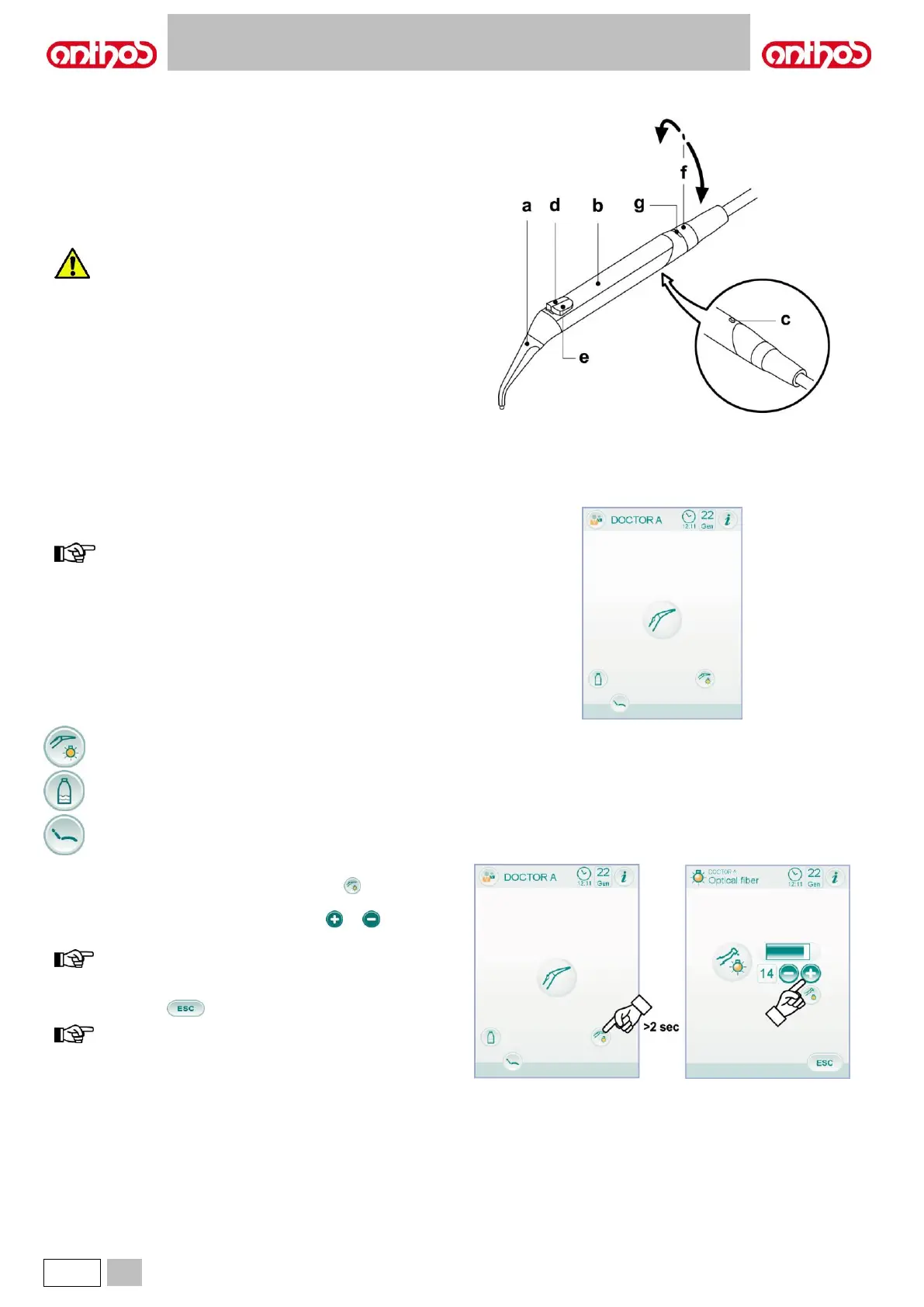
Description of the instrument.
a Nozzle.
b Handpiece.
c Syringe release button.
d Air button.
e Water button.
f Hot/cold selector (only for 6-function syringes).
g Hot/cold indicator LED (only for 6-function syringes).
The instrument is supplied non-sterile.
It is recommended to use disposable protections and
nozzles.
Technical specifications.
• Operating time:
- syringe 3F: continuous operation,
- syringe 6F: 5 sec. operation, 10 sec. rest,
- syringe 6F (with fibre optics): 5 sec. operation, 10 sec. rest.
• Power supply:
- 6F and 6F-L syringe (CEFLA s.c. models): 24 Vac; 50/60 Hz; 2 A;
50 W.
• Classification in accordance with standard EN 60601-1:
- 6F and 6F-L syringe (CEFLA s.c. models): CLASS II, type B.
• Installation diagram: consult the technical installation manual (see
paragraph 11.).
Use.
• Place the instrument in its working position.
instrument activation is highlighted by the relevant managing
screen appearing on the TOUCH DISPLAY.
• Button ( e ) = water;
Button ( d ) = air;
Button ( e + d ) = spray.
• 6F syringe, operation with hot water, air and spray: turn the selector
switch [ f ] clockwise (LED g on).
• 6F syringe, operation with cold water, air and spray: turn the selector
switch [ f ] counter clockwise (LED g off).
• The icon buttons available on the TOUCH DISPLAY are:
Fibre optics on/off (with 6F-L syringe, only).
Activation/deactivation independent water supply (with
SANASPRAY system, only).
Main screen controls recall.
Fibre optic brightness adjustment.
• To adjust fibre optic brightness, touch icon button (for at least 2
seconds).
• Adjust brightness level by touching icon buttons or or scrolling
the bargraph with your finger.
value setting range: 1 to 16.
• To confirm the selected brightness, simply quit this sub-menu by
touching icon button .
fibre optics will turn automatically off after 30 seconds.



 To Next Page