A7 Plus – OPERATOR'S MANUAL
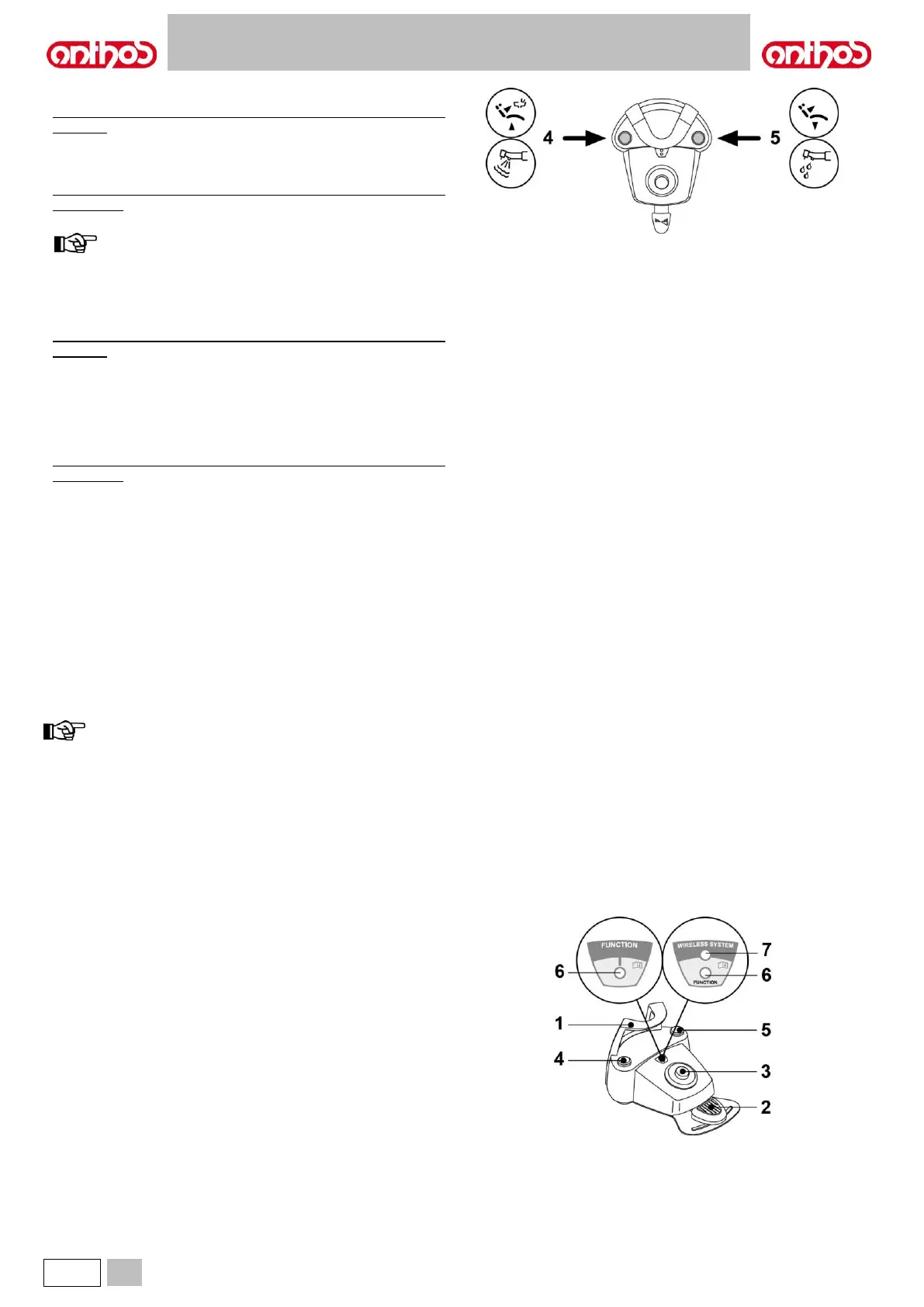
Left-hand button operation ( 4 ).
• Holding down the button for at least 2 seconds with instrument
extracted:
Chip-air control: sends a jet of air to the Turbine or the Micromotor.
Air flow is activated by pressing the button; the jet of air is interrupted
as soon as button is released.
• Holding down the button for at least 2 seconds with the instruments in
rest position:
activation of the “Patient rinsing position” program.
pressing the button a second time returns dental chair back
into working position.
Right-hand button operation ( 5 ).
• Holding down the button for at least 2 seconds with instrument
extracted:
Water Clean System Control: sends a jet of running water to
instruments such as the Turbine, the Micromotor and the Scaler for
rinsing the spray ducts. Water is delivered by pressing the button.
Water is no longer delivered as soon as the button is released and air
is automatically blown to eliminate any drops of liquid remaining inside
the spray ducts.
• Holding down the button for at least 2 seconds with the instruments in
rest position:
Activation of the “Automatic dental chair return” programme.
Wireless version.
This foot control can also be supplied in wireless version (see Paragraph
5.2.4).
Protection against liquid penetration.
The foot control is protected against liquid penetration. Degree of
protection: IPX1.
Cleaning.
Clean the foot control using a suitable product (see Paragraph 1.4).
if the foot control slips on the floor, remove any dust from the
slip-proof rubber found under the base with a dry cloth.
5.2.2. "PUSH-PEDAL” FOOT CONTROL
Description of the parts.
1 Handle.
2 Control pedal.
3 Dental chair movements.
4 Chip-air/Patient rinsing position recall control.
5 Water Clean System/Automatic dental chair return control.
6 Spray operation LED.
7 Battery charge LED (wireless version only).



 To Next Page